
Introduction
The Smart Weigh GEM20-20g Digital Milligram Jewelry Scale offers high precision for weighing small items up to 20 grams with an accuracy of 0.001 grams. Its compact design and multiple measurement modes make it ideal for various applications, including jewelry, gems, and reloading. This manual provides detailed instructions for proper setup, operation, and maintenance to ensure optimal performance and longevity of your scale.
Package Contents
- Smart Weigh GEM20-20g Digital Milligram Scale
- Weighing Tray
- 2 x 10g Calibration Weights
- Tweezers
- 2 x AAA Batteries (pre-installed or included separately)
- User Manual (this document)
Setup
- Battery Installation: Ensure 2 AAA batteries are correctly installed in the battery compartment. (Batteries are included).
- Placement: Place the scale on a hard, flat, and stable surface, free from vibrations or drafts, to ensure accurate readings.
- Protective Cover: The scale features a flip-open cover that protects the weighing platform. Open it before use.

Image: The Smart Weigh GEM20-20g scale with dimensions (3.7" x 3.15" x 1.3") and an illustration of AAA battery installation.
Operating Instructions
- Power On/Off: Press the ON button to turn on the scale. Press the OFF button to turn it off. The scale will automatically shut off after a period of inactivity to conserve battery life.
- Unit Conversion: Press the MODE button to cycle through available weighing units: grams (g), ounces (oz), carats (ct), troy ounces (ozt), pennyweights (dwt), and grains (gn).
- Tare Function: To weigh items in a container, first place the empty container on the platform. Press the TARE button. The display will reset to zero. You can then add your items to the container, and the scale will display only the net weight of the items.
- Calibration: For optimal accuracy, calibrate the scale regularly, especially after moving it or if you suspect inaccurate readings.
- Turn the scale ON.
- Press and hold the MODE button until "CAL" appears on the display, then release.
- Press MODE again. The display will flash the required calibration weight (e.g., "10.000g").
- Place the first 10g calibration weight (included) onto the center of the weighing platform.
- The display will then flash the next required calibration weight (e.g., "20.000g").
- Place the second 10g calibration weight (total 20g) onto the center of the weighing platform.
- Once calibration is complete, "PASS" will be displayed, and the scale will return to normal weighing mode. Remove the weights.
- Weighing: Place the item(s) to be weighed gently on the center of the weighing platform. Wait for the reading to stabilize.
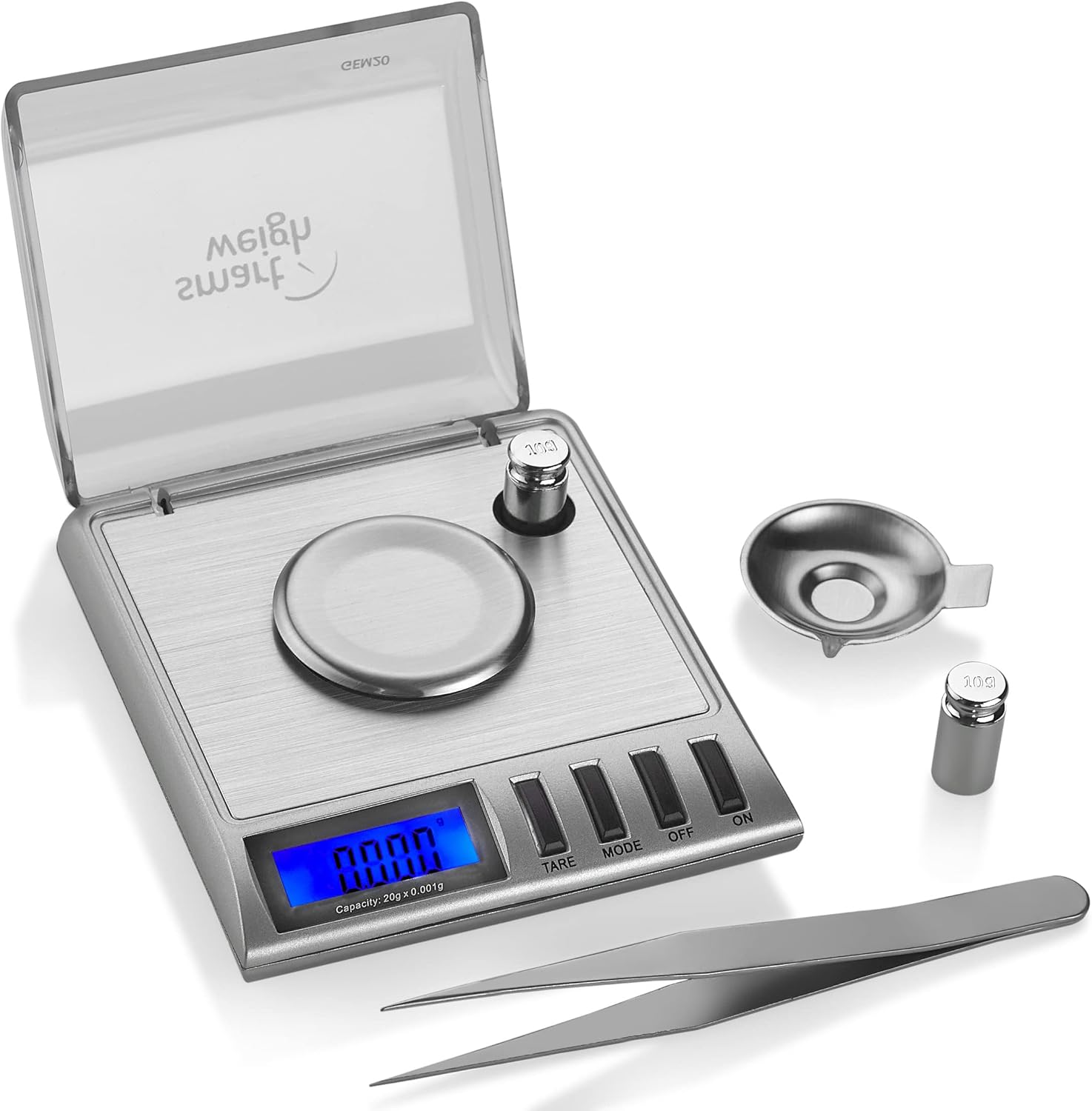
Image: The Smart Weigh GEM20-20g scale shown with its included weighing tray, two 10g calibration weights, and tweezers.

Image: The Smart Weigh GEM20-20g scale displaying "10.000" during the calibration process with a 10g weight on the platform.

Image: Close-up of the Smart Weigh GEM20-20g scale's control panel, highlighting the TARE and MODE buttons and their functions.
Maintenance
- Cleaning: Wipe the scale with a soft, damp cloth. Do not use abrasive cleaners or immerse the scale in water.
- Storage: Store the scale in a clean, dry environment. Keep the protective flip-open cover closed when not in use to protect the weighing platform.
- Battery Replacement: Replace batteries when the low battery indicator appears on the display.

Image: The Smart Weigh GEM20-20g scale with its clear protective cover closed, demonstrating how it shields the weighing platform.
Troubleshooting
| Problem | Possible Cause | Solution |
|---|---|---|
| Inaccurate readings | Scale not calibrated; unstable surface; drafts; low battery. | Recalibrate the scale (see Operating Instructions); ensure scale is on a stable, flat surface; avoid drafts; replace batteries. |
| Display shows "O_Ld" (Overload) | Weight exceeds maximum capacity (20g). | Remove excess weight immediately to prevent damage. |
| Scale does not turn on | Dead or incorrectly installed batteries. | Check battery orientation; replace with new AAA batteries. |
Specifications
- Brand: Smart Weigh
- Model: GEM20
- Capacity: 20 Grams
- Accuracy: 0.001 Grams
- Units: g, oz, ct, ozt, dwt, gn
- Display Type: LCD
- Material: Stainless Steel platform
- Power: 2 x AAA Batteries (included)
- Product Dimensions: 3.7 x 3.15 x 1.3 inches
- Item Weight: 4.3 Ounces
Warranty and Support
This Smart Weigh product is backed by a 60-day warranty, ensuring your satisfaction and peace of mind. For any issues or support inquiries, please refer to the contact information provided with your purchase or visit the official Smart Weigh website.
For additional information and products, visit the Smart Weigh Store.
