
Goodman BT1340032S
Contents
Goodman BT1340032S Blower Motor Instruction Manual
Model: BT1340032S
Introduction
This manual provides essential information for the proper installation, operation, maintenance, and troubleshooting of the Goodman BT1340032S Blower Motor. This motor is a 208-230V, 1/4 HP component designed for specific HVAC applications. Please read this manual thoroughly before attempting any installation or service to ensure safe and efficient operation.
Safety Information
WARNING: Risk of Electric Shock or Injury.
- Always disconnect power to the unit before installing, servicing, or removing the motor.
- Installation and servicing should only be performed by qualified personnel.
- Ensure all wiring connections comply with local and national electrical codes.
- Wear appropriate personal protective equipment (PPE), such as safety glasses and gloves.
- Do not operate the motor if it is damaged or if any components are missing.
Setup and Installation
The Goodman BT1340032S Blower Motor is designed for direct replacement in compatible HVAC systems. Follow these general steps for installation:
- Power Disconnection: Turn off all power to the HVAC unit at the main breaker or disconnect switch. Verify power is off using a voltage tester.
- Access Motor: Locate and access the existing blower motor within the HVAC unit. This may involve removing access panels or covers.
- Disconnect Wiring: Carefully disconnect all electrical wiring from the old motor. Note the position and color of each wire for correct re-connection. Take photos if necessary.
- Remove Old Motor: Unbolt or unmount the old blower motor from its housing or mounting bracket.
- Install New Motor: Mount the new Goodman BT1340032S motor securely in the same position as the old one. Ensure it is properly aligned and fastened.
- Connect Wiring: Reconnect all electrical wiring to the new motor according to the previous configuration. Double-check all connections for tightness and correctness.
- Secure Components: Replace any access panels or covers removed during the process.
- Restore Power: Once installation is complete and all safety checks are performed, restore power to the HVAC unit.

Figure 1: Goodman BT1340032S Blower Motor. This image shows the motor from an angled perspective, highlighting the main body, electrical connections, and the extended shaft.
Operating Instructions
As a component motor, the Goodman BT1340032S operates as part of a larger HVAC system. Its operation is typically controlled by the system's thermostat and control board. Once properly installed and wired, the motor will engage when the HVAC system calls for heating or cooling, driving the blower fan to circulate air.
- Ensure the HVAC system's thermostat is set to the desired mode (Heat, Cool, Fan On/Auto).
- The motor will activate automatically when the system initiates an air circulation cycle.
- Listen for smooth operation. Unusual noises may indicate an issue.
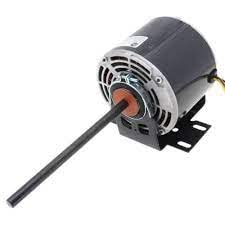
Figure 2: Goodman BT1340032S Blower Motor with mounting bracket. This view shows the motor from the rear, including the fan-like vents and the attached mounting base.
Maintenance
Regular maintenance helps ensure the longevity and efficient operation of your blower motor. Always disconnect power before performing any maintenance.
- Annual Inspection: Have a qualified technician inspect the motor and blower assembly annually.
- Cleanliness: Keep the area around the motor and blower wheel free of dust and debris. Accumulated dirt can reduce efficiency and cause overheating.
- Lubrication: This motor is typically designed with sealed bearings that do not require lubrication. Refer to the specific motor label for lubrication requirements if unsure. Do not lubricate if not specified.
- Vibration Check: Periodically check for excessive vibration during operation, which could indicate an unbalanced blower wheel or motor issue.

Figure 3: Goodman BT1340032S Blower Motor side view. This image provides a clear side profile of the motor, showing the main casing, electrical wires, and the extended shaft.
Troubleshooting
Before attempting any troubleshooting, ensure power is disconnected. If you are unsure about any step, consult a qualified HVAC technician.
| Problem | Possible Cause | Solution |
|---|---|---|
| Motor does not start | No power; Faulty wiring; Motor failure; Capacitor failure (if applicable) | Check circuit breaker/fuse; Verify wiring connections; Test motor for continuity; Replace motor or capacitor. |
| Motor runs but no air flow | Blower wheel detached or damaged; Obstruction in ductwork | Inspect blower wheel for secure attachment and damage; Check ducts for blockages. |
| Excessive noise or vibration | Loose mounting; Unbalanced blower wheel; Worn bearings | Tighten mounting bolts; Clean blower wheel; Replace motor if bearings are worn. |
| Motor overheats | Restricted airflow; Incorrect voltage; Motor overload | Check air filters and ducts for restrictions; Verify correct voltage supply; Ensure motor is not undersized for application. |
Specifications
- Model: BT1340032S
- Brand: Goodman
- Voltage: 208-230 Volts
- Horsepower: 0.25 hp (1/4 HP)
- Speed: 100 (RPM or other unit not specified, stated as per input)
- Manufacturer: Goodman
- ASIN: B00EKVGM66
- Date First Available: August 15, 2013
Warranty and Support
For specific warranty information regarding your Goodman BT1340032S Blower Motor, please refer to the documentation provided at the time of purchase or contact Goodman customer support directly. Typically, new parts come with a manufacturer's warranty covering defects in materials and workmanship.
In case of issues, it is recommended to first consult the troubleshooting section of this manual. If the problem persists, contact a certified HVAC technician or Goodman's official support channels for assistance.
Note: Products purchased through Amazon.com may be eligible for a 30-day return policy from the seller, as per Amazon's standard return guidelines. This is separate from any manufacturer's warranty.
For further assistance, visit the official Goodman website or contact their customer service department. Keep your purchase receipt and product model number handy.
Documents and downloads
Ask a question about this manual
Ask about setup, troubleshooting, compatibility, parts, safety, or missing instructions. Manuals+ will review the question and use this page’s manual context to help answer it.