
1. Introduction
This manual provides essential information for the safe and effective installation, operation, and maintenance of your Intertherm OEM Upgraded Replacement Furnace Control Circuit Board, model 624564-0. This control board serves as the central processing unit for your furnace, managing various functions to ensure proper heating operation. Please read this manual thoroughly before attempting any installation or service.
2. Safety Information
WARNING: Improper installation, adjustment, alteration, service, or maintenance can cause property damage, personal injury, or loss of life. Consult a qualified installer, service agency, or the gas supplier for information or assistance.
- Always disconnect electrical power to the furnace before installing or servicing the control board. Failure to do so can result in electrical shock or death.
- Ensure all wiring connections are secure and comply with local and national electrical codes.
- This control board should only be installed by a qualified HVAC technician.
- Wear appropriate personal protective equipment (PPE), such as gloves and safety glasses, during installation and service.
- Do not operate the furnace with damaged components. Replace any faulty parts immediately.
3. Setup and Installation
3.1. Before You Begin
- Verify that the replacement control board (model 624564-0) is compatible with your specific Intertherm furnace model.
- Gather necessary tools: screwdriver set, wire strippers, multimeter, and safety glasses.
- Take clear photographs of the existing wiring connections on the old control board for reference.
- Disconnect all electrical power to the furnace at the main breaker.
3.2. Installation Steps
- Power Disconnection: Ensure the furnace's power supply is completely off. Confirm with a multimeter.
- Access Old Board: Open the furnace access panel to locate the existing control board.
- Disconnect Wiring: Carefully disconnect all wires from the old control board, labeling them if necessary to match your reference photos.
- Remove Old Board: Unscrew or unclip the old control board from its mounting.
- Install New Board: Mount the new Intertherm 624564-0 control board in the same location. Ensure it is securely fastened.
- Connect Wiring: Reconnect all wires to the new control board according to your labels and reference photos. Double-check each connection for tightness and correct placement.
- Close Panel: Securely close the furnace access panel.
- Restore Power: Restore electrical power to the furnace at the main breaker.
- Test Operation: Initiate a heating cycle to verify proper furnace operation. Observe for any error codes or unusual behavior.
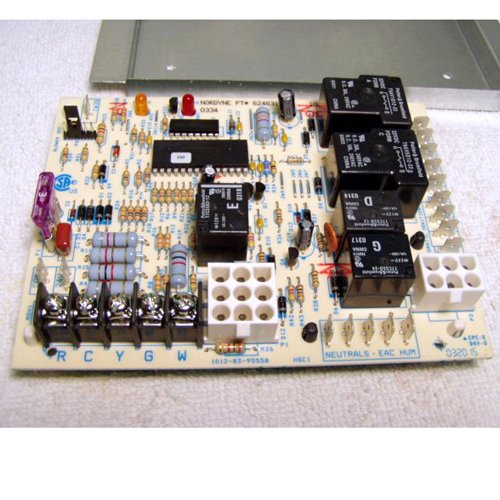
Figure 1: The Intertherm Furnace Control Circuit Board 624564-0. This image shows the front view of the circuit board with various terminals and components visible, illustrating its compact design and typical layout for furnace control.
4. Operation
Once installed, the Intertherm 624564-0 control board operates automatically to manage the furnace's heating cycles. It receives signals from the thermostat, controls the igniter, gas valve, and blower motor, and monitors safety limits. The board typically features diagnostic LED lights that provide status indications and error codes to assist in troubleshooting.
4.1. Normal Operation Indicators
- Solid Green LED: Indicates normal operation and standby mode.
- Flashing Green LED: May indicate a call for heat or a specific operational stage (refer to furnace-specific documentation for exact flash codes).
- Solid Red LED: Typically indicates a lockout condition or a fault.
- Flashing Red LED: Indicates a specific error code. Count the flashes and refer to the troubleshooting section or your furnace manual.
5. Maintenance
The Intertherm 624564-0 control board is designed for reliable, long-term operation with minimal maintenance. However, periodic inspection of the furnace system, including the control board, is recommended.
- Annual Inspection: Have a qualified technician inspect the furnace annually. This includes checking electrical connections, cleaning dust from components, and verifying proper operation of the control board.
- Keep Clean: Ensure the area around the control board is free from dust and debris, which can impede airflow and lead to overheating of components.
- Check Wiring: Periodically check for any loose or corroded wiring connections to the control board.
6. Troubleshooting
This section provides guidance for common issues. For complex problems, always consult a qualified HVAC technician.
| Problem | Possible Cause | Solution |
|---|---|---|
| Furnace not starting | No power to furnace; thermostat issue; safety limit tripped; faulty igniter. | Check circuit breaker; verify thermostat settings; reset furnace power; inspect igniter. |
| Blower motor not running | Faulty blower motor; capacitor issue; control board fault; thermostat wiring. | Check blower motor connections; test capacitor; consult technician for board diagnosis. |
| Furnace cycles on and off rapidly (short cycling) | Dirty air filter; restricted airflow; oversized furnace; faulty thermostat. | Replace air filter; check ducts for obstructions; consult technician. |
| Diagnostic LED flashing red | Specific fault code (e.g., pressure switch, flame sensor, limit switch). | Count flashes and refer to your furnace's specific diagnostic chart for the corresponding error. Address the indicated component. |
7. Specifications
- Model Number: 624564-0 (OEM Upgraded Replacement)
- Brand: Intertherm
- Manufacturer: Nordyne
- Item Weight: 20 Ounces
- Part Number: OEM Upgraded Repl for 624564-0
- Function: Furnace Control Board
8. Warranty and Support
This Intertherm OEM Upgraded Replacement Furnace Control Circuit Board 624564-0 is typically covered by a manufacturer's warranty against defects in materials and workmanship. Specific warranty terms and duration may vary. Please retain your proof of purchase for warranty claims.
For technical support, warranty inquiries, or service, please contact your authorized Intertherm dealer or a qualified HVAC professional. Always provide the model number (624564-0) and your purchase date when seeking assistance.
