
Introduction
The Metra 95-8240B Double DIN Stereo Dash Kit is designed to facilitate the installation of an aftermarket double DIN radio into specific Toyota Prius models. This kit ensures a professional, factory-like appearance by providing a gapless fit between the new stereo and the vehicle's dashboard. It is engineered for compatibility with Toyota Prius vehicles manufactured between 2004 and 2009.
Safety Information
Always prioritize safety during installation. Disconnect the vehicle's battery before beginning any electrical work. Ensure all connections are secure and properly insulated to prevent short circuits. If you are unsure about any step, it is recommended to seek assistance from a qualified professional installer. Wear appropriate personal protective equipment, such as safety glasses, during the installation process.
Package Contents
The Metra 95-8240B Double DIN Stereo Dash Kit includes all necessary components for a complete installation. The kit typically contains:
- Double DIN Trim Bezel (Matte Black)
- Left Mounting Bracket
- Right Mounting Bracket
- 68 Ohm Resistor (for temperature sensor bypass, if applicable)
Note: Contents may vary slightly. Refer to the packaging for the exact list of included items.
Setup and Installation
This section outlines the general steps for installing the Metra 95-8240B dash kit. Specific vehicle disassembly instructions are not covered here and should be referenced from a vehicle-specific service manual or online resources.
- Prepare the Vehicle: Ensure the vehicle is turned off and the negative terminal of the battery is disconnected to prevent electrical hazards.
- Remove Factory Radio: Carefully remove the factory radio and associated dash components. This often involves disassembling a significant portion of the dashboard in the Toyota Prius (2004-2009 models).
- Assemble the Dash Kit: Attach the left and right mounting brackets to your new double DIN aftermarket radio. Ensure the radio is positioned correctly within the brackets to achieve the desired depth and alignment.
- Integrate Temperature Sensor Resistor: For Toyota Prius models, the factory temperature sensor is often integrated into the original radio unit. When replacing the radio, a 68-ohm resistor (included with the kit) is typically required to bypass this sensor and prevent error messages on the vehicle's display. Consult your vehicle's wiring diagram or a professional installer for the correct wiring of this resistor into the vehicle's harness. Improper installation can lead to climate control issues or error codes.
- Mount the Radio Assembly: Secure the assembled radio and dash kit into the vehicle's dashboard opening. Ensure all mounting points align and are fastened securely.
- Reconnect Wiring: Connect the aftermarket radio's wiring harness to the vehicle's wiring harness, ensuring all connections are correct and secure. Reconnect any other vehicle-specific connectors that were detached.
- Reassemble Dash Components: Carefully reassemble all removed dash components, ensuring no wires are pinched and all clips and screws are properly secured.
- Test Functionality: Reconnect the vehicle's battery. Turn on the vehicle and test the functionality of the new radio and all related vehicle systems (e.g., climate control, steering wheel controls if an adapter was used).
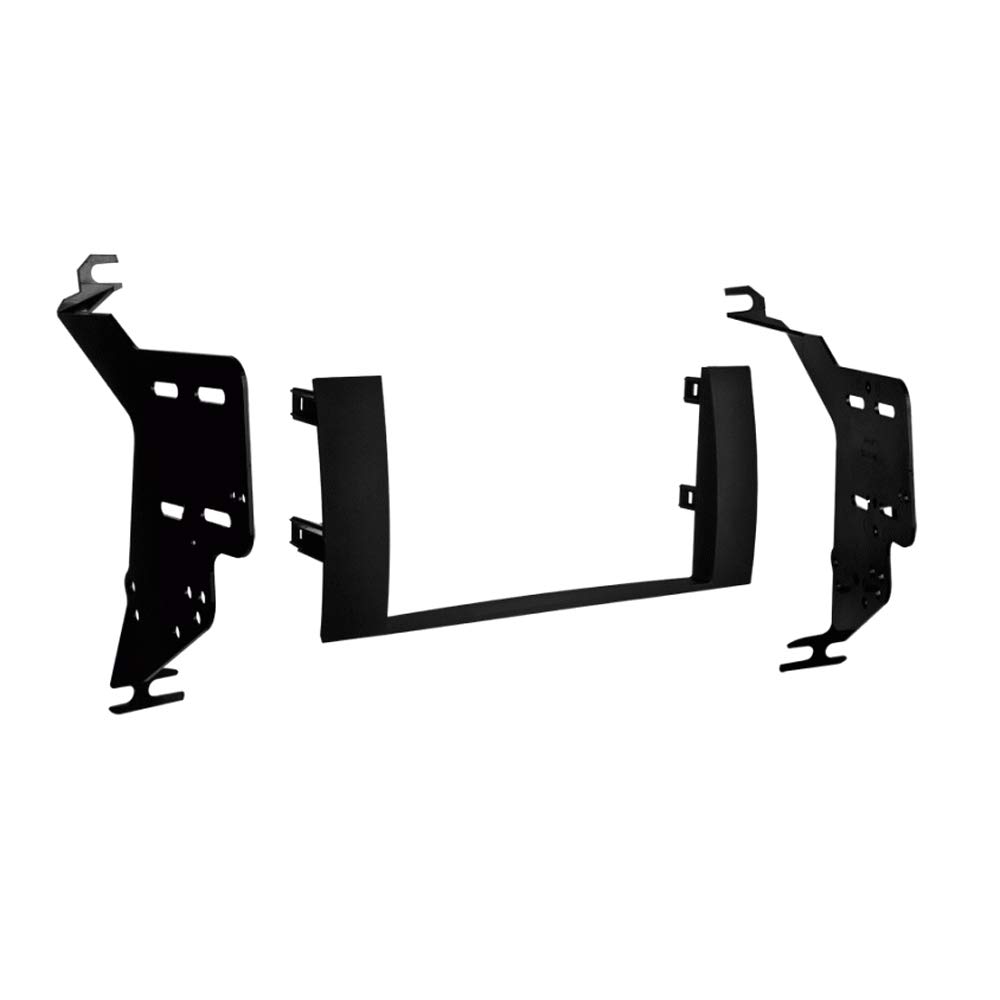
This image displays the three primary components of the Metra 95-8240B dash kit: two side mounting brackets and the central double DIN trim bezel, all in matte black.
Operating
The Metra 95-8240B dash kit itself does not have operational functions. Its purpose is to provide a secure and aesthetically pleasing mounting solution for your aftermarket double DIN stereo. Once installed, the operation of your stereo will be governed by the stereo manufacturer's instructions.
Maintenance
The dash kit requires minimal maintenance. To keep the matte black finish clean, wipe it gently with a soft, damp cloth. Avoid using abrasive cleaners or solvents, as these can damage the plastic finish. Ensure no liquids seep into the stereo unit or vehicle electronics during cleaning.
Troubleshooting
| Issue | Possible Cause | Solution |
|---|---|---|
| Dash kit does not fit perfectly or leaves gaps. | Incorrect alignment during installation; minor vehicle manufacturing variations; aftermarket stereo dimensions. | Ensure the kit and stereo are aligned precisely before tightening screws. Verify the stereo is fully seated. Some minor trimming of the kit or vehicle dash may be necessary in rare cases, but proceed with caution. |
| Climate control or display errors after installation. | Temperature sensor bypass resistor (68 Ohm) not installed or incorrectly wired. | Verify the 68 Ohm resistor is correctly wired into the vehicle's harness as per instructions or professional guidance. Ensure connections are secure. |
| Stereo is loose or rattles. | Mounting screws not tightened; brackets not properly secured to stereo or dash. | Check all mounting screws for tightness. Ensure the side brackets are firmly attached to both the stereo and the vehicle's mounting points. |
Specifications
- Model Number: 95-8240B
- Product Dimensions (approx.): 2.9"D x 6.5"W x 2.9"H (Bezel)
- Item Weight: 5 ounces
- Color: Matte Black
- Material: High-grade ABS Plastic
- Compatibility: Toyota Prius 2004-2009
- Radio Type: Double DIN (ISO Double DIN mount)
- Country of Origin: USA
Warranty and Support
For warranty information and technical support, please refer to the official Metra Electronics website or contact their customer service department. Keep your proof of purchase for any warranty claims.
Metra Electronics Corp.
Website: www.metraonline.com
Contact information typically available on their website.


