
Performance Tool W2450
Performance Tool W2450 Flashlight User Manual
Model: W2450
1. Introduction
Welcome to the user manual for your Performance Tool W2450 Flashlight. This manual provides essential information for the safe and effective use of your new flashlight.
The Performance Tool W2450 Flashlight is designed for reliable and powerful illumination, featuring a Super Bright Nichia LED and durable anodized aluminum construction. It offers 85 lumens of output and a 9.5-hour run time, suitable for various applications.

A black Performance Tool W2450 flashlight with a textured grip and a wrist strap, showcasing its compact design.
2. Safety Information
Please read and understand all safety instructions before using the flashlight. Failure to follow these instructions may result in injury or damage to the product.
- Do not look directly into the LED light. The intense light can cause temporary vision impairment or eye damage.
- Keep out of reach of children. This product is not a toy.
- Do not mix old and new batteries, or different types of batteries (e.g., alkaline and rechargeable).
- Remove batteries if the flashlight will not be used for an extended period to prevent battery leakage and corrosion.
- Dispose of used batteries properly according to local regulations.
- Do not attempt to disassemble the flashlight beyond battery replacement. There are no user-serviceable parts inside.
3. Package Contents
Verify that all items are present in the package:
- 1 x Performance Tool W2450 Flashlight
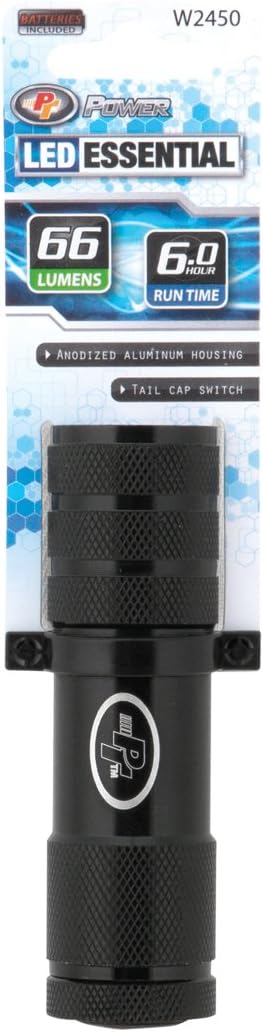
The Performance Tool W2450 flashlight shown in its retail packaging, highlighting the 'LED Essential' branding and key features like lumens and run time.
4. Setup and Battery Installation
The W2450 Flashlight requires batteries for operation (batteries may or may not be included depending on the specific package).
- Unscrew the tail cap of the flashlight by turning it counter-clockwise.
- Insert the required batteries (e.g., 2 x AA Alkaline batteries) into the battery compartment, ensuring correct polarity (+/-) as indicated inside the compartment.
- Screw the tail cap back on clockwise until it is securely tightened. Do not overtighten.
5. Operating Instructions
The Performance Tool W2450 Flashlight features a simple tail cap switch for operation.
- To turn the flashlight ON, press the tail cap switch firmly until it clicks.
- To turn the flashlight OFF, press the tail cap switch firmly again until it clicks.
6. Maintenance
Cleaning
Wipe the exterior of the flashlight with a soft, slightly damp cloth. Do not use abrasive cleaners, solvents, or harsh chemicals, as these may damage the finish or internal components. Ensure the flashlight is dry before storing.
Battery Replacement
When the light output dims significantly or the flashlight stops working, it is time to replace the batteries. Follow the steps outlined in the "Setup and Battery Installation" section to replace the old batteries with new ones.
7. Troubleshooting
If you encounter issues with your Performance Tool W2450 Flashlight, please refer to the table below for common problems and solutions.
| Problem | Possible Cause / Solution |
|---|---|
| Flashlight does not turn on. |
|
| Light is dim or flickers. |
|
8. Specifications
| Feature | Detail |
|---|---|
| Model | W2450 |
| Light Source | Nichia LED |
| Brightness | 85 Lumens |
| Run Time | Up to 9.5 hours |
| Light Path Distance | Up to 100 Meters |
| Power Source | Battery Powered |
| Battery Type | Alkaline (e.g., 2 x AA) |
| Material | Anodized Aluminum |
| Color | Black |
| Dimensions (L x W x H) | 6.75 x 1.5 x 1 inches (17.15 x 3.81 x 2.54 cm) |
| Weight | 2.04 ounces (57.8 grams) |
| Water Resistance | Water Resistant |
| Special Features | Durable, Lightweight, Portable |

An image illustrating the compact size of the Performance Tool W2450 flashlight, showing its length of 6.4 inches (16 cm) in relation to a human hand.
9. Warranty and Support
For specific warranty information, details on product returns, or technical support, please refer to the documentation included with your purchase or visit the official Performance Tool website. You may also contact Performance Tool customer service directly for assistance.
Related documentsW2450


Ask a question about this manual
Ask about setup, troubleshooting, compatibility, parts, safety, or missing instructions. Manuals+ will review the question and use this page’s manual context to help answer it.