1. Introduction
The BAOFENG BF-888S is a reliable and easy-to-use two-way radio designed for various communication needs. It is suitable for environments such as security operations, supermarket coordination, construction site communication, and outdoor activities like field survival, biking, and hiking. This manual provides essential information for setting up, operating, and maintaining your BF-888S radio.
2. Safety Information
- Do not operate the radio in explosive atmospheres (e.g., flammable gases, dust particles, metallic powders).
- Do not charge the battery in wet environments.
- Use only BAOFENG-approved batteries and chargers to prevent damage and ensure safety.
- Avoid exposing the radio to direct sunlight for extended periods or to extreme temperatures.
- Keep the radio away from medical devices to avoid interference.
- Do not disassemble or modify the radio. Repairs should only be performed by qualified technicians.
3. Product Features
- Frequency Range: UHF 400-470MHz
- 16 Channel Capacity
- 1500mAh Li-ion Battery for extended use
- 50 CTCSS/105 CDCSS for enhanced privacy
- VOX Function for hands-free operation
- Voice Prompt for channel announcements
- PC Programming capability
- Emergency Alarm function
- Intelligent Charging system
- Battery Save mode to prolong battery life
- Low Voltage Alert
- Time-out Timer (TOT)
- Built-in Flashlight
- Communication Range: Up to 3 miles (5 km) depending on environment and terrain
4. Package Contents
Each BAOFENG BF-888S radio package typically includes the following items:
- Portable Two-Way Radio (BF-888S)
- Antenna
- Earpiece
- Li-ion Battery Pack
- Desktop Charger (with EU plug)
- Belt Clip
- Wrist Strap
- User's Manual
- USB Programming Cable (1PC per pack of 10 radios)
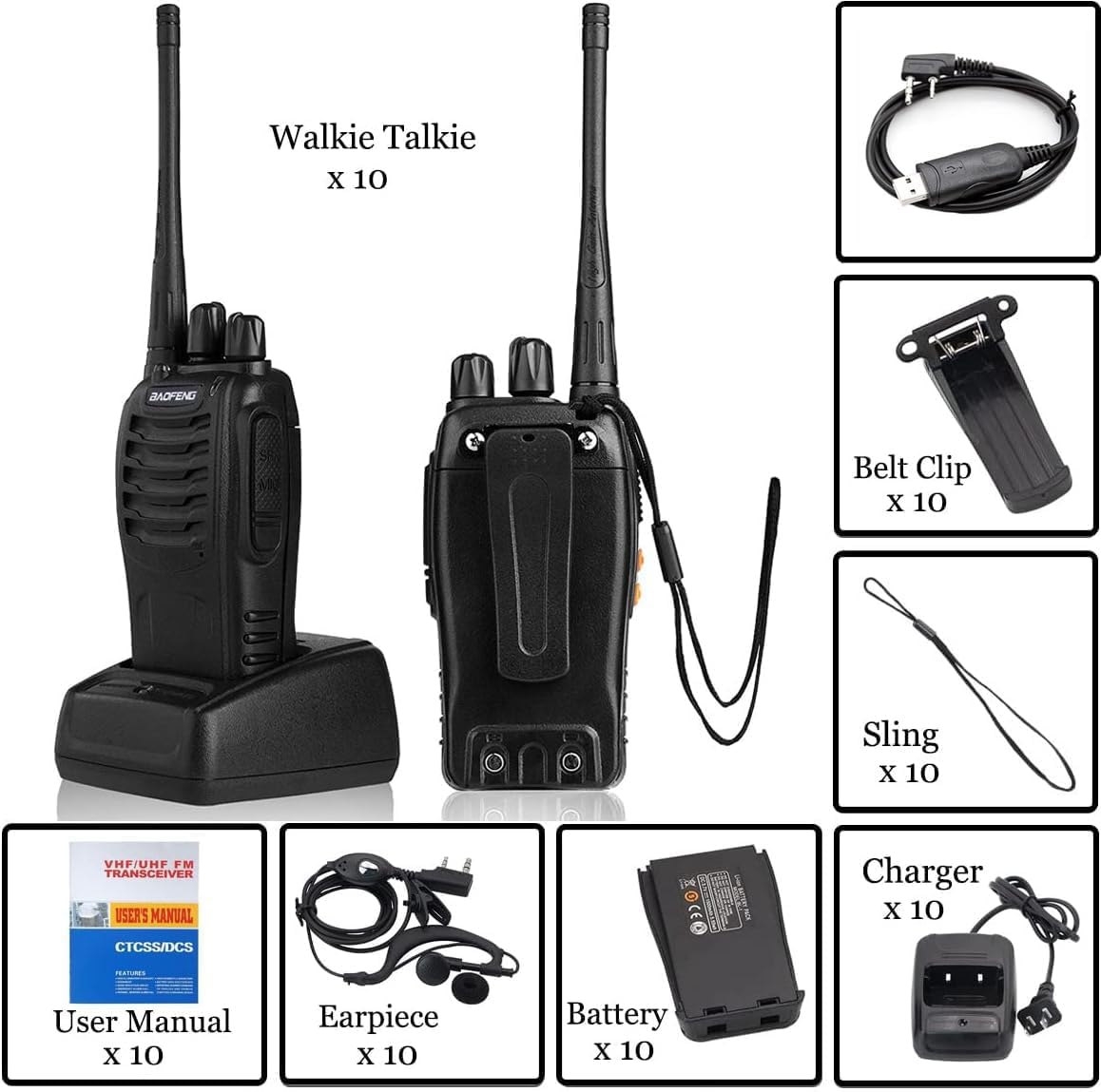
Figure 1: Complete package contents of the BAOFENG BF-888S Two-Way Radio.
5. Component Identification
Familiarize yourself with the various parts of your BF-888S radio:

Figure 2: Labeled diagram of the BAOFENG BF-888S Two-Way Radio components.
- Antenna: For transmitting and receiving signals.
- Channel Switch: Rotary knob to select one of the 16 available channels.
- Power Switch/Volume Control: Rotary knob to turn the radio on/off and adjust the volume.
- LED Indicator: Illuminates red during transmission and green during reception.
- SP/MIC Jacks: Ports for connecting the earpiece/microphone accessory or programming cable.
- Flashlight: Built-in LED light for illumination.
- PTT (Push-to-Talk) Button: Press and hold to transmit, release to receive.
- Moni (Monitor) Button: Press to temporarily disable squelch and listen to weak signals.
- Function Button: Can be programmed for various functions (e.g., Emergency Alarm, VOX).
- MIC (Microphone): For speaking during transmission.
6. Setup
6.1 Battery Installation
- Align the battery pack with the grooves on the back of the radio.
- Slide the battery pack upwards until it clicks into place.
- To remove, push the battery release latch (if present) and slide the battery downwards.
6.2 Antenna Attachment
- Screw the antenna clockwise into the connector on the top of the radio until it is firmly seated.
- Do not overtighten.
6.3 Charging the Battery
Before initial use, fully charge the battery pack. The radio can be charged by placing it in the desktop charger.
- Connect the AC adapter to the desktop charger and plug it into a power outlet.
- Place the radio (with battery attached) into the charging slot.
- The LED indicator on the charger will typically show red while charging and turn green when fully charged.
- Charging usually takes 3-4 hours for a full charge.
Video 1: Demonstrates charging the BAOFENG BF-888S radio, along with basic operation like power on/off, channel selection, PTT, and flashlight activation.
6.4 PC Programming
The BF-888S supports PC programming for advanced customization of channels, CTCSS/CDCSS codes, VOX settings, and other features. A USB programming cable is included for this purpose. Refer to the specific programming software manual for detailed instructions.
7. Operating Instructions
7.1 Power On/Off and Volume Control
- To turn the radio ON, rotate the Power Switch/Volume Control knob clockwise. You will hear a voice prompt indicating the current channel.
- To turn the radio OFF, rotate the Power Switch/Volume Control knob counter-clockwise until it clicks.
- Adjust the volume by rotating the same knob.
7.2 Channel Selection
- Rotate the Channel Switch knob to select the desired channel (1-16).
- A voice prompt will announce the selected channel number.
- Ensure all radios intended for communication are set to the same channel.
7.3 Transmitting and Receiving (PTT)
- To transmit, press and hold the PTT (Push-to-Talk) button on the side of the radio. The LED indicator will glow red.
- Speak clearly into the microphone.
- Release the PTT button to stop transmitting and return to receive mode. The LED indicator will turn green when receiving a signal.
7.4 Flashlight Operation
The built-in flashlight can be activated via the programmable Function Button. Consult your radio's specific programming or user manual for the exact button assignment.
7.5 VOX Function (Voice Operated Transmit)
When VOX is enabled (via PC programming), you can transmit by speaking into the microphone without pressing the PTT button. This feature is useful for hands-free operation. Adjust VOX sensitivity via programming software.
7.6 Emergency Alarm
The Emergency Alarm function can be activated via the programmable Function Button. When activated, the radio will emit a loud alarm sound to alert others. Consult your radio's specific programming or user manual for the exact button assignment.
7.7 Monitoring Function
Press the Moni button to temporarily disable the squelch function. This allows you to listen to very weak signals that might otherwise be filtered out, or to listen to activity on a channel without a matching CTCSS/CDCSS tone.
Video 2: Provides an overview of the BAOFENG BF-888S radio's appearance and introduces its key functions, including charging and basic controls.
8. Maintenance
- Cleaning: Wipe the radio's surface with a soft, damp cloth. Do not use harsh chemicals or abrasive cleaners.
- Battery Care: Store batteries in a cool, dry place when not in use. Avoid overcharging or completely draining the battery frequently to prolong its lifespan.
- Antenna: Ensure the antenna is securely attached. Do not bend or force the antenna, as this can damage the radio's performance.
- Storage: If storing the radio for an extended period, remove the battery and store it separately.
9. Troubleshooting
If you encounter issues with your BAOFENG BF-888S radio, try the following basic troubleshooting steps:
- No Power: Ensure the battery is fully charged and correctly installed. Check if the power/volume knob is turned ON.
- Cannot Transmit or Receive: Verify that all radios are on the same channel and within range. Check if the antenna is securely attached. Ensure the battery has sufficient charge.
- Poor Audio Quality: Check the volume level. Ensure the microphone and speaker are not obstructed. Move closer to the other radio if range is an issue.
- Interference: Try switching to a different channel. If using CTCSS/CDCSS, ensure it is correctly configured on all radios.
- Radio is Locked: Some radios have a key lock feature. Refer to the full user manual or programming guide to disable it if accidentally activated.
For more complex issues, consult the detailed user manual provided with your product or contact BAOFENG customer support.
10. Specifications
| Category | Specification |
|---|---|
| Frequency Range | UHF 400-470MHz |
| RF Rated Power | ≤ 5W |
| Channel Capacity | 16 |
| Channel Spacing | 25KHz |
| Operated Voltage | 3.7V |
| Battery | 1500MAh Li-ion |
| Battery Life | About 8 hours |
| Frequency Stability | ±2.5ppm |
| Operated Temperature | -30°c to +60°c |
| Antenna Impedance | 50Ω |
| Communication Range | 2-4km (up to 3 miles/5 km in optimal conditions) |
| Transmitter RF Power Output | 3W |
| Modulation | F3E |
| Spurious Emission | ≤65dB |
| FM Noise | ≤-45dB(W) ≤-40dB (N) |
| Audio Distortion | ≤5% |
| Transmitting Current | ≤1.3A |
| Receiver Sensitivity (12dB SINAD) | ≤0.20 uV |
| Selectivity | 55dB/50dB |
| Intermodulation | ≥65dB |
| Adjacent Channel Selectivity | ≥60dB |
| Spurious Response | ≥60dB |
| Audio Power Output | 1000mW |
| Dimensions (L×W×H, radio only) | 10×50×32 mm |
| Weight (with battery/antenna) | 198g |
11. Warranty and Support
For warranty information, please refer to the documentation included with your purchase or contact your retailer. For technical support or further assistance, please visit the official BAOFENG website or contact their customer service department.


