
Mackie 1202VLZ4
Contents
Mackie 1202VLZ4 12-Channel Mixer User Manual
Model: 1202VLZ4
Introduction
The Mackie 1202VLZ4 is a compact 12-channel mixer designed for professional audio applications, offering exceptional performance and durability. As part of the renowned VLZ series, it incorporates Mackie's industry-proven Onyx preamps, delivering crystal-clear sonic clarity and a high-headroom, low-noise design. This manual provides essential information for setting up, operating, maintaining, and troubleshooting your 1202VLZ4 mixer, ensuring optimal performance and longevity.
Key Features
- 12-Channel Analog Mixer: Provides versatile input options for various audio sources.
- 4 Onyx Mic Preamps: Equipped with high-quality Onyx microphone preamplifiers for superior audio fidelity, ultra-wide 60dB gain range, 128.5 dB dynamic range, and distortion under 0.0007% (20Hz - 50kHz).
- 2 Aux Sends Per Channel: Allows for flexible routing to external effects processors or monitor mixes.
- 4 Stereo Channels: Dedicated stereo inputs for keyboards, media players, and other stereo devices.
- 4 Channel Inserts: Provides points for integrating external processors like compressors or gates on individual channels.
- "Built-Like-A-Tank" Construction: Features a rugged steel chassis and grime-resistant rotary sealed pots for exceptional durability.
- Improved RF Rejection: Ideal for broadcast applications.
- Phantom Power: +48V phantom power available for condenser microphones.
- 18 dB/oct 100Hz Low-Cut Filter: On mic input channels to remove unwanted low-frequency rumble.
Setup Guide
Follow these steps to properly set up your Mackie 1202VLZ4 mixer.
1. Unpacking and Inspection
Carefully remove the mixer from its packaging. Inspect the unit for any signs of damage that may have occurred during shipping. Retain the original packaging for future transport or storage.
2. Power Connection
Ensure the mixer's power switch is in the OFF position. Connect the supplied AC power cord to the mixer's power inlet on the rear panel and then to a suitable AC power outlet. The mixer supports 100-120V or 220-240V AC, selectable via a switch on the rear panel.

Image: Rear panel of the Mackie 1202VLZ4 mixer, highlighting the power input, main outputs, and channel inserts.
3. Input Connections
Connect your audio sources to the appropriate input channels:
- Microphones: Use XLR cables to connect microphones to the MIC 1-4 inputs. Engage +48V phantom power if using condenser microphones.
- Line-Level Devices: Connect instruments, keyboards, or other line-level devices using 1/4" TRS or TS cables to the LINE IN inputs (channels 1-4) or the stereo line inputs (channels 5-6, 7-8, 9-10, 11-12).
- Tape Input: Use RCA cables to connect a stereo playback device (e.g., CD player, smartphone) to the TAPE IN jacks.
4. Output Connections
Connect the mixer's outputs to your amplification system, recording device, or monitoring equipment:
- Main Outputs: Connect the MAIN OUT (XLR or 1/4" TRS) to your power amplifier or powered speakers.
- Control Room Outputs: Connect the CONTROL ROOM OUT (1/4" TRS) to your studio monitors.
- Headphones: Plug your headphones into the PHONES jack.
- Aux Sends: Connect AUX SEND 1 and 2 to external effects processors or monitor amplifiers.
- Tape Output: Use RCA cables to connect the TAPE OUT to a recording device.
Operating Instructions
This section details the functions of the mixer's controls and how to operate them effectively.
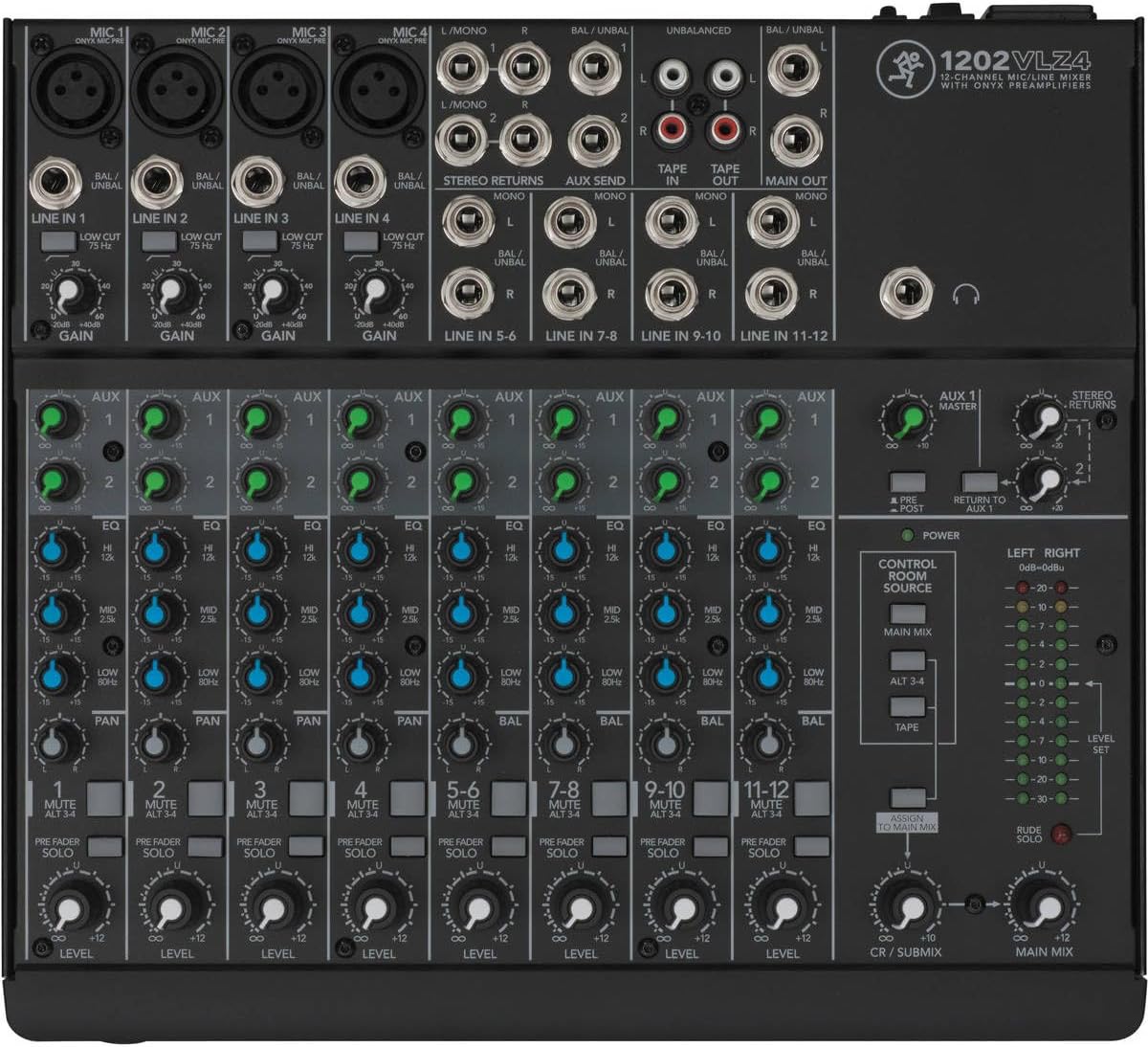
Image: Top panel of the Mackie 1202VLZ4 mixer, illustrating the layout of input channels, EQ, Aux sends, and master section controls.
Channel Strip Controls (Channels 1-4)
- GAIN: Adjusts the input sensitivity for the microphone or line input. Set this to achieve a healthy signal level without clipping (indicated by the red PEAK LED).
- LOW CUT (75 Hz): Engages a high-pass filter at 75 Hz to remove unwanted low-frequency rumble from microphone signals.
- EQ (Equalization):
- HIGH: Adjusts the treble frequencies.
- MID: Adjusts the mid-range frequencies.
- LOW: Adjusts the bass frequencies.
- AUX 1 & 2: Controls the amount of signal sent from the channel to the respective Aux Send outputs.
- PAN: Positions the channel's signal in the stereo field (left to right).
- MUTE / ALT 3-4: Mutes the channel from the main mix and sends it to the Alt 3-4 bus.
- PRE FADER SOLO: Sends the channel's signal to the headphones and control room outputs for monitoring without affecting the main mix.
- LEVEL: Adjusts the overall output level of the channel to the main mix.
Stereo Channel Controls (Channels 5-12)
- Similar EQ, AUX, BAL (Balance for stereo), MUTE/ALT 3-4, PRE FADER SOLO, and LEVEL controls as mono channels, adapted for stereo input.
Master Section Controls
- AUX 1 MASTER: Controls the overall level of Aux Send 1.
- STEREO RETURNS: Controls the level of signals returning from external effects processors connected to the Stereo Returns.
- CONTROL ROOM SOURCE: Selects what is heard through the control room outputs and headphones (Main Mix, Alt 3-4, Tape).
- LEVEL SET: Used in conjunction with the channel GAIN controls to set optimal input levels.
- MAIN MIX: Controls the overall output level of the main stereo mix.
- CR / SUBMIX: Controls the level of the control room/submix output.
- PHONES: Adjusts the headphone output level.
- LEVEL METERS: Provides visual indication of output levels for the Left/Right Main Mix.
Maintenance
Proper maintenance ensures the longevity and optimal performance of your mixer.
- Cleaning: Use a soft, dry cloth to wipe down the mixer's surface. For stubborn grime, a slightly damp cloth with mild soap can be used, ensuring no liquid enters the controls or jacks. Avoid abrasive cleaners or solvents.
- Dust Protection: When not in use, cover the mixer with a dust cover to prevent dust and debris from accumulating in the faders and knobs.
- Storage: Store the mixer in a cool, dry environment away from direct sunlight and extreme temperatures.
- Cable Management: Ensure cables are neatly organized and not under tension to prevent damage to the mixer's jacks.
Troubleshooting
This section addresses common issues you might encounter and provides solutions.
| Problem | Possible Cause | Solution |
|---|---|---|
| No sound output |
|
|
| Hum or Buzzing Noise |
|
|
| Distorted Audio |
|
|
| Phantom Power Not Working |
|
|
Specifications
| Attribute | Value |
|---|---|
| Model Number | 1202VLZ4 |
| Number of Channels | 12 |
| Product Dimensions | 13.98 x 13.23 x 6.1 inches |
| Item Weight | 10.08 pounds |
| Color | Gray |
| Connectivity Technology | Aux |
| Power Source | Corded Electric |
| Manufacturer | Loud Technologies, Inc. |
| Date First Available | August 6, 2013 |
Warranty and Support
For detailed warranty information and technical support, please refer to the official Mackie website or the full user manual PDF.
- Official User Manual (PDF): For the most comprehensive information, download the official PDF manual: Mackie 1202VLZ4 User Manual PDF
- Manufacturer's Website: Visit the Mackie website for product registration, software downloads, FAQs, and contact information for customer support.
Documents and downloads
Ask a question about this manual
Ask about setup, troubleshooting, compatibility, parts, safety, or missing instructions. Manuals+ will review the question and use this page’s manual context to help answer it.