
Introduction
This manual provides essential information for the safe and effective operation, maintenance, and troubleshooting of your Performance Tool W50084 10 Amp Variable Speed Polisher/Sander. Please read this manual thoroughly before using the tool and retain it for future reference.

Image: The Performance Tool W50084 Polisher/Sander, showing its main body, D-handle, and polishing pad.
Safety Information
Always observe basic safety precautions when using electrical tools to reduce the risk of fire, electric shock, and personal injury. This product contains chemicals known to the State of California to cause cancer and birth defects or other reproductive harm (Proposition 65 warning).
General Safety Rules:
- Read all instructions before operating the tool.
- Wear appropriate personal protective equipment, including eye protection, hearing protection, and gloves.
- Ensure the work area is clean, well-lit, and free from obstructions.
- Do not operate power tools in explosive atmospheres, such as in the presence of flammable liquids, gases, or dust.
- Keep children and bystanders away while operating a power tool.
- Avoid accidental starting. Ensure the switch is in the off-position before plugging in.
- Do not overreach. Keep proper footing and balance at all times.
- Disconnect the plug from the power source before making any adjustments, changing accessories, or storing the tool.
- Maintain tools with care. Keep cutting tools sharp and clean.
- Use the correct tool for your application. Do not force the tool.
- Do not abuse the cord. Never use the cord for carrying, pulling, or unplugging the power tool.
- Store idle tools out of reach of children and untrained persons.
Components and Accessories
The Performance Tool W50084 Polisher/Sander comes with several components and accessories to facilitate various tasks.
- 10 Amp Variable Speed Polisher/Sander Unit
- Ergonomic D-handle
- Hook-and-loop backer pad
- Foam wax applicator
- Terry cloth bonnet
- Synthetic wool bonnet
- Two sanding disc pads
- Spanner wrench
- 6ft. 2-pronged power cord
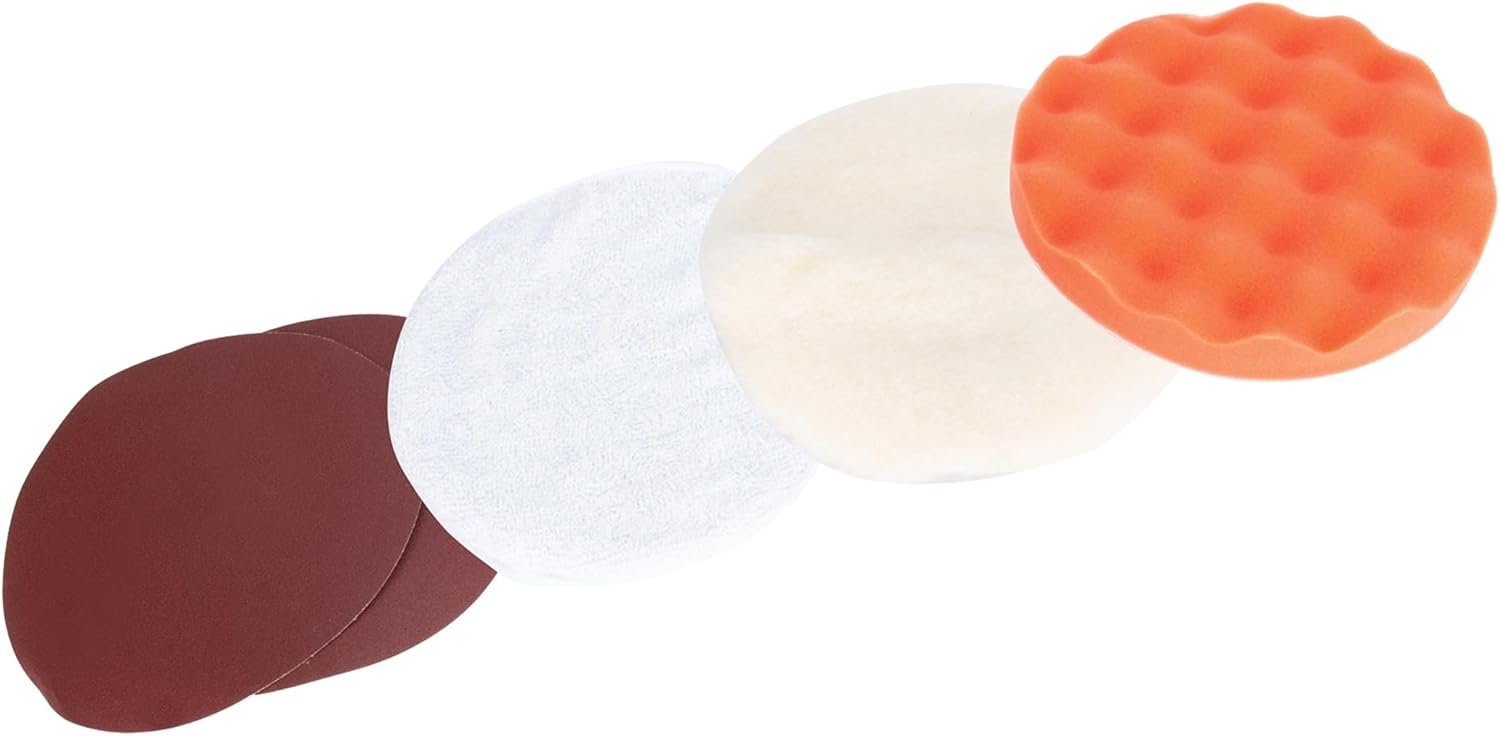
Image: Various accessories included with the polisher, such as foam pads, wool bonnets, and sanding discs.
Setup
Before operating the polisher/sander, ensure it is properly assembled and all accessories are securely attached.
- Attach the D-Handle: Secure the ergonomic D-handle to the front of the polisher using the provided hardware. Ensure it is tightened firmly for stable operation. The D-handle can be positioned for either left or right-hand use.
- Install the Backer Pad: If not already installed, attach the hook-and-loop backer pad to the spindle of the polisher. Use the spanner wrench to tighten it securely.
- Attach Accessories: Depending on your task (polishing or sanding), attach the appropriate accessory (foam wax applicator, terry cloth bonnet, synthetic wool bonnet, or sanding disc) to the hook-and-loop backer pad. Press firmly to ensure it adheres properly.
- Power Connection: Ensure the tool's power switch is in the "OFF" position before plugging the 2-pronged power cord into a suitable electrical outlet.

Image: Side view of the polisher/sander, illustrating the D-handle and the attachment point for pads.
Operating Instructions
Follow these steps for effective and safe operation of your polisher/sander.
- Power On: With the appropriate pad/bonnet attached, hold the tool firmly with both hands using the main grip and the D-handle. Press the power switch to turn the tool on.
- Adjust Speed: The tool features variable speed control, allowing for 0-4200 no-load RPM. Use the speed adjustment dial (typically a thumb wheel) to select the desired RPM for your specific task. Lower speeds are generally used for polishing and waxing, while higher speeds are suitable for sanding.
- Application:
- Polishing/Waxing: Apply a small amount of polish or wax directly to the foam applicator or the surface. Start the tool at a low speed and spread the product evenly before increasing speed as needed. Move the tool in a consistent, overlapping pattern.
- Sanding: Ensure the sanding disc is securely attached. Start the tool before making contact with the surface. Apply light, even pressure and move the tool smoothly across the surface to avoid gouging.
- Safety Lockout: The tool is equipped with a comfortable paddle switch with a safety lockout feature. Familiarize yourself with its operation to prevent accidental starts.
- Power Off: When finished, release the power switch. Wait for the pad to come to a complete stop before setting the tool down. Disconnect the tool from the power source.
Note: No official product videos were found for this model. For general usage tips, refer to the written instructions provided.
Maintenance
Regular maintenance ensures the longevity and optimal performance of your polisher/sander.
- Cleaning: After each use, wipe down the tool's exterior with a clean, damp cloth. Remove any dust or residue from the ventilation openings to prevent overheating.
- Pad/Bonnet Care: Clean used foam applicators, terry cloth bonnets, and synthetic wool bonnets according to their specific care instructions. Allow them to dry completely before storage.
- Cord Inspection: Regularly inspect the power cord for any signs of damage, cuts, or fraying. Do not use the tool if the cord is damaged.
- Storage: Store the polisher/sander and its accessories in a clean, dry place, out of reach of children.
- Ball Bearing Motor: The ball bearing motor is designed for long-lasting durability. No user-serviceable parts are typically associated with the motor itself.
Troubleshooting
If you encounter issues with your Performance Tool W50084 Polisher/Sander, refer to the following common problems and solutions:
| Problem | Possible Cause | Solution |
|---|---|---|
| Tool does not start or operate. | No power supply; power cord damaged; switch in "OFF" position; internal fault. | Check power outlet and cord. Ensure switch is "ON". If problem persists, seek professional service. |
| Tool runs but pad does not spin or spins slowly. | Pad not securely attached; excessive pressure applied; internal mechanism issue. | Ensure pad is firmly attached to backer pad. Reduce pressure. If issue continues, professional service may be required. |
| Excessive vibration or noise. | Pad/bonnet improperly attached or damaged; loose components; internal wear. | Check pad/bonnet for proper attachment and condition. Inspect for any loose parts. If severe, discontinue use and seek professional service. |
| Tool overheats. | Blocked ventilation openings; continuous heavy use; motor overload. | Clear ventilation openings. Allow tool to cool down. Avoid prolonged heavy use. |
Specifications
Key technical specifications for the Performance Tool W50084 Polisher/Sander:
| Feature | Specification |
|---|---|
| Model | W50084 |
| Motor | 10 Amp |
| No-Load RPM | 0-4200 RPM (Variable Speed) |
| Voltage | 120 Volts |
| Maximum Power | 1200 Watts |
| Item Weight | 6.4 Pounds (approx. 6.35 lbs) |
| Product Dimensions | 17.3 x 5.1 x 5.1 inches |
| Power Source | Corded Electric |
| Material | Stainless Steel (for certain components) |
| Color | Black / Grey |
Warranty and Support
Performance Tool products are designed for quality and durability. For information regarding warranty coverage, product support, or service, please refer to the warranty card included with your purchase or visit the official Performance Tool website. You may also contact their customer service for assistance.
For additional information, you can visit the Performance Tool Store on Amazon.


