
1. Introduction
This manual provides instructions for the setup, operation, and maintenance of your SINGCALL Wireless Calling Pager System, which includes the APE2300 display receiver and APE700RW call buzzers. Please read this manual thoroughly before use to ensure proper functionality and longevity of the product.
2. Package Contents
Verify that all items are present in your package:
- 1 x APE2300 Display Receiver
- 20 x APE700RW Call Buzzers
- Power Adapter for APE2300
- User Manual (this document)
3. Product Overview
3.1 APE2300 Display Receiver
The APE2300 is the central display unit that receives call signals from the buzzers. It features a clear digital display and audio alerts.

Front view of the APE2300 Display Receiver, showing the digital display and antenna.
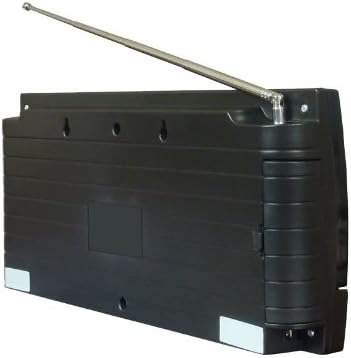
Back view of the APE2300 Display Receiver, showing mounting points and power input.
3.2 APE700RW Call Buzzer
The APE700RW is a compact, high-sensitivity call button designed for customer use. It transmits a signal to the APE2300 when pressed.

Top view of the APE700RW Call Buzzer with 'Call' button.
4. Setup Instructions
4.1 APE2300 Display Receiver Setup
- Placement: Position the APE2300 receiver in a central location where it is easily visible to staff. Ensure it is within the operational range of all call buzzers.
- Power Connection: Connect the provided power adapter to the APE2300 receiver and plug it into a standard electrical outlet. The display will illuminate.
- Antenna: Extend the antenna fully for optimal signal reception.
4.2 APE700RW Call Buzzer Setup
- Placement: Place each APE700RW call buzzer in its designated service area (e.g., on a table, counter, or patient room).
- Registration (Pairing): The buzzers are typically pre-registered with the receiver. If new buzzers are added or re-registration is required, refer to the detailed pairing instructions in the advanced settings section (not covered in this basic manual, refer to full product documentation for advanced configuration). The APE700 features a super stable registration method to prevent messy code phenomena.
5. Operating Instructions
5.1 Making a Call (APE700RW)
To initiate a service call, simply press the 'Call' button on the APE700RW buzzer. The buzzer is designed with high sensitivity for reliable activation.
5.2 Receiving a Call (APE2300)
When a call buzzer is pressed, the APE2300 display receiver will:
- Display: Show the calling number on its three-group, two-digit display. The display can show up to 180 call extensions and can be configured to show numbers or English characters.
- Audio Alert: Provide a speech broadcast of the operation and play one of twelve selectable chord music tunes. The length of the call sound can be adjusted.
- Time Display: When in standby mode, the receiver will show the current time.
Video demonstrating the operation of the SINGCALL APE2300 receiver with various call buttons, showing how calls are displayed and announced.
5.3 Customizing Settings (APE2300)
The APE2300 allows for customization of several settings:
- Display Time Length: Adjust how long a call number remains on the display.
- Call Sound Length: Select the duration of the audio alert.
- Chord Music: Choose from twelve different chord music options for call alerts.
Refer to the full product manual for detailed instructions on accessing and modifying these settings.
6. Maintenance
Proper maintenance ensures the longevity and reliable operation of your SINGCALL system.
- Cleaning: Use a soft, dry cloth to clean the surfaces of both the APE2300 receiver and APE700RW buzzers. Avoid abrasive cleaners or solvents.
- Environmental Conditions: The APE700RW buzzers are designed with resistance to temperature and humidity changes, contributing to their security, stability, and reliability. However, avoid exposing either unit to extreme temperatures, direct sunlight, or excessive moisture.
- Power Supply: Always use the original power adapter for the APE2300 receiver.
- Buzzer Batteries: The APE700RW buzzers are typically long-lasting. If a buzzer stops responding, it may require battery replacement. Consult the full product manual for specific battery type and replacement instructions.
7. Troubleshooting
If you encounter issues with your SINGCALL system, try the following troubleshooting steps:
| Problem | Possible Cause | Solution |
|---|---|---|
| APE2300 display is off | No power | Check power adapter connection and wall outlet. |
| APE2300 not receiving calls | Buzzer out of range, buzzer battery low, or interference. | Move buzzer closer to receiver. Replace buzzer battery. Check for strong interference sources. Ensure buzzers are registered. |
| APE700RW buzzer not responding | Low or dead battery. | Replace the buzzer battery. |
| Incorrect call number displayed | Buzzer registration issue. | Re-register the buzzer following advanced setup instructions in the full manual. |
If the problem persists after attempting these solutions, please contact SINGCALL customer support.
8. Specifications
| Feature | Detail |
|---|---|
| APE2300 Display Receiver | |
| Display Type | Three groups of two-digit, three-color digital pipe display |
| Call Extension Capacity | Up to 180 call extensions |
| Audio Features | Speech broadcast, 12 chord music options |
| Standby Feature | Displays current time |
| APE700RW Call Buzzer | |
| Features | Diffusion color dream light, high sensitivity touch buttons, stable registration, resistance to temperature/humidity changes |
| General System Specifications | |
| Item Dimensions | 14.57 x 8.27 x 5.51 inches (System Package) |
| Item Weight | 1.8 kg (System Package) |
| Material Type | Acrylonitrile Butadiene Styrene |
| UPC | 519527504484 |
| ASIN | B00ED8BF4K |
9. Warranty and Support
9.1 Warranty Information
Your SINGCALL Wireless Calling Pager System is covered by a standard manufacturer's warranty. Please retain your proof of purchase for warranty claims. For specific warranty terms and conditions, refer to the documentation included with your product or visit the official SINGCALL website.
9.2 Customer Support
For technical assistance, troubleshooting not covered in this manual, or warranty inquiries, please contact SINGCALL customer support through their official website or the contact information provided with your purchase. When contacting support, please have your product model (APE2300 / APE700RW) and ASIN (B00ED8BF4K) available.