1. Introduction
The SVAKOM Gaga is a rechargeable device designed with a built-in camera, integrated light, and multiple vibration modes. This manual provides essential information for the safe and effective use, maintenance, and troubleshooting of your SVAKOM Gaga.
2. Safety Information
- Material Safety: The device is constructed from medical-grade silicone, which is phthalate-free and latex-free. Clean the device thoroughly before and after each use.
- Water Resistance: The device has an IPX4 water repellency rating, meaning it is resistant to splashing water from any direction. Do not submerge the device in water.
- Charging: Use only the provided USB cable for charging. Do not use the device while it is charging. Ensure the charging port is dry before connecting the cable.
- Storage: Store the device in a cool, dry place, away from direct sunlight and extreme temperatures. Keep out of reach of children.
- Disposal: Do not dispose of the device with household waste. Follow local regulations for electronic waste disposal.
3. Package Contents
Verify that all items listed below are included in your package:
- SVAKOM Gaga Device
- USB Charging Cable
- Storage Pouch
- User Manual (this document)

Image: All items included in the SVAKOM Gaga package, laid out for inspection.
4. Product Overview
The SVAKOM Gaga features a sleek design with intuitive controls and a specialized tip housing the camera and light.
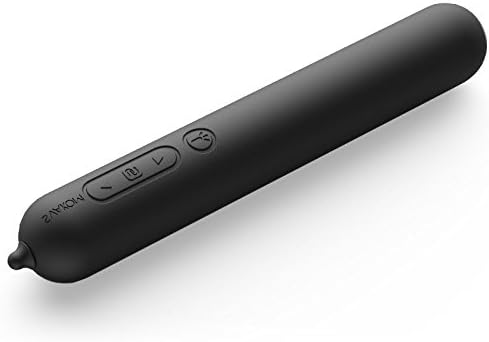
Image: The SVAKOM Gaga device, highlighting the control buttons on its body.
Key Features:
- Control Buttons: Located on the device body for power and vibration mode adjustments.
- Camera Lens: Integrated at the tip for visual feedback.
- Integrated Light: Illuminates the area for the camera.
- USB Port: For charging and connecting to a computer.

Image: Close-up of the device tip, showing the embedded camera lens and light.
5. Setup
5.1 Charging the Device
- Locate the USB charging port on the device.
- Connect the provided USB cable to the device's charging port.
- Plug the other end of the USB cable into a standard USB power adapter (not included) or a computer's USB port.
- The indicator light on the device will illuminate during charging. A full charge takes approximately 1.5 hours.
- Once fully charged, the indicator light will change or turn off (refer to specific device behavior). The device offers up to 8 hours of continuous use on a full charge.
5.2 Connecting to a Computer for Camera Function
- Ensure the device is charged.
- Connect the device to your computer using the provided USB cable.
- Your computer should recognize the device as a webcam. Access the camera feed through your computer's default camera application or compatible software.
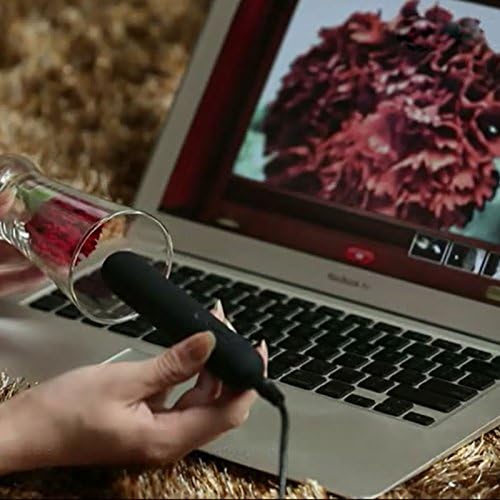
Image: The SVAKOM Gaga device connected to a laptop, demonstrating the camera feed displayed on the screen.
6. Operating Instructions
6.1 Power On/Off
- To Power On: Press and hold the power button (usually indicated by a power symbol) for 2-3 seconds until the device vibrates or an indicator light illuminates.
- To Power Off: Press and hold the power button again for 2-3 seconds until the device stops vibrating and the indicator light turns off.
6.2 Vibration Modes
The SVAKOM Gaga features 6 distinct vibration modes, including an intelligent mode.
- Changing Modes: While the device is on, short press the mode button (often indicated by a wave or pattern symbol) to cycle through the available vibration patterns.
- Adjusting Intensity: Use the '+' and '-' buttons to increase or decrease the vibration intensity within the current mode.
- Intelligent Mode: This mode automatically adjusts vibration patterns based on usage. Refer to the device's specific indicator for intelligent mode activation.
6.3 Camera and Light Function
The camera and integrated light activate automatically when the device is connected to a computer via USB and recognized as a webcam. The light provides illumination for the camera feed.
7. Maintenance
7.1 Cleaning
- Always clean the device before and after each use.
- Wash the device with warm water and a mild, toy-safe soap or a specialized toy cleaner.
- Rinse thoroughly to remove all soap residue.
- Dry the device completely with a lint-free cloth before storing.
- Do not use cleaners containing alcohol, petroleum, or acetone, as these can damage the silicone material.
7.2 Storage
Store the SVAKOM Gaga in its provided storage pouch in a clean, dry, and cool place, away from direct sunlight and extreme temperatures. Avoid storing with other materials that could react with silicone.
8. Troubleshooting
- Device Not Turning On: Ensure the device is fully charged. If it still doesn't turn on, try connecting it to the charger for a few minutes.
- Vibration is Weak or Inconsistent: The battery may be low; recharge the device. If the issue persists after charging, contact customer support.
- Camera Not Working/No Image on Computer:
- Ensure the USB cable is securely connected to both the device and the computer.
- Try a different USB port on your computer.
- Verify that your computer's camera application or software is correctly configured to detect external webcams.
- Restart your computer.
- Device Not Charging: Check the USB cable for damage and ensure the charging port is clean and dry. Try a different USB power source.
9. Specifications
| Model Number | 6510 |
| Material | Medical Grade Silicone |
| Color | Black |
| Dimensions | 25 mm (Diameter) x 165 mm (Length) |
| Weight | 74 g |
| Battery Type | Polymer Lithium Battery |
| Battery Capacity | 430 mAh |
| Charging Time | Approx. 1.5 hours |
| Maximum Continuous Use | Up to 8 hours |
| Vibration Modes | 6 |
| Water Repellency | IPX4 (Splash-proof) |
10. Warranty Information
For detailed warranty information, please refer to the warranty card included in your product packaging or visit the official SVAKOM website. Keep your proof of purchase for warranty claims.
11. Customer Support
If you have any questions, concerns, or require technical assistance, please contact SVAKOM customer support through their official website or the contact information provided in your product documentation.


