
1. Introduction
The HID ProxPoint Plus Proximity Reader (Model 6005BGB00) is a compact, high-quality access control device designed for seamless integration into various security systems. This reader utilizes 125 kHz proximity technology to read HID proximity cards, providing reliable and efficient access verification. Its small size and robust construction make it suitable for a wide range of indoor and outdoor applications.
This manual provides essential information for the proper installation, operation, and maintenance of your ProxPoint Plus reader. Please read these instructions carefully before proceeding with installation or use.
2. Product Overview
The ProxPoint Plus reader is designed for simplicity and durability. It features a single LED indicator for status feedback and a robust housing. The reader connects to an access control panel via a pigtail cable.
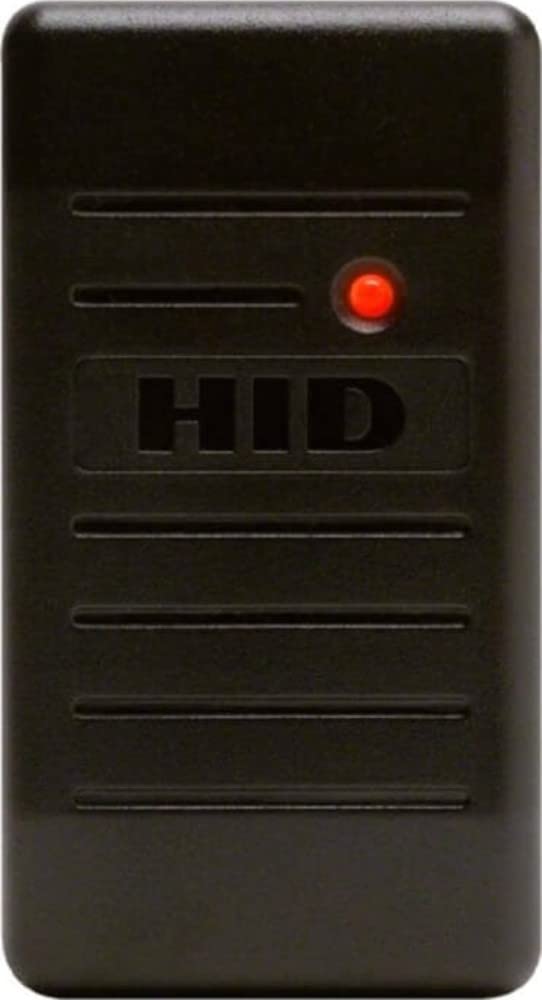
Figure 1: Front view of the HID ProxPoint Plus Proximity Reader. The device is a compact, gray rectangular unit featuring the 'HID' logo prominently in the center and a red LED indicator light in the upper right corner, signifying operational status.
3. Setup and Installation
3.1 Mounting
The ProxPoint Plus reader is designed for easy surface mounting. Ensure the mounting surface is flat and stable. Avoid mounting the reader directly on or near large metallic objects, as this may affect read range performance. If mounting on metal is unavoidable, use a non-metallic spacer.
3.2 Wiring
The reader connects to the access control panel using its integrated pigtail cable. Refer to your access control panel's documentation for specific wiring requirements. Standard wiring typically involves:
- Red: +DC Power (5.1-16VDC)
- Black: Ground
- Green: Data 0 (Wiegand)
- White: Data 1 (Wiegand)
- Brown: Hold/LED Control (Optional)
- Orange: Beeper Control (Optional)
Ensure all connections are secure and insulated to prevent short circuits. Use appropriate wire gauges for the distance between the reader and the control panel.
3.3 Power Requirements
The ProxPoint Plus reader operates on a voltage range of 5.1 to 16 VDC. Ensure the power supply meets these specifications and provides stable power to the reader and the access control system.
4. Operation
4.1 Presenting a Card
To gain access, present a valid 125 kHz proximity card or fob directly in front of the reader. The reader will emit an audible beep and the LED indicator will change color to confirm a successful read and access grant (if configured by the access control system).
4.2 LED Indicators
The ProxPoint Plus reader features a multi-color LED to indicate its status:
- Red LED: Indicates standby mode, awaiting a card presentation.
- Green LED: (If configured) Indicates a successful card read and access granted.
- Amber LED: (If configured) May indicate a specific status or error, depending on the access control system's programming.
5. Maintenance
The HID ProxPoint Plus reader is designed for minimal maintenance. Follow these guidelines to ensure optimal performance and longevity:
- Cleaning: Periodically wipe the reader's surface with a soft, damp cloth. Avoid using abrasive cleaners, solvents, or harsh chemicals, as these can damage the housing.
- Inspection: Regularly inspect the reader and its wiring for any signs of damage or wear. Address any issues promptly.
- Environmental Conditions: Ensure the reader operates within its specified environmental conditions (temperature, humidity) to prevent damage.
6. Troubleshooting
If you encounter issues with your ProxPoint Plus reader, refer to the following table for common problems and solutions:
| Problem | Possible Cause | Solution |
|---|---|---|
| Reader does not power on (no LED). | No power supply or incorrect wiring. | Verify power connections and voltage (5.1-16VDC). Check wiring for shorts or breaks. |
| Reader powers on but does not read cards. | Incorrect card type, card damage, or reader malfunction. | Ensure using 125 kHz HID proximity cards. Test with a known good card. Check reader wiring to the access panel. |
| Short read range. | Interference from metal, other readers, or environmental factors. | Relocate reader away from metal objects or other RF sources. Ensure proper power supply. |
| LED is always green or amber. | Access control panel configuration issue or wiring problem. | Consult your access control panel's manual for LED control settings. Check wiring for LED control lines. |
If the problem persists after attempting these solutions, contact technical support.
7. Specifications
Key technical specifications for the HID ProxPoint Plus Proximity Reader (Model 6005BGB00):
| Feature | Specification |
|---|---|
| Model Number | 6005BGB00 |
| Brand | HID |
| Technology | 125 kHz Proximity |
| Input Voltage | 5.1 - 16 VDC |
| Color | Gray |
| Product Dimensions | 4 x 6 x 3 inches (approximate) |
| Item Weight | 4.8 ounces |
| Special Feature | Compact, Plug & Play |
8. Warranty and Support
8.1 Warranty Information
Warranty terms and conditions for the HID ProxPoint Plus Proximity Reader are typically provided at the point of purchase or can be found on the official HID Global website. Please retain your proof of purchase for warranty claims.
8.2 Technical Support
For technical assistance, further documentation, or to report issues not covered in this manual, please visit the official HID Global support website or contact your authorized HID distributor.
Official HID Global Website: www.hidglobal.com