
1. Introduction
This manual provides essential information for the safe and efficient operation of your Indesit FIMB 53 K.A IX electric oven. Please read these instructions carefully before using the appliance and retain them for future reference. Proper use and maintenance will ensure optimal performance and longevity of your oven.
2. Safety Information
Always adhere to the following safety guidelines to prevent injury or damage to the appliance:
- Electrical Safety: Ensure the oven is correctly installed by a qualified technician and connected to a grounded power outlet. Do not use adapters or extension cords. Disconnect power before cleaning or maintenance.
- Hot Surfaces: The oven and its accessories become very hot during operation. Always use oven mitts when handling hot items. Keep children and pets away from the appliance.
- Fire Hazard: Do not store flammable materials in or near the oven. Never leave the oven unattended during cooking, especially when using high temperatures or grilling.
- Cleaning: Use only recommended cleaning agents. Ensure the oven is cool before cleaning.
- Ventilation: Ensure adequate ventilation around the oven as specified in the installation instructions.
3. Product Overview
The Indesit FIMB 53 K.A IX is a built-in electric oven designed for conventional cooking. It features a stainless steel finish, a built-in digital display, and an internal light for visibility during cooking. The oven is supplied with grids for various cooking needs.
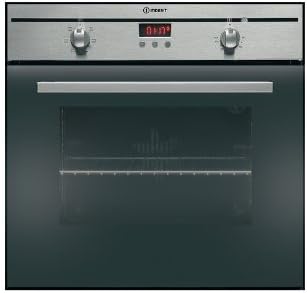
Figure 1: Front view of the Indesit FIMB 53 K.A IX electric oven. The control panel features two rotary knobs for function and temperature selection, centered around a digital display for time and settings. The oven door is made of dark glass, allowing visibility into the cooking cavity.
Control Panel Components:
- Function Selector Knob: Used to select the desired cooking mode (e.g., conventional, grill).
- Temperature Selector Knob: Used to set the cooking temperature in degrees Celsius.
- Digital Display: Shows the current time, cooking duration, and other settings.
- Control Buttons: Typically used for setting the timer, adjusting the clock, or confirming selections.
4. Setup
4.1 Installation
The Indesit FIMB 53 K.A IX is a built-in appliance. Installation should only be performed by a qualified electrician or authorized service technician in accordance with local safety regulations and the provided installation template. Ensure the appliance is properly secured and connected to the electrical supply.
4.2 First Use
- Remove all packaging materials, protective films, and accessories from the oven cavity.
- Clean the interior of the oven with a damp cloth and mild detergent, then dry thoroughly.
- Before cooking food, heat the empty oven at its maximum temperature for approximately 60 minutes to burn off any manufacturing residues. Ensure the room is well-ventilated during this process. A slight odor may be present; this is normal.
- Allow the oven to cool completely before its first use with food.
5. Operating Instructions
5.1 Setting the Clock
Upon initial power-up or after a power outage, the digital display will flash. Use the control buttons (refer to your specific model's button layout) to set the current time. Confirm the setting to stop the flashing.
5.2 Selecting a Cooking Function
- Turn the Function Selector Knob to the desired cooking mode. For general baking and roasting, select the conventional cooking symbol (usually two horizontal lines).
- The oven light will illuminate, and the heating elements will begin to operate.
5.3 Setting the Temperature
- After selecting a function, turn the Temperature Selector Knob to the desired temperature in degrees Celsius.
- The oven will begin to preheat. An indicator light (if present) will turn off once the set temperature is reached.
5.4 Using the Timer
Your oven's digital display allows you to set a cooking duration or a delayed start. Consult the specific button functions for your model to:
- Set Cooking Duration: Program the oven to switch off automatically after a set time.
- Set End Time: Program the oven to start and finish cooking at a specific time.
- Minute Minder: Use as a simple kitchen timer without affecting oven operation.
6. Maintenance and Cleaning
Regular cleaning and maintenance ensure the hygiene and efficiency of your oven.
6.1 General Cleaning
- Exterior: Clean the stainless steel exterior with a soft cloth and a non-abrasive cleaner specifically designed for stainless steel. Avoid harsh chemicals or abrasive pads.
- Interior: After each use, wipe the oven interior with a damp cloth once it has cooled. For stubborn stains, use a specialized oven cleaner, following the product instructions carefully. Ensure all cleaner residue is removed.
- Oven Door: Clean the glass door with a glass cleaner. Do not immerse the door in water.
- Accessories: Wash grids and trays in warm soapy water or in a dishwasher.
6.2 Replacing the Oven Light
Ensure the oven is disconnected from the power supply before attempting to replace the light bulb. Unscrew the protective glass cover, replace the old bulb with a new high-temperature resistant bulb (check specifications for wattage), and then reattach the cover.
7. Troubleshooting
If you encounter issues with your oven, consult the following table before contacting service.
| Problem | Possible Cause | Solution |
|---|---|---|
| Oven does not heat | No power supply; Function/temperature not set; Fuse tripped. | Check power connection; Ensure function and temperature knobs are set; Check household fuse box. |
| Oven light not working | Bulb is faulty or loose. | Replace the oven light bulb (see Section 6.2). |
| Food not cooking evenly | Incorrect temperature/shelf position; Overcrowding the oven. | Adjust temperature; Use recommended shelf position; Avoid placing too many items in the oven at once. |
| Digital display flashing | Power interruption; Clock not set. | Set the clock (see Section 5.1). |
8. Specifications
- Model: Indesit FIMB 53 K.A IX
- Internal Model Number: 40027540
- Type: Electric Oven
- Installation Type: Built-in
- Power: 2250 Watts
- Energy Class: A
- Dimensions (H x W x D): 60 x 54.5 x 60 cm
- Weight: 32 kg (70.55 lbs)
- Features: Conventional cooking, Built-in display, Grids, Internal light
9. Warranty and Support
Your Indesit FIMB 53 K.A IX electric oven is covered by a manufacturer's warranty. Please refer to the warranty card provided with your purchase for specific terms, conditions, and duration. For technical assistance, spare parts, or to schedule a service appointment, please contact Indesit Customer Service. Contact details can typically be found on the Indesit official website or in your purchase documentation.


