
Introduction and Overview
Thank you for choosing the Ingersoll IN8410WH Sam Automatic Watch. This manual provides essential information for the proper setup, operation, and maintenance of your timepiece. The IN8410WH is an automatic self-winding watch featuring a durable stainless steel case, sapphire crystal, dual time display, and a power reserve indicator.
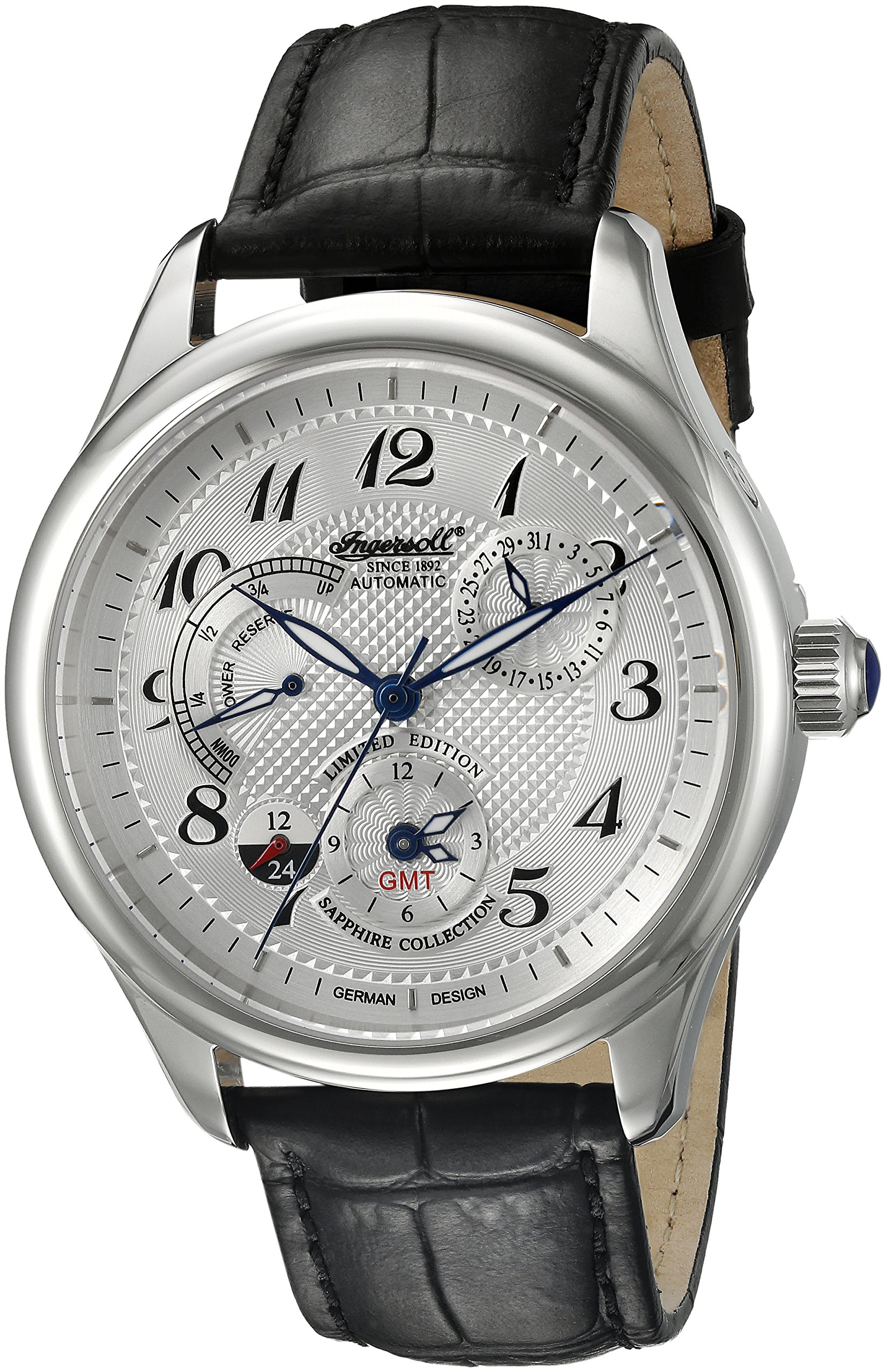
Front view of the Ingersoll IN8410WH Sam Automatic Watch, showcasing its dial and hands.
Key Features:
- Automatic movement for self-winding operation.
- Scratch-resistant Sapphire crystal.
- Dual time display for tracking a second time zone.
- Power reserve indicator to show remaining running time.
- Robust 44mm solid stainless steel case.
- Water resistant to 30 meters (99 feet), suitable for splashes and rain.
Setup
Your Ingersoll IN8410WH watch is powered by an automatic movement, meaning it winds itself with the motion of your wrist. If the watch has stopped, it needs to be wound manually to initiate operation.
Initial Winding
- Gently pull the crown out to its normal operating position (Position 0).
- Rotate the crown clockwise approximately 30-40 times. This will build up a sufficient power reserve to start the watch.
- Once the watch starts running, normal daily wear will keep it wound. If worn regularly (8-10 hours a day), manual winding should not be necessary.

The transparent case back reveals the automatic self-winding movement of the watch.
Operating Instructions
Setting the Time
- Pull the crown out to the outermost position (Position 2). The second hand will stop.
- Rotate the crown to set the hour and minute hands to the desired time. Ensure you pass 12 o'clock twice if setting past midnight to correctly set the AM/PM for the date change.
- Push the crown back into its normal operating position (Position 0).
Setting the Date
The date can be adjusted using the push-button located at the 2 o'clock position on the watch case.
- Ensure the main time is not between 9 PM and 3 AM to avoid damaging the movement during date change. If it is, adjust the main time outside this window first.
- Using a small, non-sharp tool (like a toothpick), gently press the recessed button at the 2 o'clock position. Each press will advance the date by one day.
- Adjust until the correct date is displayed.
Using the Dual Time Display
The dual time display allows you to track a second time zone. The 12/24 hour indicator (often labeled GMT) at the 6 o'clock sub-dial helps distinguish AM/PM for the second time zone.
- Pull the crown out to the first position (Position 1).
- Rotate the crown counter-clockwise to adjust the hour hand of the second time zone. The minute hands for both time zones are synchronized.
- Once the desired second time zone is set, push the crown back into its normal operating position (Position 0).
Power Reserve Indicator
The power reserve indicator on the dial shows the remaining running time of your watch. When fully wound, it will show maximum power. As the power depletes, the indicator will move towards empty. If the indicator is low, manually wind the watch or wear it to replenish the power reserve.
Maintenance
Proper care will ensure the longevity and performance of your Ingersoll IN8410WH watch.
Cleaning
- Wipe the watch case and sapphire crystal with a soft, dry, lint-free cloth.
- For the leather strap, avoid excessive moisture. If it gets wet, allow it to air dry naturally, away from direct heat.
- Do not use harsh chemicals or abrasive materials for cleaning.
Water Resistance (30M / 99 Feet)
Your watch is water resistant to 30 meters (3 ATM / 99 feet). This means it is suitable for:
- Accidental splashes.
- Rain.
It is NOT suitable for showering, bathing, swimming, diving, or any water sports. Avoid operating the crown or push-buttons when the watch is wet.
General Care
- Avoid exposing the watch to extreme temperatures (hot or cold) or sudden temperature changes.
- Keep the watch away from strong magnetic fields, as these can affect the accuracy of the automatic movement.
- Protect the watch from impacts and drops.
Troubleshooting
If you encounter issues with your watch, please refer to the following common solutions:
Watch Not Running or Stopping Frequently
- Insufficient Power Reserve: As an automatic watch, it requires motion to wind. If you don't wear it daily or are not very active, the power reserve may deplete. Manually wind the watch by rotating the crown clockwise 30-40 times.
- Lack of Wear: Ensure you wear the watch for at least 8-10 hours a day for consistent winding. If stored for extended periods, use a watch winder or manually wind it before wearing.
Time Inaccuracy
- Magnetic Interference: Exposure to strong magnetic fields (e.g., speakers, refrigerators, certain electronic devices) can affect the watch's accuracy. If you suspect this, consult a professional watchmaker for demagnetization.
- Service Interval: Mechanical watches typically require servicing every 3-5 years to maintain optimal performance and accuracy.
Date Not Changing Correctly
- Incorrect Time Setting: Ensure the main time is set correctly, especially the AM/PM cycle. The date typically changes around midnight.
- Date Change Window: Avoid manually adjusting the date between 9 PM and 3 AM, as this can interfere with the automatic date change mechanism.
If problems persist, please contact the seller or an authorized service center.
Specifications

The Ingersoll IN8410WH watch displayed on a wrist, showing its size and fit.
| Feature | Detail |
|---|---|
| Model Number | IN8410WH |
| Movement Type | Automatic Self-Wind |
| Display Type | Analog |
| Case Material | Solid Stainless Steel |
| Case Diameter | 44 mm |
| Case Thickness | 15 mm |
| Crystal Material | Sapphire Crystal |
| Band Material | Leather |
| Band Width | 22 mm |
| Water Resistance Depth | 30 Meters (99 Feet) |
| Special Features | Dual Time Display, Power Reserve Indicator |
Warranty and Support
Warranty Information: The warranty for your Ingersoll IN8410WH watch is provided by the seller of record. Please retain your proof of purchase for any warranty claims. For specific details regarding coverage and duration, refer to the documentation provided at the time of purchase or contact the seller directly.
Customer Support: For any questions, service requests, or technical assistance not covered in this manual, please contact the authorized Ingersoll service center or the retailer from whom you purchased the watch. Always ensure that any repairs or maintenance are performed by qualified professionals to maintain the integrity of your timepiece and its warranty.

The Ingersoll watch comes in a branded presentation box, suitable for storage and protection.