
MEE audio EP-D1P-PK-MEE
MEE audio EDM Universe D1P In-Ear Headphones
Model: EP-D1P-PK-MEE
Brand: MEE audio
Product Overview
The MEE audio EDM Universe D1P In-Ear Headphones are designed to deliver a rich audio experience, specifically tuned for Electronic Dance Music (EDM) with enhanced bass and spacious sound. These headphones feature an inline microphone, remote, and universal volume control for convenient headset use with various devices.
- Inspired by and designed for Electronic Dance Music.
- Tuned for EDM with enhanced bass, spacious sound, and excellent dynamics.
- Inline microphone, remote, and universal volume control for headset use.
- Noise-isolating in-ear fit with angled nozzle for long term comfort.
- Connectivity Technology: Wired.
What's in the Box
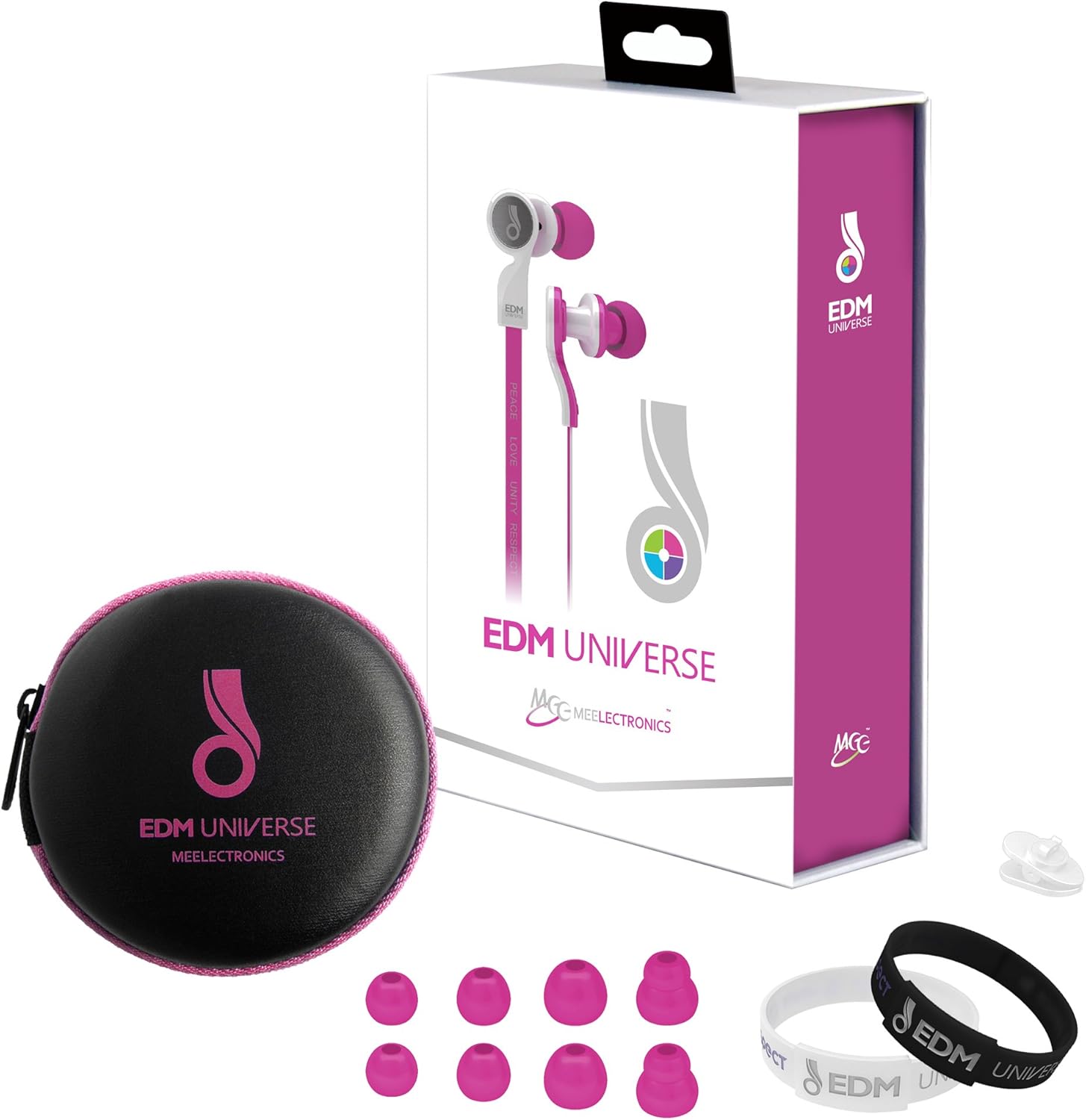
Image showing the MEE audio EDM Universe D1P In-Ear Headphones along with their included accessories: a color-matched carrying case, multiple sizes of ear tips, and an EDM wristband.
- MEE audio EDM Universe D1P In-Ear Headphones (Pink)
- Color-matched Carrying Case
- Multiple sizes of Silicone Ear Tips
- EDM Wristband
- User Manual (this document)
Setup
1. Choosing the Right Ear Tips
Selecting the correct size of ear tips is crucial for optimal sound quality and comfort. Experiment with the different sizes provided to find the pair that creates a secure seal in your ear canal. A good seal will enhance bass response and noise isolation.
2. Proper Insertion
Gently insert the earbud into your ear canal. The angled nozzle design is intended for an ergonomic fit. Twist slightly if needed to achieve a comfortable and secure position. The cable should hang naturally from your ears.

A close-up view of the MEE audio EDM Universe D1P In-Ear Headphones, highlighting the earbud design and inline remote.
3. Connecting to Your Device
Plug the 3.5mm audio jack into the headphone port of your smartphone, tablet, MP3 player, or other audio device. Ensure the connection is firm.
Operating Instructions
The EDM Universe D1P headphones feature an inline remote and microphone for convenient control of your audio and calls.
Inline Remote Functions:
- Play/Pause: Press the main button once to play or pause music.
- Next Track: Press the main button twice quickly to skip to the next track.
- Previous Track: Press the main button three times quickly to go back to the previous track.
- Answer/End Call: Press the main button once to answer an incoming call or end an active call.
- Volume Control: Use the dedicated volume slider or buttons (if present on your model) on the inline remote to adjust the audio volume.
- Microphone: The integrated microphone allows for hands-free calling. Ensure the microphone is positioned appropriately for clear voice pickup.
Note: Functionality of the remote may vary slightly depending on your device's operating system and media player application.
Maintenance
Cleaning:
- Regularly clean the ear tips with a soft, damp cloth. Remove ear tips from the earbuds for thorough cleaning if necessary.
- Gently wipe the earbuds and cable with a dry, soft cloth. Avoid using harsh chemicals or abrasive materials.
- Ensure no moisture enters the earbud drivers or the inline remote.
Storage:
- When not in use, store your headphones in the provided color-matched carrying case to protect them from dust, dirt, and tangles.
- Avoid wrapping the cable too tightly or bending it at sharp angles, as this can damage the internal wiring.
- Store in a cool, dry place away from extreme temperatures.
Troubleshooting
| Problem | Possible Cause / Solution |
|---|---|
| No sound or low volume |
|
| Poor sound quality (muffled, lacking bass) |
|
| Microphone not working |
|
| Remote control not responding |
|
Specifications
| Feature | Detail |
|---|---|
| Brand | MEE audio |
| Model Number | EP-D1P-PK-MEE |
| Connectivity Technology | Wired |
| Ear Placement | In Ear |
| Form Factor | In Ear |
| Color | Pink |
| Material | Plastic |
| Control Type | Volume Control |
| Noise Control | Sound Isolation |
| Product Dimensions | 1 x 0.5 x 1 inches |
| Item Weight | 7.8 ounces |
| UPC | 736211206664 |
Warranty and Support
The MEE audio EDM Universe D1P In-Ear Headphones come with a 1-Year manufacturer's warranty. Please retain your proof of purchase for warranty claims.
For technical support, warranty service, or additional information, please visit the official MEE audio website or contact their customer support directly. Contact details can typically be found on the product packaging or the brand's official website.
You can visit the MEE audio Store on Amazon for more information: MEE audio Store
Related documentsEP-D1P-PK-MEE


Ask a question about this manual
Ask about setup, troubleshooting, compatibility, parts, safety, or missing instructions. Manuals+ will review the question and use this page’s manual context to help answer it.