
Introduction
The Divoom On-Beat 500 is a portable Bluetooth speaker designed for streaming audio from various Bluetooth-enabled devices such as smartphones, tablets, and computers. It features NFC technology for quick pairing and a built-in speakerphone for hands-free calls. This manual provides essential information for the proper setup, operation, and maintenance of your speaker.
Safety Information
- Do not expose the speaker to liquids, moisture, or extreme temperatures.
- Avoid dropping or subjecting the speaker to strong impacts.
- Do not attempt to disassemble or modify the speaker. This will void the warranty.
- Use only the provided charging cable or a certified equivalent.
- Keep the speaker away from heat sources and direct sunlight.
- Dispose of the battery according to local regulations. Do not incinerate.
Package Contents
Verify that all items are present in the package:
- Divoom On-Beat 500 Bluetooth Speaker
- Rechargeable USB cable
- 3.5 mm audio cable
Product Overview
Familiarize yourself with the speaker's components and controls.
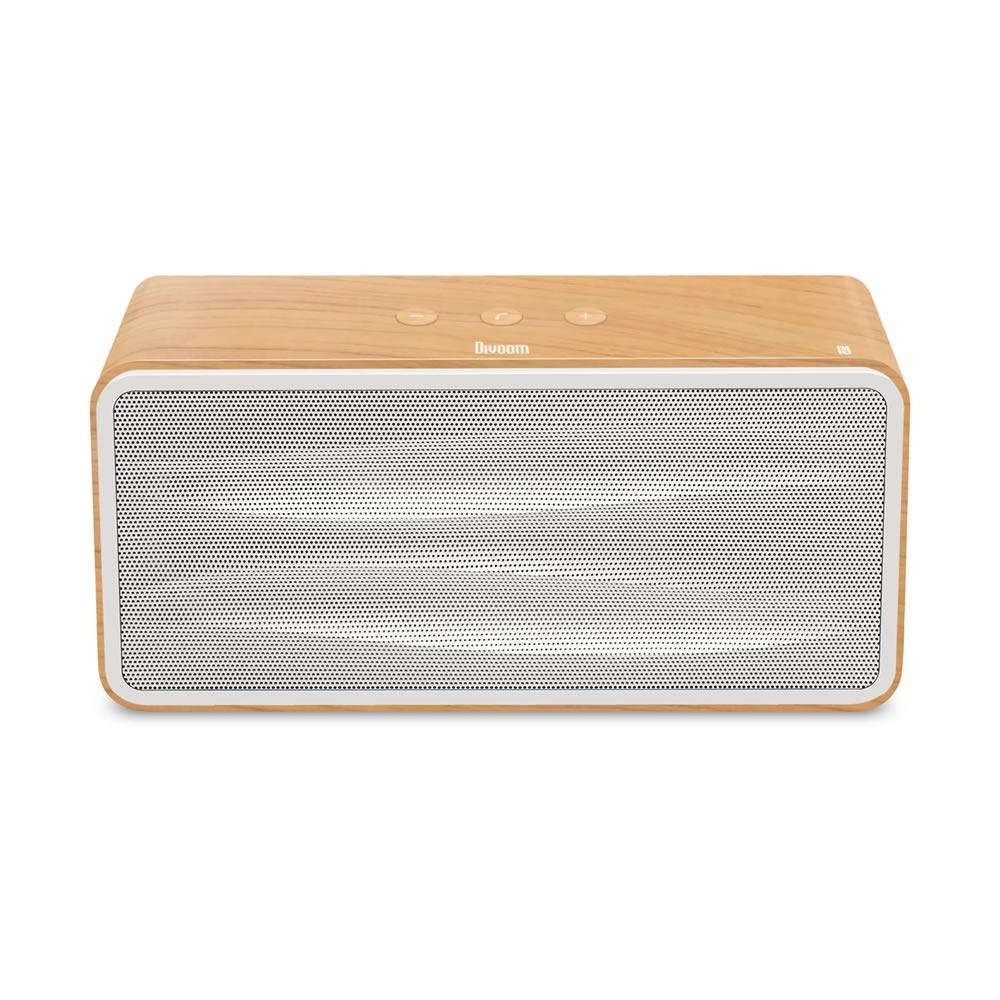
Image 1: Rear panel of the Divoom On-Beat 500, highlighting the power switch, 3.5mm AUX input, and Micro USB charging port.

Image 2: Front and side view of the Divoom On-Beat 500 speaker, illustrating the main speaker grille and the clean design of the side panel.
Controls and Ports:
- Power Switch: Located on the rear panel (refer to Image 1) to turn the speaker On or Off.
- AUX Input (3.5mm): For wired audio connection to devices without Bluetooth.
- Micro USB Port: Used for charging the speaker's internal battery.
- NFC Area: For quick Bluetooth pairing with compatible devices (location typically indicated on the top or side).
- Volume Controls: (Specific button locations not detailed in provided images, typically on top or front panel) Used to adjust audio playback volume.
- Play/Pause/Call Button: (Specific button locations not detailed in provided images) Used for media playback control and managing phone calls.
Setup
1. Charging the Speaker
- Connect the provided Micro USB cable to the Micro USB port on the rear of the speaker.
- Connect the other end of the USB cable to a USB power adapter (not included) or a computer's USB port.
- The charging indicator light (if present) will illuminate during charging and turn off or change color when fully charged.
- A full charge takes approximately 4 hours.
2. Powering On/Off
- To power on, slide the power switch on the rear panel to the 'ON' position.
- To power off, slide the power switch to the 'OFF' position.
3. Bluetooth Pairing
Method A: NFC (Near Field Communication) Pairing
- Ensure NFC is enabled on your smartphone or tablet.
- Turn on the Divoom On-Beat 500 speaker.
- Tap your NFC-enabled device gently against the NFC area on the speaker.
- Confirm the pairing request on your device. The speaker will indicate a successful connection.
Method B: Manual Bluetooth Pairing
- Turn on the Divoom On-Beat 500 speaker. It will automatically enter pairing mode, indicated by a flashing LED light.
- On your device (smartphone, tablet, computer), go to the Bluetooth settings.
- Search for available devices and select "ONBEAT-500" from the list.
- Once connected, the speaker will provide an audible confirmation, and the LED indicator will stop flashing.
4. Auxiliary (AUX) Connection
- Connect one end of the 3.5 mm audio cable to the AUX input port on the rear of the speaker.
- Connect the other end of the 3.5 mm audio cable to the headphone jack or audio output of your device.
- The speaker will automatically switch to AUX mode.
Operating
Playing Audio
- After successful Bluetooth pairing or AUX connection, start playing audio from your connected device.
- Adjust the volume using the volume controls on the speaker or directly from your connected device.
- Use the Play/Pause button on the speaker to control media playback.
Speakerphone Function
When connected via Bluetooth, the Divoom On-Beat 500 can be used as a speakerphone.
- Answering a Call: When a call comes in, press the Play/Pause/Call button once to answer.
- Ending a Call: During a call, press the Play/Pause/Call button once to end the call.
- Rejecting a Call: Press and hold the Play/Pause/Call button for a few seconds to reject an incoming call.
- Redialing: Double-press the Play/Pause/Call button to redial the last number.
Maintenance
Cleaning
- Wipe the speaker's exterior with a soft, dry, lint-free cloth.
- Do not use abrasive cleaners, alcohol, or chemical solvents.
Battery Care
- To prolong battery life, fully charge the speaker before first use.
- Avoid completely draining the battery frequently.
- If storing the speaker for an extended period, charge it to about 50% every few months.
Storage
- Store the speaker in a cool, dry place, away from direct sunlight and extreme temperatures.
- Keep it away from dust and dirt.
Troubleshooting
| Problem | Possible Solution |
|---|---|
| Speaker does not power on. | Ensure the battery is charged. Connect the speaker to a power source using the USB cable. |
| Cannot pair via Bluetooth. | Ensure the speaker is in pairing mode (flashing LED). Turn off and on Bluetooth on your device. Move the speaker closer to your device. Forget "ONBEAT-500" from your device's Bluetooth list and try pairing again. |
| No sound during playback. | Check volume levels on both the speaker and your connected device. Ensure the correct input source (Bluetooth or AUX) is selected. Verify the audio cable is securely connected for AUX mode. |
| Poor audio quality or disconnections. | Move the speaker closer to your device. Avoid obstacles between the speaker and device. Reduce interference from other wireless devices. |
| Speakerphone not working. | Ensure the speaker is connected via Bluetooth. Check microphone permissions on your connected device. |
Specifications

Image 3: Dimensions of the Divoom On-Beat 500 speaker.
| Feature | Detail |
|---|---|
| Model Name | ONBEAT-500 |
| Dimensions (L x W x H) | 8.6" x 3" x 4.13" (21.8 cm x 7.6 cm x 10.5 cm) |
| Weight | 2.58 lbs (1.17 kg) |
| Output Power | 13W (Subwoofer: 5W; Satellite: 4W x 2) |
| Driver Size | Subwoofer: 3"; Satellite: 2" x 2 |
| Frequency Response | 60-20000Hz |
| Signal-to-Noise Ratio | ≥75 dB |
| Bluetooth Version | V4.0 |
| Bluetooth Profile Support | A2DP Stereo |
| Wireless Range | Up to 10 meters / 33 feet |
| Battery Type | Lithium-ion |
| Battery Capacity | 3000 mAh |
| Playback Time | Up to 8 hours |
| Battery Charge Time | 4 hours |
| Microphone Sensitivity | -36 dB |
| Connectivity Technology | Bluetooth, NFC, USB (for charging) |
| Control Method | Touch, Buttons |
Warranty Information
The Divoom On-Beat 500 Bluetooth Speaker comes with a limited warranty. Please refer to the warranty card included in your product packaging or visit the official Divoom website for detailed terms and conditions. Keep your purchase receipt as proof of purchase for warranty claims.
Support
For further assistance, technical support, or product information, please visit the official Divoom website:


