
Sagemcom Sixty
Sagemcom Sixty Cordless Telephone and Answer Machine
Model: Sixty
Brand: Sagemcom
Product Overview
The Sagemcom Sixty Cordless Telephone and Answer Machine combines modern technology with a classic design. Its unique aesthetic, smooth finish, and touchscreen functionality make it a distinctive addition to any environment. Designed for user comfort, the Sixty offers a range of features including hands-free mode, extended battery life, and an intuitive interface for easy communication.
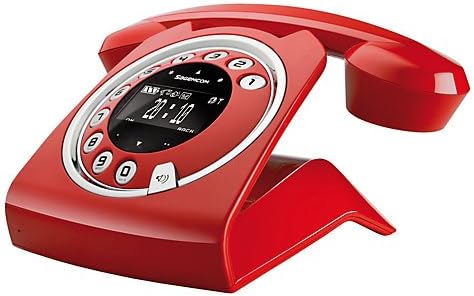
Image: The Sagemcom Sixty Cordless Telephone and Answer Machine in red, showcasing its unique retro-modern design with a circular dial and digital display.

Image: Side view of the Sagemcom Sixty Cordless Telephone, highlighting its sleek profile and the cradle design.
Setup Guide
1. Unpacking
Carefully remove all components from the packaging. Ensure you have the base unit, handset, power adapter, and telephone line cord.
2. Connecting the Base Unit
- Connect the power adapter to the 'DC IN' port on the back of the base unit and plug the other end into a wall outlet.
- Connect one end of the telephone line cord to the 'LINE' port on the base unit and the other end to your telephone wall jack.
3. Battery Installation and Charging
- Open the battery compartment on the handset.
- Insert the supplied rechargeable batteries, observing the correct polarity (+ and -).
- Close the battery compartment.
- Place the handset on the base unit. The display will indicate charging. Allow the handset to charge for at least 16 hours before first use to ensure optimal battery performance.
Operating Instructions
Making and Receiving Calls
- To Make a Call: Lift the handset or press the Call button. Dial the number using the touchscreen keypad.
- To Receive a Call: Lift the handset or press the Call button when the phone rings.
- To End a Call: Place the handset back on the base unit or press the End Call button.
Using the Touchscreen
The Sixty features a responsive touchscreen for navigation and input. Tap icons or numbers to select functions or dial. Swipe to scroll through lists or menus.
Hands-Free Mode
During a call, press the Speaker button to activate hands-free mode. Press it again to return to handset mode.
Phonebook Management
- Adding a Contact: Navigate to the Phonebook menu, select 'Add New Contact', enter the name and number using the touchscreen, and save. The phonebook can store up to 150 names.
- Searching for a Contact: Access the Phonebook and use the search function or scroll through the list.
- Editing/Deleting a Contact: Select the desired contact from the Phonebook and choose the 'Edit' or 'Delete' option.
Answering Machine Functions
The integrated answering machine has a recording capacity of 10 minutes.
- Activating/Deactivating: Access the Answering Machine menu to turn it on or off.
- Playing Messages: Select 'Play Messages' from the Answering Machine menu.
- Recording Outgoing Message: Follow the prompts in the Answering Machine menu to record a personalized outgoing message.
Maintenance
Cleaning Your Phone
To clean the phone, wipe it with a soft, damp cloth. Do not use abrasive cleaners or solvents, as these can damage the surface. Ensure the phone is disconnected from power before cleaning.
Battery Care
- Always use the supplied rechargeable batteries.
- If the phone will not be used for an extended period, remove the batteries to prevent leakage.
- Dispose of old batteries responsibly according to local regulations.
Troubleshooting
| Problem | Possible Solution |
|---|---|
| No dial tone | Check if the telephone line cord is securely connected to both the base unit and the wall jack. Ensure the power adapter is plugged in. |
| Handset not charging | Ensure the handset is correctly placed on the base unit. Clean the charging contacts on both the handset and base unit with a dry cloth. Verify the power adapter is working. |
| Poor sound quality | Move closer to the base unit. Check for interference from other electronic devices. Ensure the telephone line cord is not damaged. |
| Display is blank | Check if the handset battery is charged. If not, place it on the base unit to charge. Ensure the power adapter is connected to the base unit. |
| Cannot make or receive calls | Verify that the telephone line is active. Check all cable connections. Restart the base unit by unplugging and replugging the power adapter. |
Technical Specifications
| Feature | Specification |
|---|---|
| Brand | Sagemcom |
| Model | Sixty |
| Color | Red |
| Telephone Type | Cordless |
| Phone Talk Time | Up to 10 Hours |
| Standby Time | Up to 120 Hours |
| Recording Capacity (Answering Machine) | 10 Minutes |
| Phonebook Capacity | 150 Names |
| ASIN | B00DX64LPI |
| First Available Date | April 15, 2014 |
Warranty and Support
For warranty information and customer support, please refer to the documentation included with your purchase or visit the official Sagemcom website. Keep your proof of purchase for any warranty claims.
Related documentsSixty


Ask a question about this manual
Ask about setup, troubleshooting, compatibility, parts, safety, or missing instructions. Manuals+ will review the question and use this page’s manual context to help answer it.