Introduction
This manual provides essential instructions for the safe and proper installation, operation, and maintenance of the Phoenix Contact D-QTC 2.5-TWIN Terminal Block, model 3206571. Please read this manual thoroughly before using the product to ensure optimal performance and safety.
The D-QTC 2.5-TWIN is a high-quality electrical component designed for reliable wiring connections in industrial and scientific applications, often used in fuse block configurations.
Product Overview
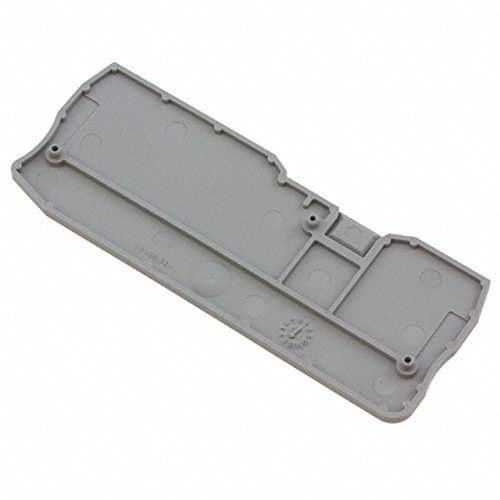
Figure 1: Underside view of the Phoenix Contact D-QTC 2.5-TWIN Terminal Block (Model 3206571). This image shows the gray plastic housing with internal structural elements and mounting points, indicating its robust design for secure installation.
Safety Information
Always observe the following safety precautions:
- Ensure power is disconnected before installation or maintenance.
- Only qualified personnel should perform installation and wiring.
- Use appropriate tools and personal protective equipment (PPE).
- Adhere to all local and national electrical codes and regulations.
- Do not use the product if it appears damaged.
Setup and Installation
Follow these steps for proper installation of the terminal block:
- Preparation: Ensure the mounting surface is clean, dry, and free from conductive debris.
- Mounting: Secure the terminal block to a DIN rail or panel using appropriate fasteners. Ensure it is firmly seated to prevent movement.
- Wire Stripping: Strip wire insulation to the recommended length (refer to specifications for exact length) to ensure proper contact without exposed conductors.
- Wire Insertion: Open the clamping unit (if applicable) and insert the stripped wire fully into the terminal point.
- Secure Connection: Close the clamping unit or tighten the screw connection to secure the wire. Gently pull on the wire to verify a secure connection.
- Repeat: Connect all necessary wires, ensuring correct polarity and circuit configuration.
Note: For multi-conductor terminal blocks, ensure each conductor is correctly isolated and secured.
Operation
Once installed and wired correctly, the Phoenix Contact D-QTC 2.5-TWIN Terminal Block operates passively as a secure electrical connection point. Its primary function is to provide a reliable and organized interface for electrical circuits.
- Circuit Integrity: The terminal block maintains the integrity of the electrical circuit, ensuring continuous current flow between connected conductors.
- Voltage and Current: Ensure that the operating voltage and current do not exceed the specified ratings of the terminal block.
- Environmental Conditions: Operate the terminal block within its specified environmental conditions (temperature, humidity) to prevent degradation of performance.
Maintenance
The D-QTC 2.5-TWIN Terminal Block is designed for minimal maintenance. However, periodic checks are recommended to ensure long-term reliability:
- Visual Inspection: Regularly inspect the terminal block for any signs of physical damage, discoloration, or loose connections.
- Connection Tightness: Periodically check the tightness of screw connections (if applicable) to prevent resistance build-up and overheating. Ensure power is off before checking connections.
- Cleaning: If necessary, gently clean the exterior of the terminal block with a dry, non-abrasive cloth. Avoid using solvents or harsh chemicals.
- Environmental Check: Ensure the operating environment remains within specified parameters, free from excessive dust, moisture, or corrosive substances.
Troubleshooting
If you encounter issues, consider the following common troubleshooting steps:
| Problem | Possible Cause | Solution |
|---|---|---|
| Loose connection / Intermittent contact | Improper wire insertion, screw not tightened sufficiently, wire vibration. | Disconnect power, re-insert wire, and ensure screw is tightened to specified torque. Check for wire damage. |
| Overheating / Discoloration | Overcurrent, loose connection, environmental factors. | Verify current draw is within specifications. Check all connections for tightness. Ensure proper ventilation. Replace if damaged. |
| Physical damage to housing | Impact, incorrect installation, chemical exposure. | Replace the terminal block. Ensure proper handling and installation procedures are followed. |
If problems persist after attempting these solutions, contact Phoenix Contact technical support.
Specifications
Key technical specifications for the Phoenix Contact D-QTC 2.5-TWIN Terminal Block (Model 3206571):
- Model Number: 3206571
- Type: D-QTC 2.5-TWIN Terminal Block
- Brand: Phoenix Contact
- ASIN: B00DWIF7MI
- Date First Available: October 15, 2014
- Category: Industrial Electrical, Wiring & Connecting, Terminal Blocks, Fuse Blocks
- Note: For detailed electrical ratings (voltage, current, wire size), please refer to the official Phoenix Contact datasheet for the D-QTC 2.5-TWIN series.
Warranty Information
Phoenix Contact products are manufactured to high-quality standards. For specific warranty terms and conditions applicable to the D-QTC 2.5-TWIN Terminal Block, please refer to the official Phoenix Contact warranty statement available on their corporate website or contact their customer service department.
Customer Support
For technical assistance, product inquiries, or support, please contact Phoenix Contact directly:
- Website: Visit the official Phoenix Contact website for product documentation, FAQs, and contact information.
- Technical Support: Refer to the contact details provided on the Phoenix Contact website for technical support specialists.


