
MEAN WELL MSP-100-12
MSP-100-12 AC to DC Switching Medical Enclosed Power Supply User Manual
Brand: MEAN WELL
1. Product Overview
The MEAN WELL MSP-100-12 is a high-efficiency, enclosed type AC to DC switching power supply specifically designed for medical applications. It features a Power Factor Correction (PFC) function and provides a stable single output of 12 Volts. This unit is suitable for various medical and industrial equipment requiring a reliable and regulated power source.
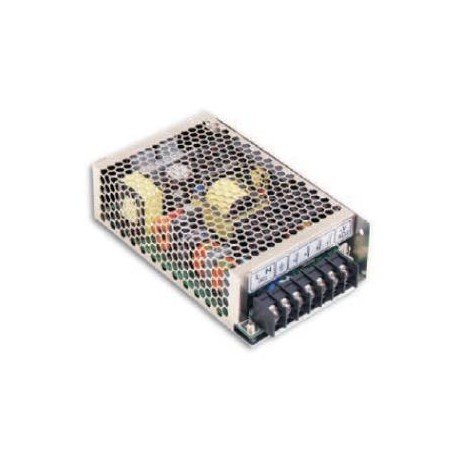
Figure 1: Front view of the MSP-100-12 AC to DC Switching Medical Enclosed Power Supply, showing its metallic mesh casing and terminal block connections.
2. Safety Instructions
Before installation and operation, please read and understand all safety instructions. Failure to do so may result in injury or damage to the unit.
- Ensure the power supply is disconnected from the main AC power source before any installation or maintenance.
- Only qualified personnel should perform installation and wiring.
- Verify input voltage and frequency match the specifications of the power supply.
- Do not operate the unit in environments with excessive moisture, dust, or extreme temperatures.
- Ensure proper grounding to prevent electrical shock.
- Do not open the casing of the power supply; there are no user-serviceable parts inside.
3. Setup and Installation
Follow these steps for proper installation of the MSP-100-12 power supply:
- Mounting: Securely mount the power supply in a well-ventilated area using appropriate screws. Ensure adequate clearance around the unit for heat dissipation.
- Input Wiring (AC): Connect the AC input wires to the designated terminals (L, N, FG) on the power supply. Refer to the terminal block diagram on the unit for correct polarity. Ensure all connections are tight and secure.
- Output Wiring (DC): Connect the DC output wires to the designated terminals (+V, -V). Observe correct polarity for your load device.
- Grounding: Connect the frame ground (FG) terminal to a reliable earth ground. This is crucial for safety and proper operation.
- Initial Check: Before applying power, double-check all wiring connections for correctness and security.
4. Operating Instructions
Once installed and wired correctly, the MSP-100-12 is ready for operation:
- Power On: Apply the specified AC input voltage (85 to 264 VAC) to the power supply.
- Output Verification: Use a multimeter to verify the output voltage is approximately 12V DC before connecting your load.
- Load Connection: Connect your medical or industrial equipment to the DC output terminals. Ensure the total current draw does not exceed 8.5 Amps.
- Indicator: The unit may have an LED indicator to show power status. Refer to the product label for specific indicator behavior.
- Overload Protection: The power supply includes built-in overload and short-circuit protection. In case of an overload, the unit may shut down or enter hiccup mode. Remove the overload condition to resume normal operation.
5. Maintenance
The MSP-100-12 power supply is designed for long-term reliability with minimal maintenance. However, periodic checks can help ensure optimal performance:
- Cleaning: Keep the power supply's ventilation openings free from dust and debris to ensure proper airflow and cooling. Use a soft, dry cloth or compressed air for cleaning. Do not use liquid cleaners.
- Connection Check: Periodically inspect all input and output wiring connections to ensure they remain tight and free from corrosion.
- Environmental Conditions: Ensure the operating environment remains within the specified temperature and humidity ranges.
6. Troubleshooting
If you encounter issues with your MSP-100-12 power supply, refer to the following troubleshooting guide:
| Problem | Possible Cause | Solution |
|---|---|---|
| No output voltage / No LED indicator | No AC input power Loose input wiring Internal fuse blown Overload/Short circuit | Check AC power source and circuit breaker. Verify input wiring connections are secure. Contact qualified service personnel (do not open unit). Disconnect load, check for short circuit, then reapply power. |
| Output voltage too low or unstable | Overload condition Loose output wiring Faulty load device | Reduce load or use a higher wattage power supply. Check and secure output wiring connections. Test the load device separately. |
| Unit is hot | Insufficient ventilation Overload condition High ambient temperature | Ensure adequate airflow around the unit. Reduce load or use a higher wattage power supply. Operate within specified temperature range. |
If the problem persists after following these steps, please contact customer support.
7. Specifications
Key technical specifications for the MSP-100-12 power supply:
| Parameter | Value |
|---|---|
| Model Number | MSP-100-12 |
| Primary Output Voltage (VDC) | 12 V |
| Output Current (Amps) | 8.5 A |
| Maximum Output Power (Watts) | 102 W |
| Input Voltage (VAC) | 85 to 264 VAC |
| Input Frequency (Hz) | 47 to 63 Hz |
| Product Dimensions (L x W x H) | 6.26 x 1.5 x 3.82 inches |
| Item Weight | 0.83 Pounds (13.28 ounces) |
| Manufacturer | Mean Well |
8. Warranty and Support
For warranty information and technical support regarding your MEAN WELL MSP-100-12 power supply, please refer to the documentation provided with your purchase or contact your authorized MEAN WELL distributor or reseller. General support inquiries can often be directed to the manufacturer's official website.
Note: No official product videos were provided in the available data for this manual.
Related documentsMSP-100-12


Ask a question about this manual
Ask about setup, troubleshooting, compatibility, parts, safety, or missing instructions. Manuals+ will review the question and use this page’s manual context to help answer it.