
1. Introduction and Overview
This manual provides essential information for the proper use and care of your Amazon Basics 11.6-inch Laptop Carrying Case. This bag is designed for safely transporting laptops and tablets, making it suitable for both professional and casual environments. It features multiple compartments for organizing essentials and offers versatile carrying options for convenience.

Figure 1: Front view of the Amazon Basics 11.6-inch Laptop Carrying Case.
2. Product Features
- Compact Compatibility: Designed to fit laptops and tablets up to 11.6 inches, providing protection for various devices.
- Ample Storage: A high-volume front compartment offers space for power cords, business cards, USB devices, and other essentials. A handy front pocket provides quick access to smaller items like airline tickets or passports.
- Versatile Carrying Options: Features both an adjustable, removable shoulder strap and sturdy grab handles for comfortable and convenient transport.
- Travel-Friendly Design: Includes a luggage pass-through on the back panel, allowing for easy attachment to rolling luggage.

Figure 2: Key features of the carrying case.
3. Setup
3.1 Attaching the Shoulder Strap
- Locate the two D-rings on either side of the main compartment zipper.
- Attach the swivel hooks of the adjustable shoulder strap to these D-rings. Ensure both hooks are securely fastened.
- Adjust the strap length using the buckle to achieve a comfortable carrying position, whether over the shoulder or across the body.
3.2 Organizing Contents
- Utilize the padded main compartment for your laptop or tablet.
- Store power cords, chargers, and larger accessories in the high-volume front compartment. This compartment also includes smaller pockets for business cards or USB drives.
- The handy front pocket is ideal for quick-access items such as airline tickets, passports, or a smartphone.

Figure 3: Organized front compartment.
4. Operating Instructions
4.1 Carrying the Case
- Grab Handles: For short distances or when quick handling is needed, use the sturdy top grab handles.
- Shoulder Strap: For hands-free carrying or longer commutes, use the adjustable and padded shoulder strap. Ensure the strap is adjusted to a comfortable length to distribute weight evenly.
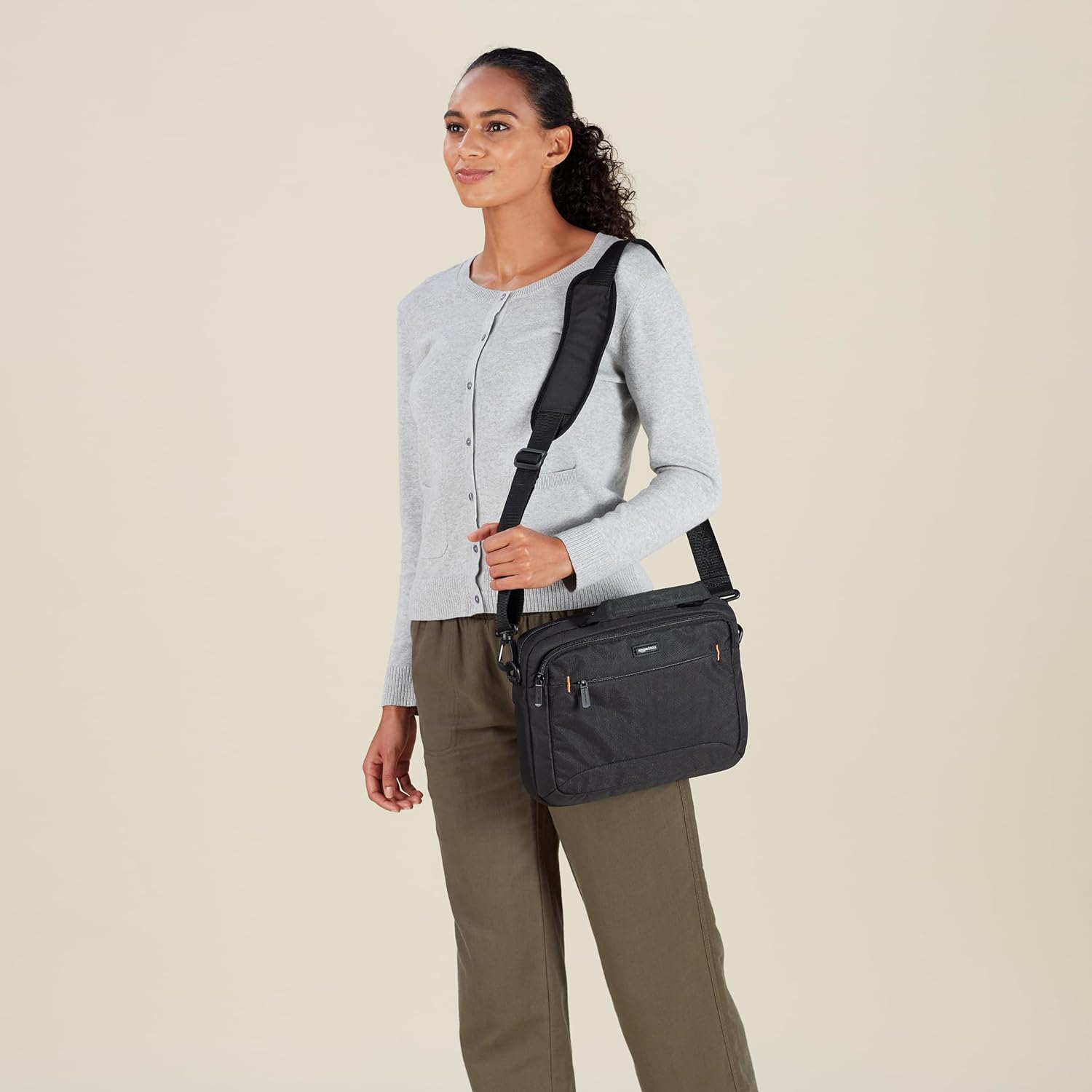
Figure 4: Carrying the case with the shoulder strap.
4.2 Using the Luggage Pass-Through
- On the back panel of the carrying case, locate the wide fabric strap.
- Slide this strap over the extended handle of your rolling luggage. This secures the laptop case to your luggage, allowing for easier transport through airports or busy areas.

Figure 5: Luggage pass-through in use.
5. Maintenance
5.1 Cleaning Instructions
- The bag is machine washable. For best results, use a gentle cycle with cold water and a mild detergent.
- Do not use bleach or harsh chemicals.
- Air dry the bag completely. Do not tumble dry, as this may damage the fabric or padding.
- For minor spots, wipe with a damp cloth and mild soap.
6. Troubleshooting
6.1 Zipper Issues
- If a zipper becomes stiff, apply a small amount of zipper lubricant or a graphite pencil lead along the teeth.
- Avoid forcing stuck zippers to prevent damage.
6.2 Strap Adjustment
- If the shoulder strap slips, ensure the buckle is threaded correctly and tightened securely.
- For optimal comfort, adjust the strap so the bag rests at your hip level.
6.3 Overloading
- Avoid overloading the bag beyond its intended capacity to prevent strain on zippers, seams, and straps.
- Distribute weight evenly across compartments to maintain balance and comfort.
7. Specifications
| Feature | Detail |
|---|---|
| Standing screen display size | 29.5 Centimeters (11.6 inches) |
| Brand | Amazon Basics |
| Series | Bag |
| Item model number | NC1305222R1 |
| Item Weight | 12.3 ounces |
| Product Dimensions | 13.19 x 10.24 x 2.95 inches |
| Color | Black |
| Manufacturer | Amazon |
| ASIN | B00DUGZFA6 |
| Date First Available | September 1, 2013 |
8. Warranty and Support
For warranty information and customer support, please refer to the official Amazon Basics website or contact Amazon customer service directly. Details regarding product returns, exchanges, and troubleshooting assistance can be found through these channels.

