
1. Introduction
Thank you for choosing the Quechua Lighting Hiking Lantern 1354139. This compact and powerful lantern is designed to provide reliable illumination for your tent during hiking and camping activities. Its features include ambient lighting, a compressible design for easy transport, and efficient battery life.
Please read this manual carefully before using your lantern to ensure proper operation and maintenance.
2. Setup
2.1 Battery Installation
The Quechua Lighting Hiking Lantern 1354139 requires 4 x AAA alkaline batteries (not included).
- Locate the battery compartment cover, usually at the base or side of the lantern.
- Open the battery compartment cover by twisting or unlatching it according to the markings.
- Insert 4 x AAA batteries, ensuring the correct polarity (+ and -) as indicated inside the compartment.
- Securely close the battery compartment cover.
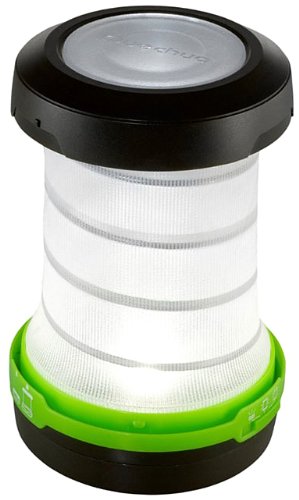
Figure 1: Quechua Lighting Hiking Lantern 1354139. This image displays the lantern in its compact form, highlighting its portability and the integrated wrist strap for easy carrying or hanging.
3. Operating Instructions
3.1 Power On/Off and Mode Selection
The lantern features multiple lighting modes. A single button typically controls power and mode selection.
- To Turn On: Press the power button once. The lantern will typically activate in its default mode (e.g., high mode).
- To Change Modes: While the lantern is on, press the power button repeatedly to cycle through available modes (e.g., High, Medium, Off).
- To Turn Off: Continue pressing the power button until the lantern switches off, or press and hold the button for a few seconds in any mode.
3.2 Compressing for Storage
The lantern is designed to be compressible to reduce its storage space during transport.
- Gently push the top and bottom sections of the lantern towards each other until it collapses into its compact form.
- Ensure the fabric diffuser is properly folded or tucked in during compression to avoid damage.
4. Maintenance
4.1 Cleaning
- Wipe the exterior of the lantern with a soft, damp cloth.
- Do not use abrasive cleaners or solvents, as these can damage the lantern's finish or components.
- Ensure the lantern is completely dry before storage or next use.
4.2 Storage
- When storing the lantern for extended periods, remove the batteries to prevent leakage and potential damage.
- Store the lantern in a cool, dry place, away from direct sunlight and extreme temperatures.
- Utilize its compressible feature to save space during storage.
5. Troubleshooting
| Problem | Possible Cause | Solution |
|---|---|---|
| Lantern does not turn on. |
|
|
| Light is dim or flickers. |
|
|
6. Specifications
- Model: 1354139
- Brand: Quechua
- Lighting Type: LED 1 W
- Field of Vision: Ambient lighting
- Range (High Mode): 4.50 meters
- Diffuser: Fabric
- Battery Type: 4 x AAA Alkaline batteries
- Battery Life (High Mode): Approximately 3 hours 50 minutes
- Battery Life (Medium Mode): Approximately 12 hours 50 minutes
- Features: Compressible design, Wrist strap, Snap hook
7. Warranty and Support
For information regarding warranty, returns, or technical support, please refer to the retailer's policy or contact Quechua customer service directly. Keep your purchase receipt for warranty claims.
Note: Specific warranty terms may vary by region and retailer.