
1. Introduction
This manual provides essential information for the safe and efficient operation of the AUTONICS TC4S-N4R Temperature Controller. Please read this manual thoroughly before installation and operation to ensure correct usage and to prevent potential hazards.
The TC4S-N4R is a 1/16 DIN single display 4-digit temperature controller featuring PID control, Relay and SSR output, and operates on 100-240 VAC. It supports various input types including K, J, L, and RTD.
2. Safety Precautions
WARNING:
- Ensure power is disconnected before installation, wiring, or maintenance. Failure to do so may result in electric shock or fire.
- Do not disassemble or modify the unit. This may cause electric shock, fire, or malfunction.
- Install the unit in a location free from excessive vibration, shock, dust, humidity, and direct sunlight.
- Use the unit within the specified power supply voltage range.
- Connect the power supply and sensor wires correctly according to the wiring diagram. Incorrect wiring can cause damage to the unit.
3. Product Overview
The AUTONICS TC4S-N4R is designed for precise temperature control in various industrial applications. Its compact 1/16 DIN size makes it suitable for integration into control panels.
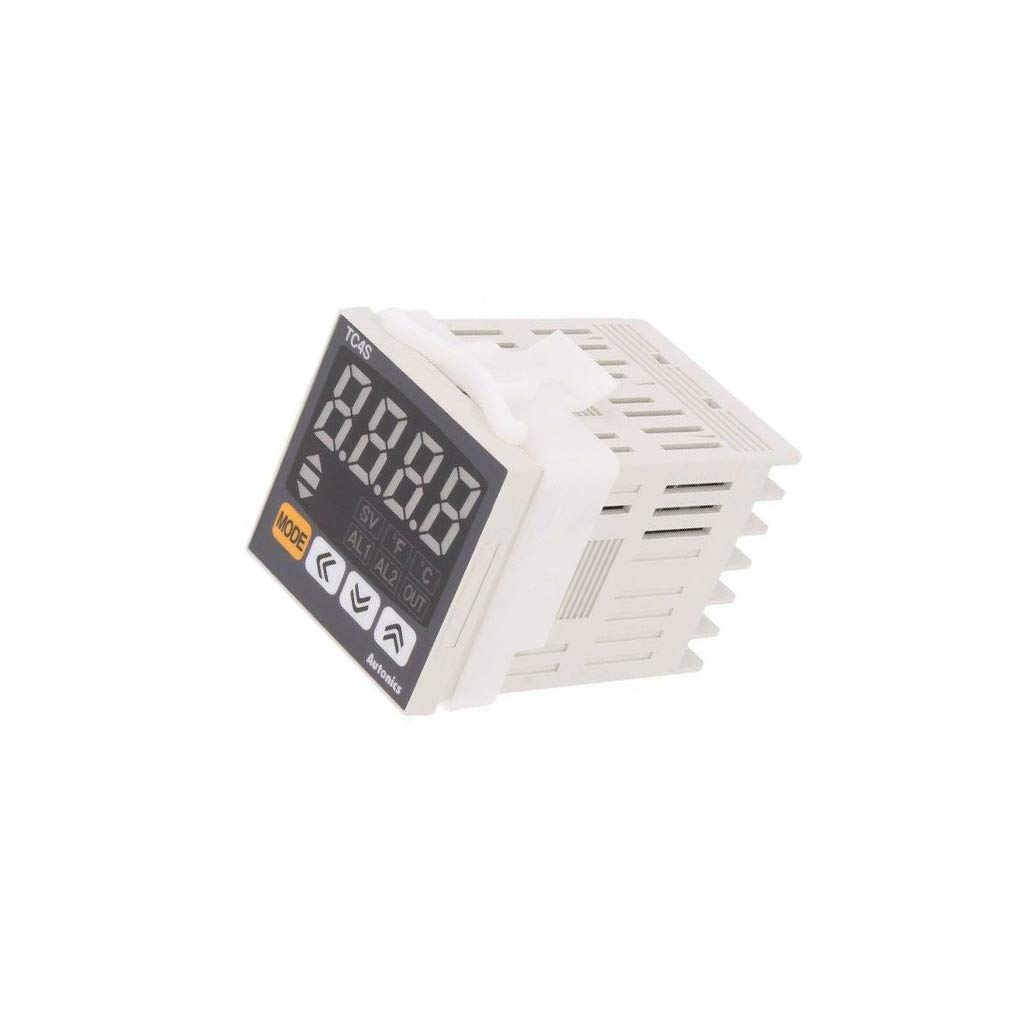
Figure 1: Front view of the AUTONICS TC4S-N4R Temperature Controller. This image displays the single 4-digit display, control buttons, and the compact 1/16 DIN form factor of the device.
Key Features:
- 1/16 DIN size for space-saving installation.
- Single 4-digit display for clear temperature indication.
- Advanced PID control algorithm for stable and precise temperature regulation.
- Simultaneous Relay and SSR (Solid State Relay) output for versatile control options.
- Wide input range: K, J, L type thermocouples and RTD sensors.
- Operating voltage: 100-240 VAC.
4. Setup
4.1 Mounting
The TC4S-N4R is designed for panel mounting. Ensure adequate space for ventilation and wiring connections. The unit requires a panel cutout of 45x45 mm (1/16 DIN standard).
- Cut a square hole in the panel according to the specified dimensions.
- Insert the controller into the cutout from the front.
- Attach the mounting bracket from the rear and tighten the screws to secure the unit firmly in place.
4.2 Wiring
All wiring should be performed by qualified personnel with power disconnected. Refer to the wiring diagram below for correct connections. The TC4S-N4R uses an 11-pin socket (socket required, not included).
Power Supply:
- Connect the 100-240 VAC power supply to the designated power terminals (typically pins 10 and 11 on an 11-pin socket).
- Ensure proper grounding.
Sensor Input:
- Connect the temperature sensor (K, J, L type thermocouple or RTD) to the input terminals (typically pins 6, 7, 8).
- Observe polarity for thermocouples. For RTD, ensure correct 2-wire or 3-wire connection.
Control Output:
- Relay Output: Connect the load to the relay output terminals (e.g., pins 4 and 5 for normally open contact).
- SSR Output: Connect the Solid State Relay input to the SSR output terminals (e.g., pins 2 and 3).
Note: Specific pin assignments may vary slightly. Always refer to the detailed wiring diagram provided with your specific unit or on the product label.
5. Operating Instructions
5.1 Power On
After completing all wiring, apply power to the unit. The display will show the current process value (PV) and the set point (SV).
5.2 Setting the Temperature (Set Point - SV)
- Press the MODE button (or equivalent) to enter the set point adjustment mode. The SV display will typically flash.
- Use the UP and DOWN arrow buttons to adjust the desired temperature value.
- Press the MODE button again to confirm the setting and exit the adjustment mode. The controller will begin to regulate the temperature to the new set point.
5.3 PID Control
The TC4S-N4R utilizes a Proportional-Integral-Derivative (PID) control algorithm for precise and stable temperature regulation. This algorithm automatically calculates the necessary output to minimize the difference between the process value (PV) and the set point (SV).
- Auto-tuning: The controller may feature an auto-tuning function to automatically determine optimal PID parameters for your specific system. Refer to the detailed programming manual for instructions on initiating auto-tuning.
- Manual Adjustment: PID parameters (P, I, D) can also be manually adjusted in the parameter settings menu if auto-tuning does not yield desired performance.
5.4 Display Indicators
The 4-digit display shows the current process value (PV). Additional indicators (LEDs) may be present to show output status (e.g., heating/cooling active) or alarm status.
6. Maintenance
Regular maintenance ensures the longevity and reliable operation of your TC4S-N4R Temperature Controller.
6.1 Cleaning
- Disconnect power before cleaning.
- Wipe the display and front panel with a soft, dry cloth.
- Do not use abrasive cleaners, solvents, or alcohol, as these may damage the plastic parts.
6.2 Inspection
- Periodically check wiring connections for looseness or corrosion.
- Ensure the unit is free from dust accumulation, especially around ventilation openings.
- Inspect the sensor and its wiring for any signs of damage or wear.
7. Troubleshooting
This section provides solutions to common issues encountered during operation.
| Problem | Possible Cause | Solution |
|---|---|---|
| No power to unit | Incorrect wiring, no power supply, blown fuse | Check power connections (100-240 VAC). Verify power source. Inspect internal fuse if accessible (consult service manual). |
| Display shows "HHHH" or "LLLL" | Sensor open circuit (HHHH) or short circuit (LLLL), incorrect sensor type setting | Check sensor wiring for breaks or shorts. Verify sensor type setting matches the connected sensor. Replace faulty sensor. |
| Temperature not stable / Overshoot | PID parameters not optimized | Perform auto-tuning. If issues persist, manually adjust PID parameters (P, I, D) according to the detailed programming manual. |
| Output not activating | Incorrect wiring, faulty output component, set point not reached | Verify output wiring (Relay/SSR). Check if the process value is below/above the set point as required for activation. Test the external load. |
8. Specifications
Below are the general specifications for the AUTONICS TC4S-N4R Temperature Controller:
- Model: TC4S-N4R
- Control Method: PID Control
- Display: Single 4-Digit
- Input Type: K, J, L type Thermocouple; RTD (Pt100Ω)
- Output Type: Relay Output & SSR Output
- Alarm Output: No Alarm Output
- Power Supply: 100-240 VAC ~ 50/60Hz
- Mounting: 1/16 DIN Panel Mount
- Connection: 11-pin socket (socket not included)
- Item Weight: Approximately 0.51 Pounds (0.23 kg)
- Manufacturer: AUTONICS
9. Warranty and Support
AUTONICS products are manufactured under strict quality control. For specific warranty terms and conditions, please refer to the official AUTONICS warranty statement or contact your local distributor.
For technical support, troubleshooting assistance beyond this manual, or service inquiries, please contact AUTONICS customer service or an authorized service center. Contact information can typically be found on the official AUTONICS website or product packaging.
When contacting support, please have your product model (TC4S-N4R) and serial number ready.


