
Introduction
This manual provides essential instructions for the safe and efficient installation, operation, and maintenance of your InSinkErator HWT-F1000S Instant Hot Water Tank with F-1000S Filtration System. This system is designed to deliver near-boiling, filtered water directly from your kitchen sink, enhancing convenience for various tasks.
The InSinkErator HWT-F1000S system includes a 2/3-gallon stainless steel tank with an adjustable thermostat and a 12.5-inch by 2.25-inch F-1000S water filter. The filtration system is designed to reduce particulates and chlorine taste and odor, improving the quality of your drinking water.
Setup and Installation
The InSinkErator HWT-F1000S is designed for easy DIY installation. It requires an under-sink outlet for the tank's power cord and features tool-free tank connections. The quick-connect filter uses a twist-and-lock design for straightforward installation and replacement.
Components Included:
- Instant Hot Water Tank (HWT-00)
- F-1000S Water Filtration System
Installation Steps:
- Prepare the Installation Area: Ensure adequate space under your sink for the tank and filter. A standard 115-volt grounded electrical outlet is required.
- Mount the Tank: Securely mount the hot water tank in an upright position under the sink.
- Install the Filter System: Mount the F-1000S filter head and cartridge. The quick-connect design allows for easy attachment.
- Connect Water Lines: Connect the cold water supply to the filter inlet, and the filter outlet to the hot water tank inlet. Connect the tank outlet to your instant hot water faucet (sold separately).
- Flush the System: Before plugging in the tank, flush the system with cold water through the faucet for several minutes to remove air and carbon fines from the filter.
- Connect Power: Plug the tank's power cord into the grounded electrical outlet. The system includes dry start protection to prevent damage if accidentally plugged in without water.
- Adjust Temperature: Use the adjustable thermostat on the tank to set your desired water temperature. The manufacturer recommends approximately 200 degrees F for optimal performance.

Image: The InSinkErator HWT-F1000S Instant Hot Water Tank, a compact unit designed for under-sink installation.
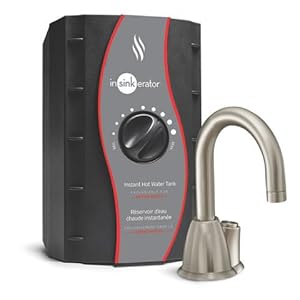
Image: A diagram illustrating the complete instant hot water system, including the tank and filtration unit.
Operating Instructions
Once installed and powered, your InSinkErator Instant Hot Water Tank will begin heating water to the set temperature. The system provides near-boiling water (approximately 200°F inside the tank) on demand.
Dispensing Hot Water:
- To dispense hot water, activate your instant hot water faucet (sold separately) according to its specific operating instructions.
- For filtered drinking water, ensure your faucet supports both hot and cold filtered options.
Temperature Adjustment:
- The tank features an easily adjustable thermostat knob. Turn the knob to increase or decrease the desired water temperature.
- Allow time for the water to reach the new temperature setting after adjustment.

Image: An instant hot water faucet dispensing hot water into a teapot, demonstrating typical use.
Maintenance
Regular maintenance ensures optimal performance and longevity of your InSinkErator Instant Hot Water Tank and Filtration System.
Filter Replacement:
- The F-1000S water filter cartridge should be replaced periodically to maintain effective reduction of particulates and chlorine taste and odor. Refer to the filter packaging for recommended replacement intervals, typically every 6 months.
- To replace the filter, simply twist the old cartridge to unlock and remove it, then insert and twist the new cartridge into place until it locks. No tools are required.
- Always flush the system after replacing the filter to remove any trapped air or carbon fines.
Cleaning:
- Periodically inspect the tank and connections for any leaks or signs of wear.
- Clean the exterior of the tank and faucet with a mild detergent and soft cloth. Avoid abrasive cleaners.

Image: The InSinkErator F-1000S water filter cartridge, designed for easy twist-and-lock replacement.
Troubleshooting
This section provides basic troubleshooting steps for common issues. For more complex problems, please refer to the full product manual or contact customer support.
No Hot Water:
- Check Power: Ensure the tank is properly plugged into a working electrical outlet.
- Check Thermostat: Verify the thermostat setting on the tank is not set to the lowest temperature.
- Water Supply: Confirm the cold water supply to the unit is turned on.
Water Not Hot Enough:
- Adjust Thermostat: Increase the temperature setting on the tank's thermostat. Allow sufficient time for the water to heat up.
- Usage: Excessive hot water draw in a short period may temporarily reduce water temperature.
Leaking:
- Check Connections: Inspect all water line connections for tightness.
- Filter Cartridge: Ensure the filter cartridge is correctly seated and locked into its head.
Specifications
| Feature | Specification |
|---|---|
| Brand | InSinkErator |
| Model Number | HWT-F1000S |
| Tank Capacity | 2/3 Gallons |
| Power Source | Corded Electric |
| Wattage | 750 watts |
| Voltage | 115 volts |
| Maximum Temperature | 210 °F (approx. 200°F inside tank) |
| Product Dimensions (W x H) | 10.88" x 10.88" |
| Item Depth | 6.125 inches |
| Item Weight | 7.3 pounds |
| Special Features | Chlorine Reduction, NSF certified |
| Included Components | Hot water tank and filtration system |
Warranty Information
The InSinkErator HWT-F1000S Instant Hot Water Tank comes with a 3-Year "We Come to You" Limited Warranty on the tank itself. The F-1000S filter system (excluding replacement filter cartridges) is covered by a 1-Year Limited Warranty.
For complete details regarding warranty coverage, terms, and conditions, please refer to the official product warranty documentation provided with your purchase or visit the InSinkErator website.
Support and Contact Information
For technical assistance, troubleshooting, or to inquire about replacement parts and accessories, please contact InSinkErator customer support.
You can find more information and support resources on the official InSinkErator website or by visiting the InSinkErator Store on Amazon.