
Introduction
The Electro-Harmonix Small Clone Analog Chorus Pedal is designed to produce lush, shimmering chorus tones. This pedal is renowned for its rich, warm analog sound, making it a valuable tool for guitarists seeking classic modulation effects. It offers a range of chorus effects from subtle shimmer to dramatic, swirling modulation, suitable for various musical styles.
Key features include true bypass for signal integrity, a 9V battery for power, and a pure analog circuit for authentic tone.
What's in the Box
- Electro-Harmonix Small Clone EH 4600 Analog Chorus Pedal
- 9V battery
Setup
Powering the Pedal
The Small Clone EH 4600 can be powered by a 9V battery (included) or an optional 9V DC power adapter (not included). To install the battery, remove the bottom plate of the pedal.
Connections
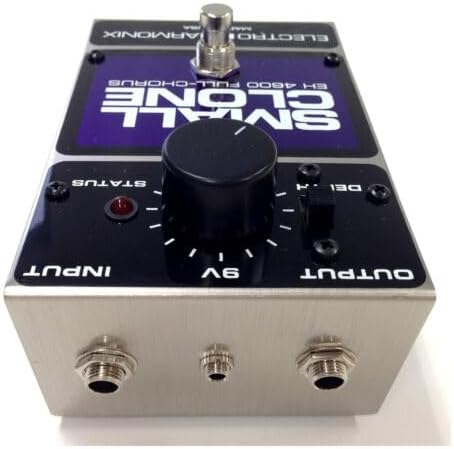
The pedal features standard 1/4 inch (6.35mm) audio jacks for input and output.
- Connect your guitar or other instrument to the INPUT jack on the right side of the pedal.
- Connect the OUTPUT jack on the left side of the pedal to your amplifier or the input of another effects pedal.
Operating Instructions
The Small Clone EH 4600 features simple controls for easy tone shaping.
Controls
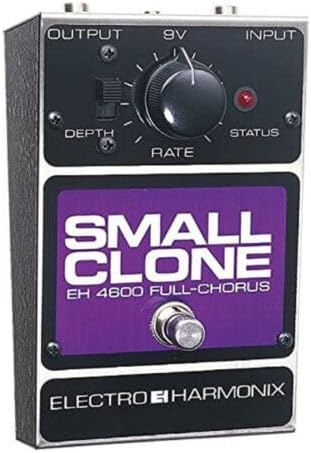
- RATE Knob: This knob controls the speed of the chorus effect. Turning it clockwise increases the speed, while turning it counter-clockwise decreases it.
- DEPTH Switch: This switch controls the intensity or width of the chorus effect. The up position provides a deeper, more pronounced chorus, while the down position offers a more subtle effect.
- STATUS LED: Indicates when the effect is active.
- FOOTSWITCH: Engages or bypasses the effect. The pedal features true bypass, ensuring your instrument's tone remains unaffected when the pedal is disengaged.
Official Product Video
Maintenance
To ensure optimal performance and longevity of your Small Clone EH 4600 pedal, follow these simple maintenance guidelines:
- Cleaning: Use a soft, dry cloth to clean the pedal's exterior. Avoid using abrasive cleaners or solvents.
- Battery Replacement: If using battery power, replace the 9V battery when the STATUS LED dims or the effect performance degrades. To replace, carefully remove the four screws on the bottom plate, replace the battery, and reattach the plate.
- Storage: Store the pedal in a cool, dry place away from direct sunlight and extreme temperatures when not in use.
Troubleshooting
If you encounter issues with your Small Clone EH 4600, try the following steps:
- No Sound: Check all cable connections. Ensure the power supply (battery or adapter) is functioning correctly. Verify that your instrument and amplifier are working.
- Weak or Distorted Effect: Replace the 9V battery if it's low. Ensure all cables are fully inserted and not damaged.
- Unwanted Noise: Try using a different power supply or a fresh battery. Ensure the pedal is not placed too close to other electronic devices that might cause interference.
Specifications
| Item Weight | 1.3 pounds |
| Product Dimensions | 5.25 x 3.38 x 2.75 inches |
| Model Number | EH 4600 (30621rakmusi-12084) |
| Connector Type | 1/4 inch (6.35mm) audio jack |
| Signal Format | Analog |
| Material Type | Plastic, Electronic Components |
| Power Source | 9V Battery Powered |
| Voltage | 9 Volts |
| Style | Chorus |
Warranty & Support
For warranty information, technical support, or further inquiries, please visit the official Electro-Harmonix store or contact their customer service directly.
You can find more information and support at the Electro-Harmonix Store.


