
1. Introduction
This manual provides detailed instructions for the installation, operation, and maintenance of the MEAN WELL DR-4512 DIN Rail Power Supply. The DR-4512 is a reliable 42W single output industrial power supply designed for DIN rail mounting, offering a stable 12V DC output at 3.5 Amps. Please read this manual thoroughly before using the product to ensure safe and efficient operation.
2. Safety Instructions
WARNING: Failure to follow these safety instructions may result in electric shock, fire, or serious injury.
- Ensure the power supply is disconnected from the main power source before any installation or maintenance.
- This device is designed for indoor use only. Do not expose to moisture or extreme temperatures.
- Installation should be performed by qualified personnel only, in accordance with all local and national electrical codes.
- Do not open the power supply casing. There are no user-serviceable parts inside.
- Verify input voltage compatibility (85-264 VAC) before connecting to power.
- Ensure proper grounding to prevent electric shock.
- Do not overload the power supply beyond its rated output current (3.5A).
3. Product Overview
The MEAN WELL DR-4512 is a compact and efficient power supply designed for industrial control systems. It features a robust housing and is suitable for mounting on standard DIN rails.
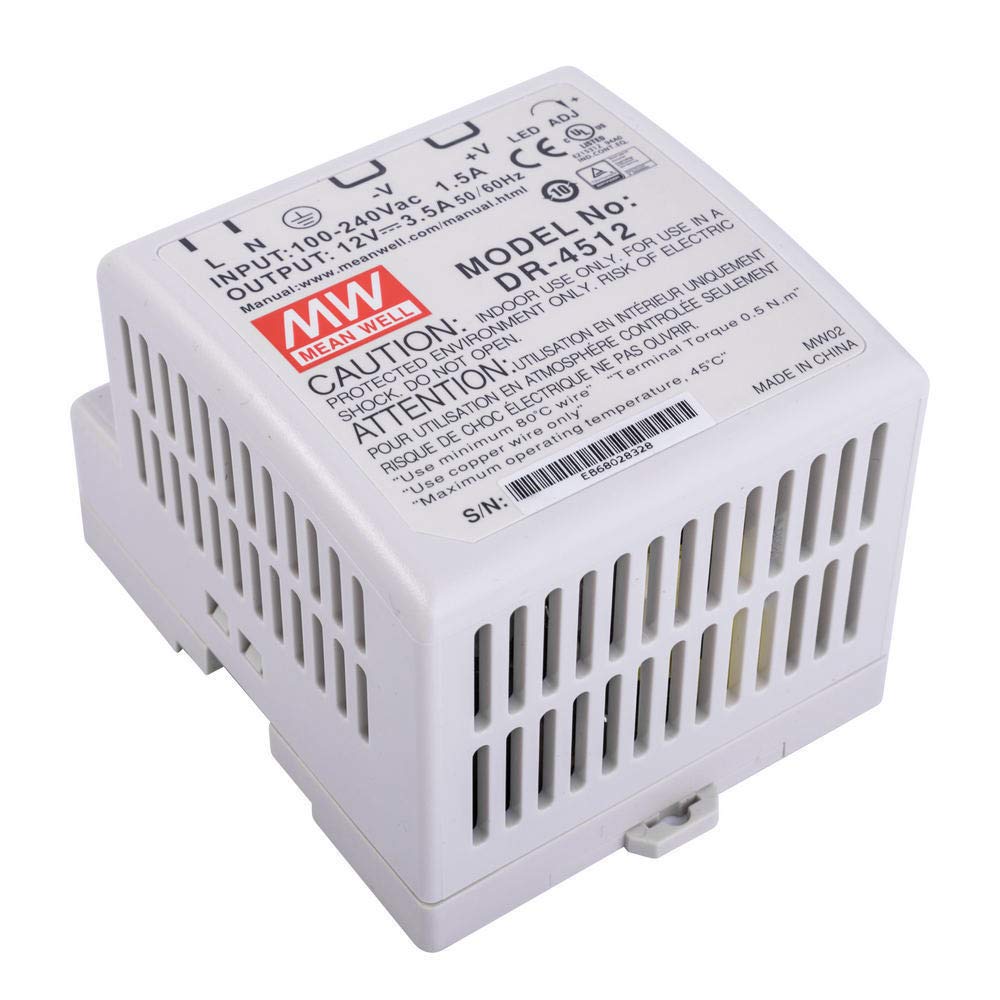
Figure 3.1: Front view of the MEAN WELL DR-4512 DIN Rail Power Supply, showing input/output terminals and adjustment potentiometer.
Key Features:
- Universal AC input / Full range (85-264 VAC)
- Protections: Short circuit / Overload / Over voltage
- Cooling by free air convection
- Can be installed on DIN rail TS-35/7.5 or 15
- LED indicator for power on
- Compact size: 3.0" x 2.6" x 3.6"
4. Setup and Installation
Follow these steps for safe and correct installation of your DR-4512 power supply.
4.1 Mounting
- Ensure the DIN rail (TS-35/7.5 or TS-35/15) is securely mounted in a well-ventilated area.
- Hook the top edge of the power supply onto the DIN rail.
- Push the bottom edge of the power supply firmly until it clicks into place on the rail.
- Verify that the unit is securely fastened and cannot be easily dislodged.
4.2 Wiring
Refer to the terminal block markings for correct wiring connections.
- Input Terminals (AC IN): Connect the AC input wires (Line, Neutral, Ground) to the corresponding terminals. The input voltage range is 85-264 VAC.
- Output Terminals (DC OUT): Connect your load to the DC output terminals (+V and -V). Ensure correct polarity. The output is 12V DC.
- Use appropriate wire gauges for the current ratings to prevent overheating.
- Tighten all terminal screws securely to prevent loose connections.
5. Operating Instructions
Once installed and wired correctly, the DR-4512 is ready for operation.
- Power On: Apply AC power to the input terminals. The green LED indicator on the front panel should illuminate, indicating the unit is powered on and operating.
- Output Voltage Adjustment: The DR-4512 features a potentiometer for fine-tuning the output voltage. Use a small screwdriver to carefully adjust the "V.ADJ" potentiometer to achieve the desired output voltage within the specified range (typically 10.8V to 13.8V).
- Load Connection: Connect your 12V DC load to the output terminals. Ensure the total current draw does not exceed 3.5 Amps.
The power supply is designed for continuous operation within its specified limits. Ensure adequate ventilation around the unit for optimal performance and longevity.
6. Maintenance
The MEAN WELL DR-4512 power supply requires minimal maintenance. Regular checks can help ensure its long-term reliability.
- Cleaning: Periodically clean the exterior of the unit with a soft, dry cloth. Do not use liquid cleaners or solvents. Ensure power is disconnected before cleaning.
- Ventilation: Ensure that the ventilation openings are not obstructed by dust or debris. Proper airflow is crucial for cooling.
- Connections: Periodically check all input and output terminal connections to ensure they remain tight and secure.
- Environmental Conditions: Ensure the operating environment remains within the specified temperature and humidity ranges.
Do not attempt to open or repair the unit. Refer all servicing to qualified service personnel.
7. Troubleshooting
This section addresses common issues you might encounter with the DR-4512 power supply.
| Problem | Possible Cause | Solution |
|---|---|---|
| No output voltage / LED off | No AC input power Blown fuse (internal) Faulty wiring | Check AC power source and connections. Unit requires professional service. Verify all input wiring is correct and secure. |
| Output voltage too low or fluctuating | Overload condition Faulty load Incorrect voltage adjustment | Reduce load current. Check for short circuits in the load. Disconnect load and test power supply. Adjust "V.ADJ" potentiometer. |
| Unit is hot | Insufficient ventilation Overload condition High ambient temperature | Ensure proper airflow around the unit. Reduce load current. Operate within specified temperature range. |
If the problem persists after attempting these solutions, contact qualified service personnel or MEAN WELL support.
8. Specifications
Detailed technical specifications for the MEAN WELL DR-4512 power supply.
| Parameter | Value |
|---|---|
| Model | DR-4512 |
| Input Voltage Range | 85 ~ 264 VAC |
| Output Voltage | 12 VDC |
| Output Current | 3.5 A |
| Rated Power | 42 W |
| Voltage Adjustment Range | 10.8 ~ 13.8 VDC |
| Efficiency | Typically 80% |
| Mounting Type | DIN Rail (TS-35/7.5 or 15) |
| Dimensions (L x W x H) | 3.0" x 2.6" x 3.6" (78 x 67 x 93 mm) |
| Weight | 0.7 lbs (0.32 kg) |
| Operating Temperature | -20°C to +60°C (Refer to derating curve) |
| Protections | Short Circuit, Overload, Over Voltage |
9. Warranty and Support
MEAN WELL products are manufactured to high quality standards. For specific warranty information, please refer to the warranty card included with your product or visit the official MEAN WELL website.
For technical support, service, or inquiries regarding your DR-4512 power supply, please contact your authorized MEAN WELL distributor or visit the MEAN WELL official support page. When contacting support, please have your product model number (DR-4512) and purchase details available.
Official MEAN WELL Website: www.meanwell.com


