
1. Introduction
The Woods 50021 Mechanical 24-Hour Programmable 2 Outlet Timer is designed to automate the operation of indoor lights and appliances. This device allows you to set specific ON/OFF times, repeating daily, to enhance convenience and manage energy consumption. It features a manual override for immediate control without altering programmed settings.
2. Important Safety Information
- Indoor Use Only: This timer is intended for indoor use in dry locations. Do not expose to water or moisture.
- Electrical Rating: Do not exceed the electrical ratings of the timer (125Vac 60Hz, 15A / 1875W Resistive, 8A / 1000W Tungsten, 5A Ballast, 1/2Hp).
- Grounding: Ensure the timer is plugged into a properly grounded 3-prong outlet.
- Children: Keep out of reach of children.
- Cleaning: Unplug the timer before cleaning. Use a dry cloth; do not use liquid cleaners.
- Repairs: Do not attempt to disassemble or repair the timer. Refer all servicing to qualified personnel.
3. Key Features
- Automatic nightlight that turns ON in the absence of light.
- 48 ON/OFF settings programmable in 30-minute intervals, repeating daily.
- Two (2) grounded outlets for connecting multiple devices.
- Compatible with CFL, LED, and incandescent bulbs.
- Electrical Rating: 125Vac 60Hz, 15A / 1875W Resistive, 8A / 1000W Tungsten, 5A Ballast, 1/2Hp.
4. Setup and Programming
This section guides you through setting up and programming your Woods 50021 timer. For a visual demonstration, please refer to the video below.
Video: Demonstration of setting a Woods Indoor Mechanical Timer. This video illustrates how to set the current time, program ON/OFF intervals using the pins, and utilize the manual override switch.
4.1 Setting the Current Time
- Plug the timer into a wall outlet.
- Rotate the dial clockwise until the current approximate time aligns with the arrow labeled "TIME NOW". PM hours are shaded on the dial for easy identification.
4.2 Programming ON/OFF Times
The timer dial has segment pins around its circumference. Each segment pin represents 30 minutes.
- Ensure all segment pins are initially pulled UP (OFF position).
- Push the segment pins DOWN for the period(s) of time you want the connected device to be ON.
- Leave the segment pins UP for the period(s) of time you want the connected device to be OFF.
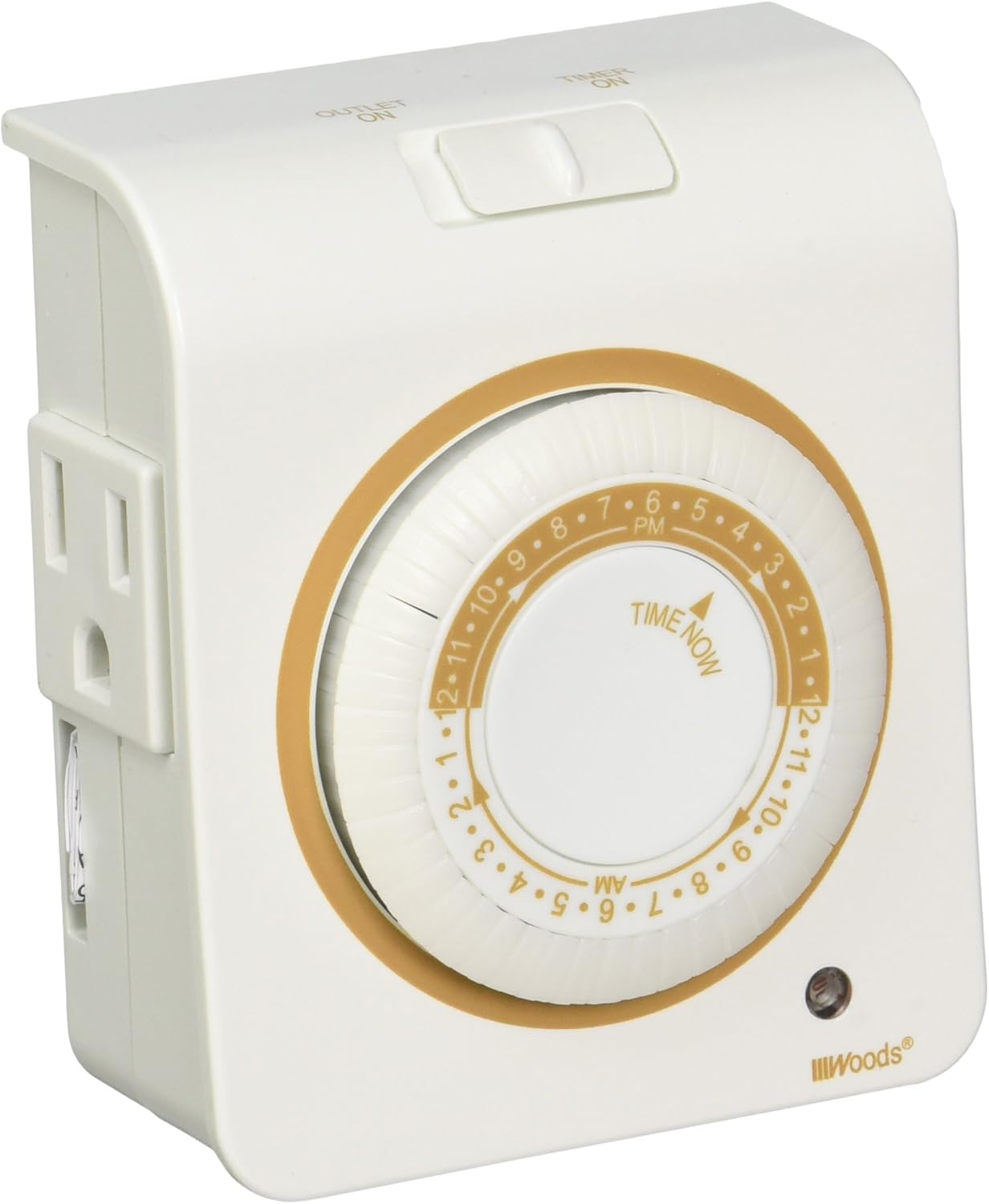
Image: Front view of the Woods 50021 Mechanical Timer, showing the central 24-hour dial with programmable pins and the two grounded outlets on the side.
4.3 Manual Override
The timer includes a manual override switch located on the top of the unit.
- To permanently turn the connected device ON, slide the switch to the "OUTLET ON" position. This bypasses all programmed settings.
- To revert to the programmed timer settings, slide the switch back to the "TIMER ON" position.
5. Operation
Once the current time is set and the ON/OFF intervals are programmed, the timer will automatically activate and deactivate connected devices according to your settings. The dial will continuously rotate, indicating the current time and progressing through the programmed cycles.
6. Specifications

Image: Back view of the Woods 50021 Mechanical Timer, displaying the electrical rating and manufacturing information.
| Specification | Detail |
|---|---|
| Model Number | 50021 |
| Brand | Woods |
| Color | White |
| Input Voltage | 125Vac, 60Hz |
| Resistive Rating | 15A / 1875W |
| Tungsten Rating | 8A / 1000W |
| Ballast Rating | 5A |
| Motor Rating | 1/2Hp |
| Number of Outlets | 2 Grounded |
| Programming Intervals | 30 minutes (48 settings per day) |
| Dimensions | 1 x 1 x 1 inches (Product) |
| Item Weight | 1.6 ounces |
7. Troubleshooting
- Device not turning ON/OFF:
- Ensure the timer is securely plugged into a live outlet.
- Verify the connected device is functioning correctly when plugged directly into a wall outlet.
- Check that the segment pins are correctly pushed down for ON times and pulled up for OFF times.
- Confirm the manual override switch is in the "TIMER ON" position.
- Ensure the current time on the dial is accurately set.
- Timer dial not rotating:
- Ensure the timer is plugged into a live electrical outlet.
- If the timer is new, it may take a few minutes for the mechanism to start after plugging in.
- Nightlight not working:
- The nightlight activates in low-light conditions. Ensure the surrounding area is dark enough for it to turn on.
8. Warranty and Support
For warranty information or technical support, please refer to the product packaging or contact Woods customer service directly. Keep your purchase receipt as proof of purchase.


