
Introduction
This manual provides detailed instructions for the assembly, operation, and maintenance of your Z-Line WM563350MX TV Stand with Mount and 3 Shelves. Please read all instructions carefully before beginning assembly and retain this manual for future reference.
Important Safety Information: Always ensure all components are securely fastened. Do not exceed the maximum weight capacity of 150 lbs for the TV mount and shelves. This stand is designed for televisions between 36 and 70 inches.
Setup and Assembly
Before assembly, ensure all parts are present and undamaged. Refer to the included hardware list. Assembly typically requires a Phillips head screwdriver and an adjustable wrench (not included).
Assembly Steps:
- Unpack Components: Carefully remove all parts from the packaging and lay them out on a soft, clean surface to prevent scratches.
- Assemble Base: Attach the support columns to the base frame using the provided hardware. Ensure all connections are tight.
- Install Shelves: Secure the three glass shelves to the support columns. Use the provided suction cups or clips to hold the glass in place, ensuring they are level.
- Attach TV Mount Post: Fasten the main TV mount post to the rear of the stand's frame.
- Assemble TV Mounting Brackets: Attach the vertical TV mounting brackets to the horizontal support bar. These brackets will connect to the back of your television.
- Mount TV: With assistance, carefully lift your television and hook the assembled TV mounting brackets onto the TV mount post. Secure the TV using the safety screws or locking mechanisms provided. Ensure the TV is centered and level.
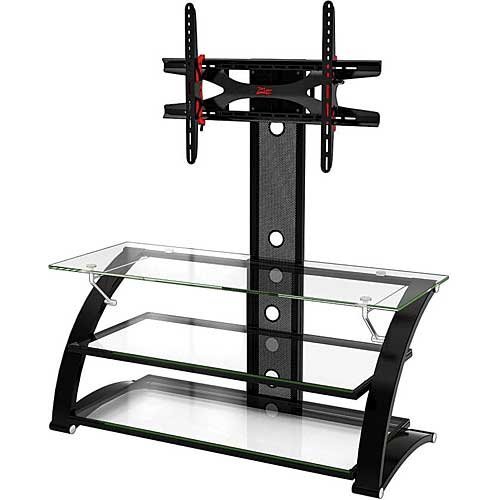
Figure 1: Fully assembled Z-Line WM563350MX TV Stand, featuring the integrated TV mount and three glass shelves. The stand is black with clear glass shelves.
Operating Instructions
TV Placement and Adjustment:
- Weight Capacity: The integrated TV mount supports televisions up to 150 lbs. Do not exceed this limit.
- Screen Size: This stand is compatible with televisions ranging from 36 to 70 inches.
- Tilt Function: The TV mount features a tilt movement type. To adjust the viewing angle, loosen the tilt adjustment knobs on the side of the TV brackets, set the desired angle, and then securely tighten the knobs.
Shelf Usage:
- The three glass shelves are designed to hold media components such as DVD players, gaming consoles, soundbars, and other accessories.
- Distribute weight evenly across the shelves. Avoid placing excessively heavy items on any single point.
Maintenance
- Cleaning: Use a soft, damp cloth to clean the metal frame and glass shelves. Avoid abrasive cleaners or harsh chemicals that may damage the finish or glass.
- Regular Inspection: Periodically check all screws and bolts to ensure they remain tight. Loose connections can compromise the stability and safety of the stand.
- Glass Care: Handle glass shelves with care. Avoid dropping heavy objects onto them or striking them with hard objects, as this can cause breakage.
Troubleshooting
- Stand is Unstable:
- Ensure all assembly screws and bolts are fully tightened.
- Verify the stand is placed on a flat, level surface.
- TV Not Level:
- Check that the TV mounting brackets are evenly attached to the television and the main mount post.
- Adjust the tilt mechanism to correct any slight imbalances.
- Difficulty Mounting TV:
- Confirm your TV's VESA pattern is compatible with the mount.
- Ensure you have the correct screws for your TV's mounting holes. Refer to your TV's manual.
Specifications
| Product Dimensions | 26 x 20 x 44 inches |
| Item Weight | 75 pounds |
| Manufacturer | Z-Line Designs |
| Model Number | WM563350MX |
| Mounting Type | Floor Mount |
| Movement Type | Tilt |
| Brand | ZLINE |
| Color | Black |
| Compatible Devices | Television |
| UPC | 846158002394 |
| TV Size Compatibility | 36" - 70" |
| Maximum TV Weight | 150 lbs |
Warranty Information
For specific warranty details regarding your Z-Line WM563350MX TV Stand, please refer to the warranty card included with your product or contact Z-Line Designs directly. Warranty coverage typically addresses manufacturing defects and material flaws under normal use.
Customer Support
If you have any questions about the assembly, operation, or maintenance of your Z-Line TV stand, or if you require assistance with parts, please contact Z-Line Designs customer support. Contact information can usually be found on the manufacturer's website or on the product packaging.
For general inquiries or to report issues, you may also refer to the retailer's customer service channels.


