
1. Product Overview
The Clarion NX613 is an advanced car navigation system designed to provide comprehensive navigation, entertainment, and connectivity features for an enhanced driving experience. It integrates with cloud services and mobile devices to offer real-time information and a wide range of media options.

Figure 1.1: The Clarion NX613 main unit displaying a navigation map with current location and route information.
2. Setup and Installation
Proper installation is crucial for optimal performance. It is recommended to have the unit installed by a qualified professional.
2.1 Included Accessories
- GPS Antenna
- Film TV Antenna
- Extension USB Cable
- Hands-free Microphone
- 4GB SDHC Memory Card (for entertainment)
- 16GB SDHC Memory Card (built-in for maps)
2.2 Initial Setup
After physical installation, power on the unit. The system will guide you through initial settings such as language selection and time zone. Ensure all antennas (GPS, TV) are properly connected for full functionality.
3. Operating Instructions
This section details the primary functions and operations of the NX613 system.
3.1 Navigation Features
The NX613 provides precise navigation with up-to-date map data.
- Map Data Updates: The system supports map data updates, with 5 differential updates and 1 full update available free of charge for one year from the date of first use. This ensures access to the latest road information, new landmarks, and updated place names.

Figure 3.1: The system offers free map data updates for one year from the initial usage date, ensuring current navigation information.
- Smart Access: Connect to cloud services for real-time information. This feature allows access to various applications and online content directly through the navigation system.
- Intelligent Voice: Utilize voice commands for navigation and other functions. The system supports multiple languages including Japanese, English, Chinese, and Korean.
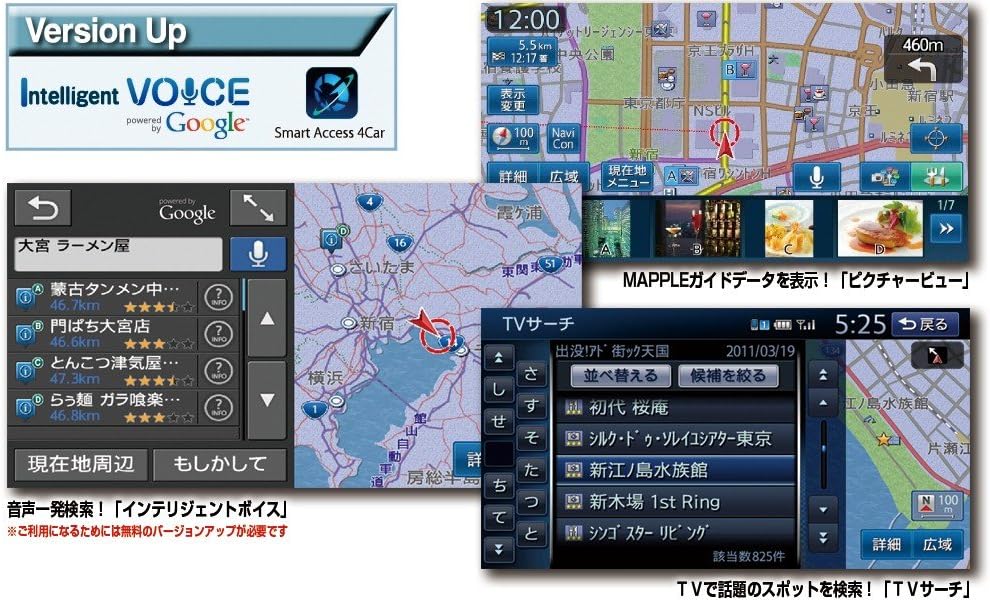
Figure 3.2: The Intelligent Voice feature enables voice-activated search and control, while the TV search function allows easy browsing of available channels.

Figure 3.3: Smart Access 4Car allows seamless integration with smartphones, providing access to cloud-based services and applications directly on the navigation display.
3.2 Media Playback and Audio
The NX613 supports a variety of media formats and offers advanced audio processing.
- Supported Media: Play audio and video from CD, DVD, iPod, iPhone, USB devices, and SD cards.
- Intelligent Tune: This unique sound technology, combined with the Virtual Stage Enhancer, transforms your car's audio environment into a high-quality surround sound space.

Figure 3.4: The system supports diverse media inputs and features 'Intelligent Tune' for advanced audio customization and enhancement.
3.3 TV and Radio
Enjoy digital TV and FM radio with VICS support.
- Terrestrial Digital TV: The unit features a 4-tuner system for stable reception.
- FM VICS: Built-in FM VICS provides real-time traffic information.

Figure 3.5: The smooth search TV function ensures continuous reception by automatically switching between antennas and utilizing relay stations.
3.4 Connectivity
- Bluetooth: Supports hands-free calling and audio streaming from compatible devices.
- External Device Support: Compatible with 4-channel external amplifiers and subwoofers.
- Camera Input: Supports simultaneous connection of rear-view and side-view cameras.
- Steering Wheel Remote Control: Compatible with genuine steering wheel remote controls for convenient operation.
4. Maintenance
Regular maintenance helps ensure the longevity and optimal performance of your NX613 unit.
4.1 Cleaning the Unit
Use a soft, dry cloth to wipe the display and control panel. For stubborn dirt, slightly dampen the cloth with water. Avoid using abrasive cleaners, solvents, or alcohol, as these can damage the surface.
4.2 Software and Map Updates
Periodically check the Clarion website for available software and map updates. Keeping your system updated ensures access to the latest features and map data.
5. Troubleshooting
If you encounter issues with your NX613, refer to the following common troubleshooting tips. For detailed solutions, consult the comprehensive user manual available on the manufacturer's website.
- No Power: Check the vehicle's fuse box and ensure all power connections to the unit are secure.
- No GPS Signal: Ensure the GPS antenna is installed in a location with a clear view of the sky and is securely connected.
- No Audio: Verify speaker connections, check volume levels, and ensure the audio source is correctly selected.
- Poor TV Reception: Check the TV antenna connections and ensure the antenna is properly positioned. Reception quality can vary based on location and signal strength.
- Touchscreen Unresponsive: Try restarting the unit. If the issue persists, a system reset may be required (refer to the full manual for instructions).
6. Specifications
| Feature | Specification |
|---|---|
| Model Number | NX613 |
| Display Size | Wide 7-inch VGA |
| Product Dimensions (D x W x H) | 18.3 x 17.8 x 10 cm |
| Product Weight | 2.8 kg |
| Color | Black |
| Connectivity Type | VGA |
| Compatible Devices | GPS, iPod, iPhone, USB, SD Card |
| Special Features | Hands-free, VICS/VICS WIDE, Smart Access, Intelligent Tune |
| Map Data Storage | Built-in 16GB SDHC Memory Card |
| TV Tuner | 4-tuner Terrestrial Digital TV |
| Audio Output | 4ch external amp + subwoofer compatible |
| Camera Input | Rear-view camera / Side-view camera simultaneous connection |
7. Warranty and Support
For warranty information, please refer to the warranty card included with your product or contact your point of purchase. Support for the Clarion NX613 can be obtained by visiting the official Clarion website or by contacting their customer service department. Keep your purchase receipt as proof of purchase for any warranty claims.