1. Important Safety Information
Always wear eye protection and other appropriate safety gear when using this tool. Be aware of flying debris and potential cut hazards.
Read and understand all instructions before operating the tool. Failure to follow all instructions listed below may result in electric shock, fire, and/or serious personal injury.
- Eye Protection: Always wear safety glasses or goggles with side shields that comply with ANSI Z87.1.
- Hearing Protection: Use hearing protection during extended operation.
- Footwear: Wear sturdy, non-slip footwear to maintain balance and protect feet.
- Clothing: Wear long pants and long sleeves to protect against debris. Avoid loose clothing or jewelry that could get caught in moving parts.
- Clear Work Area: Ensure the work area is clear of people, pets, and objects that could be thrown by the cutting line.
- Inspect Tool: Before each use, inspect the tool for any damaged parts, loose fasteners, or worn cutting line. Do not operate if damaged.
- Battery Safety: Use only Greenworks 40V batteries and chargers. Do not expose batteries to water, fire, or extreme temperatures.
2. Product Overview
The Greenworks 40V 13" Cordless String Trimmer/Edger is a versatile 2-in-1 tool designed for maintaining lawns and garden edges. It features a 40V lithium-ion battery system, offering cordless convenience and compatibility with other Greenworks 40V tools.
Key Features:
- 2-in-1 Trimmer/Edger: Easily converts between string trimming and edging modes.
- 13" Cutting Width: Provides efficient coverage for various tasks.
- 7-Position Pivoting Head: Allows for adjustable cutting angles to reach difficult areas and achieve precise edging.
- Automatic Line Feed: Features a 0.065" auto-feed line for continuous trimming without manual adjustments.
- Telescoping Shaft: Adjustable shaft length (40"-52") for user comfort and customized reach.
- Adjustable Auxiliary Handle: Enhances control and reduces user fatigue.
- Brush Cutter Upgrade: Includes a durable brush cutter attachment and 20 reinforced plastic blades for thicker vegetation.
- Lightweight Design: Weighs 7.8 lbs (without battery) for easier handling.
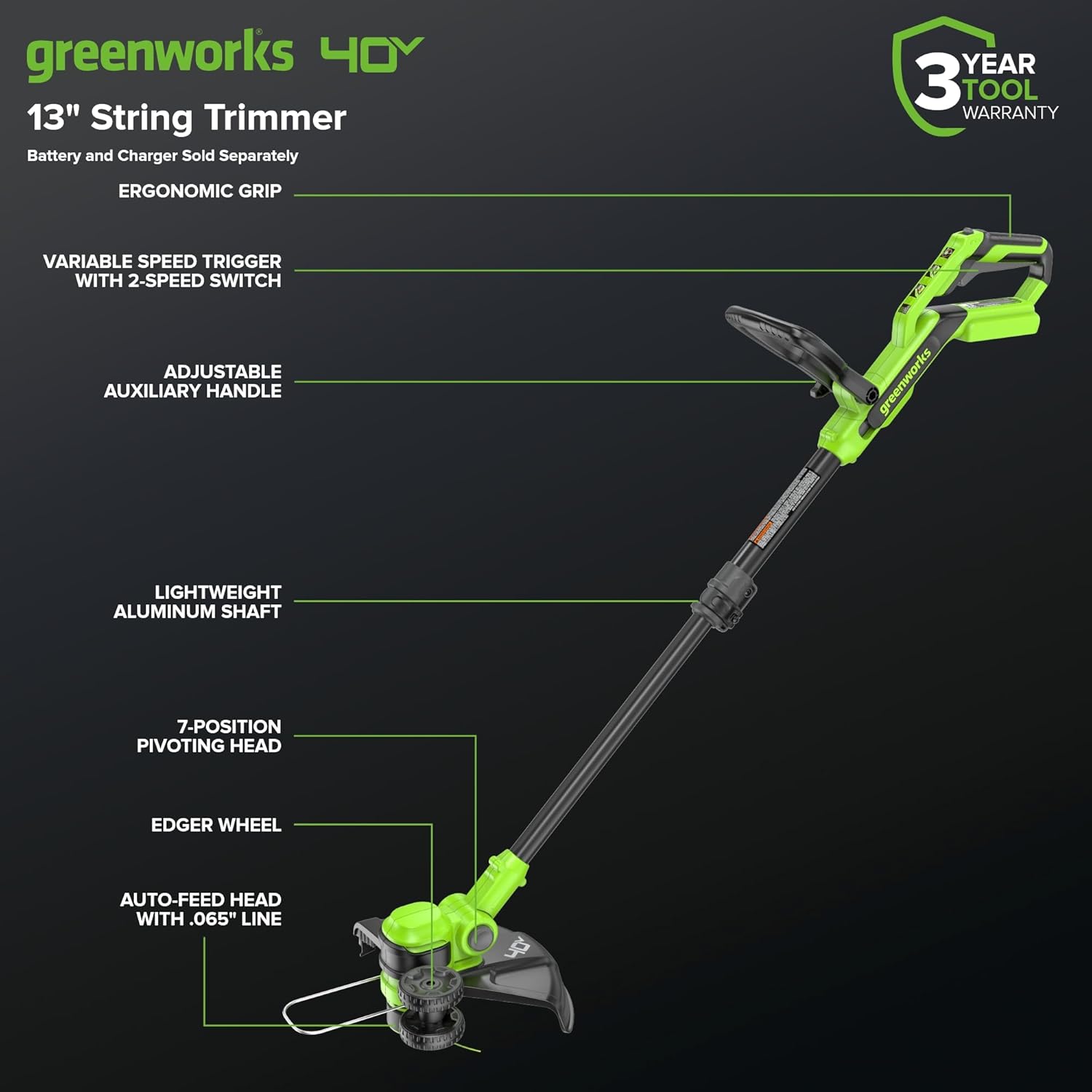
Figure 2.1: Greenworks 40V 13" Cordless String Trimmer/Edger with labeled components.

Figure 2.2: User demonstrating the adjustable telescoping shaft for customized reach.
3. Setup and Assembly
The Greenworks 40V 13" Cordless String Trimmer/Edger requires minimal assembly. Follow these steps to prepare your tool for use.
3.1 Unboxing and Component Identification
Carefully remove all components from the packaging. Ensure all parts are present before proceeding with assembly.
Video 3.1: Unboxing and initial component overview of the Greenworks cordless trimmer.
3.2 Attaching the Auxiliary Handle
- Loosen the knob on the auxiliary handle.
- Slide the handle onto the main shaft to a comfortable position.
- Tighten the knob securely to fix the handle in place.
3.3 Attaching the Guard
- Align the guard with the mounting points on the trimmer head.
- Securely attach the guard using the provided fasteners. Ensure it is firmly in place to prevent debris from being thrown towards the user.
3.4 Battery Installation
- Ensure the battery is fully charged before first use.
- Slide the 40V Lithium-Ion battery into the battery compartment on the tool until it clicks into place.
- To remove, press the battery release button and slide the battery out.
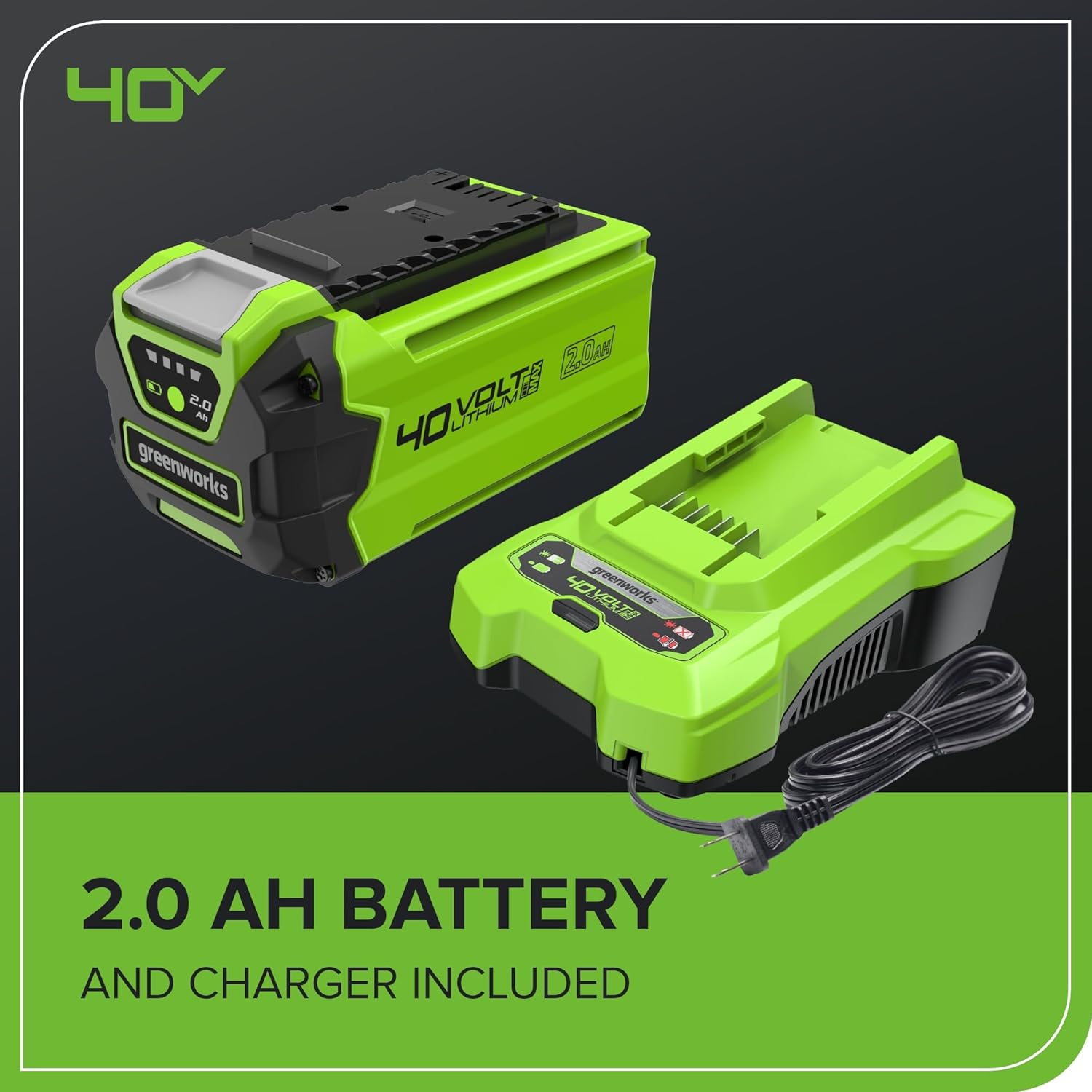
Figure 3.1: Greenworks 40V 2.0Ah battery and charger.
4. Operating Instructions
This section details how to operate your Greenworks 40V 13" Cordless String Trimmer/Edger effectively and safely.
4.1 Starting and Stopping the Tool
- To Start: Press and hold the safety lock-out button, then squeeze the trigger switch.
- To Stop: Release the trigger switch.
4.2 Adjusting the Pivoting Head (Trimming and Edging)
The pivoting head allows for easy conversion between trimming and edging, and adjustment for various angles.
- Locate the pivot button near the trimmer head.
- Press the button and rotate the head to the desired position. The tool offers 7 distinct positions.
- For edging, rotate the head 90 degrees and utilize the integrated edger wheel for stability along hard surfaces.
Video 4.1: Demonstration of how to switch the Greenworks cordless trimmer to edger mode.

Figure 4.1: User operating the trimmer in edging mode along a paved surface.
4.3 Automatic Line Feed
The trimmer features an automatic line feed system. To advance the cutting line:
- Start the tool and allow it to reach full speed.
- Briefly release the trigger, then re-engage it. The line will automatically advance a small amount.
- Repeat as necessary until the desired line length is achieved. The line will automatically cut to the correct length by the blade on the guard.
Video 4.2: Instructions on how to auto-feed trimmer string on the cordless weed eater.
4.4 Using the Brush Cutter Attachment
For thicker brush and stubborn overgrowth, the included brush cutter attachment can be used.
- Ensure the tool is off and the battery is removed before changing attachments.
- Remove the string trimmer head according to the instructions in the manual (refer to the full manual for detailed steps).
- Install the brush cutter attachment and secure it firmly.
- Always wear heavy-duty gloves and additional protective gear when using the brush cutter.

Figure 4.2: Bonus trimmer head accessory and 20 reinforced plastic blades for brush cutting.
5. Maintenance
Regular maintenance ensures optimal performance and extends the life of your Greenworks tool.
5.1 General Cleaning
- Always remove the battery before cleaning or performing any maintenance.
- Clean the tool after each use with a damp cloth. Do not use harsh chemicals or abrasive cleaners.
- Remove any grass clippings or debris from the guard, trimmer head, and ventilation openings.
5.2 Replacing the Cutting Line
When the cutting line becomes too short or breaks, it needs to be replaced.
- Ensure the tool is off and the battery is removed.
- Refer to the full product manual for specific instructions on opening the trimmer head and winding new 0.065" diameter line.
- Use only recommended replacement line to ensure proper operation and safety.
5.3 Battery Care and Storage
- Store batteries in a cool, dry place away from direct sunlight and moisture.
- Do not store batteries in a discharged state for extended periods. Charge them periodically if not in use.
- Always remove the battery from the tool when storing for extended periods.
6. Troubleshooting
This section provides solutions to common issues you might encounter with your trimmer/edger.
| Problem | Possible Cause | Solution |
|---|---|---|
| Tool does not start. | Battery not inserted correctly or discharged. Safety lock-out not engaged. | Ensure battery is fully charged and properly seated. Press safety lock-out button before squeezing trigger. |
| Cutting line does not advance. | Line is tangled or empty. Trimmer head is dirty. | Remove battery, inspect and untangle/replace line. Clean trimmer head. |
| Reduced cutting performance. | Worn or incorrect cutting line. Overgrown vegetation. | Replace with new 0.065" line. Cut in smaller passes. Consider using brush cutter attachment for very thick areas. |
If you encounter issues not listed here or solutions do not resolve the problem, please contact Greenworks customer support.
7. Specifications
| Feature | Detail |
|---|---|
| Brand | Greenworks |
| Model Number | ST40B215-00 |
| Power Source | Battery Powered (40V Lithium-Ion) |
| Cutting Width | 13 Inches |
| Line Diameter | 0.065 Inches (Auto-Feed) |
| Speed | Up to 7000 RPM |
| Item Weight | 5.1 Pounds (without battery) |
| Product Dimensions | 53.5"L x 13.2"W |
| Assembly Required | No (Minimal assembly for handle and guard) |
| Recommended Uses | Brush Cutting, Edging, Trimming |
8. Warranty and Support
Greenworks offers a 3-Year Tool & Battery Warranty, providing industry-leading coverage with free parts replacement.
For further assistance, replacement parts, or warranty claims, please visit the Greenworks Store or contact their customer support directly.
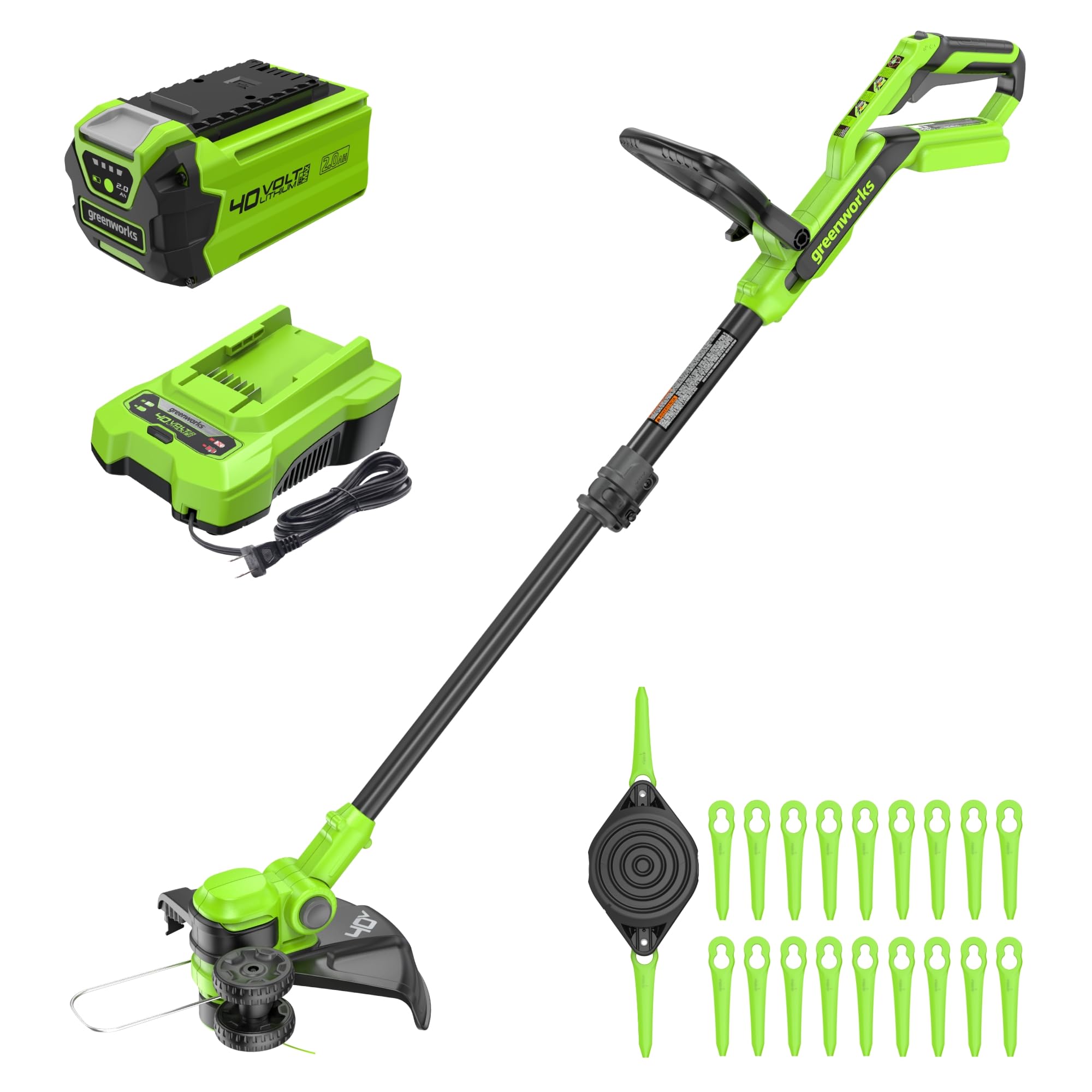
Figure 8.1: Greenworks 3-Year Tool & Battery Warranty.


