
Introduction
This instruction manual provides important information regarding the Sauter 72X9110 fan replacement part. It covers safety guidelines, product compatibility, installation procedures, and maintenance recommendations to ensure proper function and longevity of the component within your appliance. Please read this manual thoroughly before attempting any installation or maintenance.
Safety Instructions
- Always disconnect the appliance from the main power supply before attempting any installation, repair, or maintenance. Failure to do so can result in electric shock or serious injury.
- Wear appropriate personal protective equipment (PPE), such as gloves and eye protection, during installation.
- If you are unsure about any step, consult a qualified technician. Improper installation can damage the appliance or cause safety hazards.
- Keep small parts away from children.
- Ensure all connections are secure and correctly fitted before restoring power to the appliance.
Product Overview & Compatibility
The Sauter 72X9110 is a replacement fan designed for specific Brandt and Sauter appliances. It is crucial to verify compatibility with your appliance model before installation.
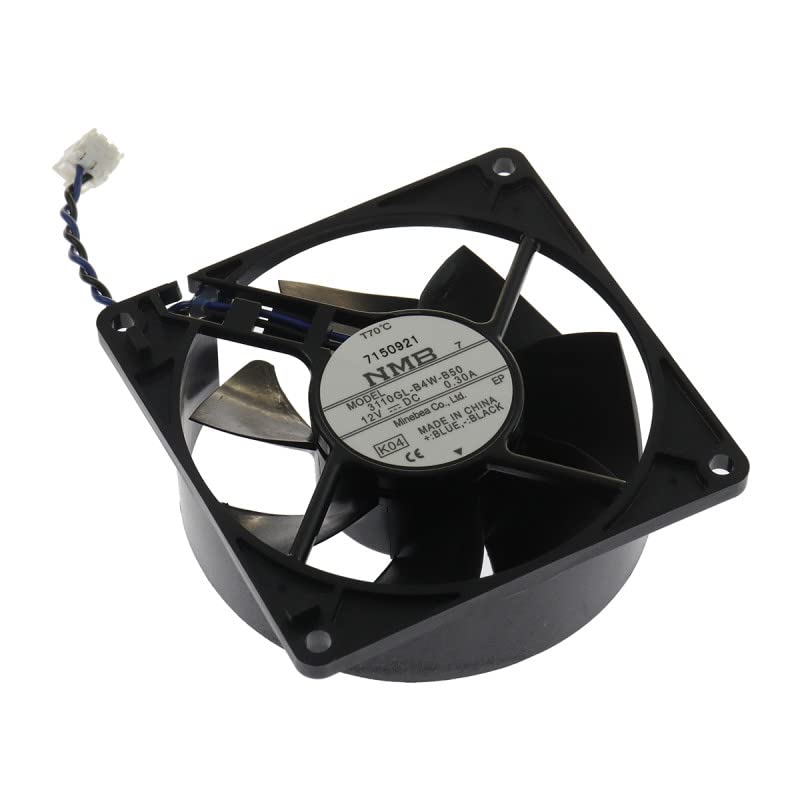
Image: Sauter 72X9110 Replacement Fan. This image displays the general appearance of the fan component.
Compatible Brands:
- BRANDT
- SAUTER
Compatible Models (Partial List):
- BRANDT: KIP710X, TI1033B, TI1015B, TI1013B, KIP710W, KIP711W, KIP916W
- SAUTER: STI864B, SCI1061A, STI998VG, STI984B, STI982B, SCI1061X, SCI1061W
Note: This list may not be exhaustive. Always refer to your appliance's specific service manual or consult with a qualified technician to confirm compatibility.
Components Included
The Sauter 72X9110 replacement fan typically includes the following:
- Sauter 72X9110 Fan Unit
- Power Cord (integrated or separate, depending on specific model variant)
Note: Additional mounting hardware or tools are generally not included and may be required for installation.
Installation Guide
This section provides general steps for replacing an appliance fan. Specific procedures may vary depending on your appliance model. Always refer to your appliance's service manual for detailed instructions.
- Preparation:
- Ensure the appliance is completely disconnected from the power supply.
- Gather necessary tools (e.g., screwdrivers, pliers, multimeter).
- Clear the work area around the appliance.
- Access the Fan:
- Depending on the appliance, you may need to remove back panels, top covers, or internal components to access the existing fan.
- Carefully document the location and connection of wires and mounting screws, possibly by taking photos.
- Remove the Old Fan:
- Disconnect any wiring connected to the old fan. Note the polarity if applicable.
- Unscrew and remove the mounting hardware securing the old fan.
- Carefully extract the old fan from its housing.
- Install the New Fan:
- Position the new Sauter 72X9110 fan into the housing, ensuring proper alignment.
- Secure the fan with the appropriate mounting screws. Do not overtighten.
- Connect the wiring to the new fan, matching the connections noted during removal. Ensure all connections are firm and insulated if necessary.
- Reassemble and Test:
- Carefully reassemble any panels or components that were removed.
- Restore power to the appliance.
- Test the appliance to ensure the new fan operates correctly and quietly. Listen for unusual noises or vibrations.
Operation
The Sauter 72X9110 fan operates as an integral component of your appliance. Its function is typically controlled by the appliance's internal systems (e.g., thermostat, control board). Once correctly installed, the fan will activate and deactivate automatically as required by the appliance's operational cycle.
Maintenance
Regular maintenance of the fan itself is generally not required beyond ensuring it remains free from obstructions and excessive dust buildup. As an internal component, access for cleaning may be limited.
- Periodic Inspection: During routine appliance maintenance, visually inspect the fan for any signs of wear, damage, or accumulation of debris.
- Cleaning: If accessible, gently clean any dust or debris from the fan blades and housing using a soft brush or a vacuum cleaner with a brush attachment. Ensure the appliance is disconnected from power before cleaning.
- Avoid Lubrication: The fan motor is typically sealed and does not require lubrication. Attempting to lubricate it may cause damage.
Troubleshooting
If the fan is not functioning correctly after installation, consider the following troubleshooting steps:
| Problem | Possible Cause | Solution |
|---|---|---|
| Fan does not start |
|
|
| Fan is noisy or vibrates |
|
|
| Fan runs continuously |
|
|
If these steps do not resolve the issue, it is recommended to contact a qualified appliance repair technician.
Specifications
| Brand | Sauter |
| Model Number | 72X9110 |
| Manufacturer Reference | 72X9110REC |
| ASIN | B00CZOYMO4 |
| Included Components | Fan Unit, Power Cord |
| First Available Date | July 29, 2016 |
Warranty and Support
Information regarding specific warranty terms for the Sauter 72X9110 replacement fan is not provided in the product details. For warranty inquiries or technical support, please refer to the original appliance manufacturer's documentation or contact Sauter customer service directly.
Availability of spare parts information is currently unavailable. Please contact the manufacturer for further details.