
Important Safeguards
When using electrical appliances, basic safety precautions should always be followed to reduce the risk of fire, electric shock, and/or injury to persons, including the following:
- Read all instructions.
- Do not touch hot surfaces. Use handles or knobs.
- To protect against fire, electric shock, and injury to persons, do not immerse cord, plugs, or appliance in water or other liquid.
- Close supervision is necessary when any appliance is used by or near children.
- Unplug from outlet when not in use and before cleaning. Allow to cool before putting on or taking off parts, and before cleaning the appliance.
- Do not operate any appliance with a damaged cord or plug or after the appliance malfunctions, or has been damaged in any manner. Return appliance to the nearest authorized service facility for examination, repair, or adjustment.
- The use of accessory attachments not recommended by the appliance manufacturer may result in fire, electric shock, or injury to persons.
- Do not use outdoors.
- Do not let cord hang over edge of table or counter, or touch hot surfaces.
- Do not place on or near a hot gas or electric burner, or in a heated oven.
- Always attach plug to appliance first, then plug cord into the wall outlet. To disconnect, turn any control to "off", then remove plug from wall outlet.
- Do not use appliance for other than intended use.
- Scalding may occur if the lid is removed during the brewing cycle.
Product Overview
The OutIn Mino is a portable electric espresso machine designed for convenience and high-quality espresso on the go. Its compact size and self-heating capabilities make it ideal for travel, camping, and daily use. It supports both ground coffee and Nespresso-compatible capsules.
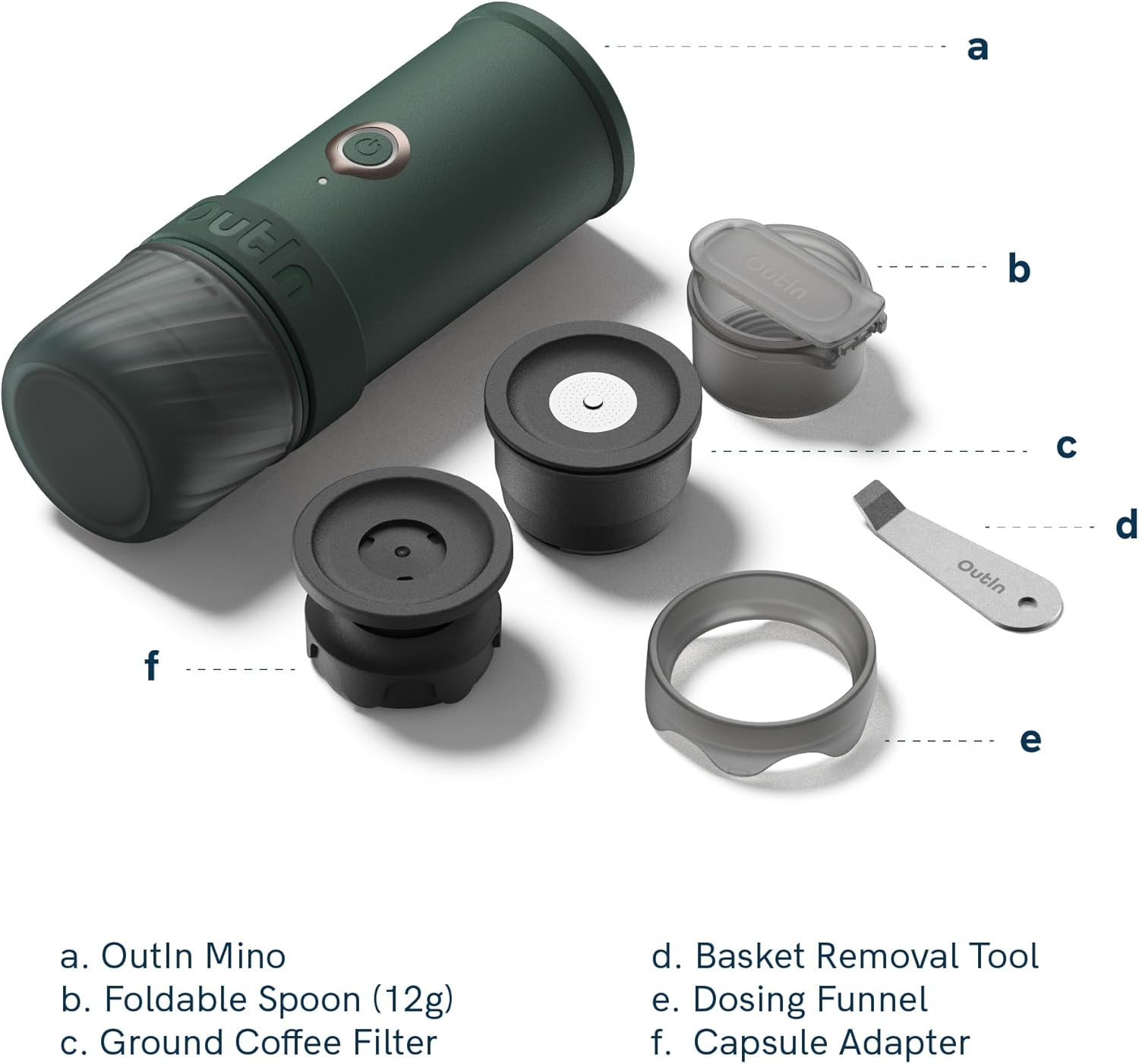
Image: Labeled diagram of the OutIn Mino Portable Electric Espresso Machine and its accessories. Components include the OutIn Mino unit, Foldable Spoon (12g), Ground Coffee Filter, Basket Removal Tool, Dosing Funnel, and Capsule Adapter.
Included Components:
- OutIn Mino Portable Electric Espresso Machine
- User Manual
- USB-C Cable
- Foldable Spoon
- Basket removal tool
- Dosing funnel
- Multi-function Mino pocket
Video: An official overview of the OutIn Mino Portable Electric Espresso Machine, demonstrating its features and ease of use. This video provides a visual guide to the product's design and basic functionality.
Setup
1. Initial Charging
- Before first use, fully charge the OutIn Mino using the provided USB-C cable.
- Connect the USB-C cable to the charging port on the back of the device (protected by a rubber flap).
- Connect the other end to a compatible USB power adapter (not included).
- The battery indicator lights will show charging progress. A full charge takes approximately 90 minutes.
2. Assembly
- Ensure all components are clean before assembly.
- Attach the desired coffee adapter (Ground Coffee Filter or Capsule Adapter) to the bottom of the main unit by twisting it securely.
- The included cup can be attached to the bottom of the coffee adapter for storage or direct brewing.
Operating Instructions
1. Using Ground Coffee
- Unscrew the bottom section and insert the Ground Coffee Filter.
- Use the dosing funnel to add up to 12g of finely ground coffee into the filter basket.
- Lightly tamp the coffee grounds using the foldable spoon.
- Screw the filter basket assembly back onto the main unit.
- Open the top lid and fill the water tank with cold or hot water (up to 70ml, indicated by markings).
- Close the top lid securely.
- Place the unit over your espresso cup or the included cup.
- For cold water heating and brewing: Press and hold the power button until you hear a beep. The LED ring will blink orange during heating (approx. 149 seconds). Once heated, it will automatically start brewing.
- For hot water brewing (no heating required): Double short press the power button. The unit will immediately start brewing.

Image: An olive green OutIn Mino Portable Electric Espresso Machine shown with a coffee capsule and a freshly prepared espresso in a glass cup. This illustrates the brewing process for both ground coffee and capsules.
2. Using NS Capsules
- Unscrew the bottom section and insert the Capsule Adapter.
- Place a Nespresso-compatible capsule into the adapter.
- Screw the capsule adapter assembly back onto the main unit.
- Open the top lid and fill the water tank with cold or hot water (up to 70ml, indicated by markings).
- Close the top lid securely.
- Place the unit over your espresso cup or the included cup.
- For cold water heating and brewing: Press and hold the power button until you hear a beep. The LED ring will blink orange during heating (approx. 149 seconds). Once heated, it will automatically start brewing.
- For hot water brewing (no heating required): Double short press the power button. The unit will immediately start brewing.
3. Water Heating Indicator
- When heating water from room temperature, the LED ring around the power button will blink orange.
- Once the water reaches the optimal brewing temperature (93.3°C / 199.9°F), the LED will turn blue, and the machine will begin extraction.
Maintenance
1. Cleaning
- Always unplug the device and allow it to cool completely before cleaning.
- The main unit is IP67 waterproof and dustproof, but avoid immersing it in water for extended periods.
- Wipe the exterior of the main unit with a damp cloth.
- Remove the coffee adapter and cup. Disassemble them and rinse all parts under running water.
- Use the basket removal tool to clean any residue from the filter basket.
- Ensure all parts are thoroughly dried before reassembling or storing to prevent mold and odors.
- The item is not dishwasher safe.
2. Descaling
- Regular descaling is recommended to maintain optimal performance, especially in areas with hard water.
- Follow the instructions for a suitable descaling solution for coffee machines.
- Run the descaling solution through the machine as if brewing, then rinse thoroughly with clean water.
Troubleshooting
| Problem | Possible Cause | Solution |
|---|---|---|
| Machine does not turn on. | Low battery or no charge. | Charge the device fully using the USB-C cable. |
| Coffee is not brewing. | Insufficient water in the tank. | Ensure water tank is filled to the appropriate level. |
| Coffee is cold or not hot enough. | Used cold water and did not activate heating. | Press and hold the power button for cold water heating and brewing. Ensure the LED blinks orange. |
| Weak or watery espresso. | Coffee grounds too coarse or insufficient amount. | Use finer ground coffee and ensure correct dosage (up to 12g). |
| No or poor crema. | Coffee grounds too old, incorrect grind, or insufficient pressure. | Use fresh coffee beans, adjust grind size, and ensure proper tamping. |
Specifications
| Brand | OutIn |
| Model Number | OTEM-MO |
| Capacity | 70 Milliliters |
| Product Dimensions | 4.92"D x 2.64"W x 7.68"H |
| Item Weight | 685 Grams |
| Power Source | Rechargeable Battery (3*3000mAh) |
| Wattage | 32.4 Watt-hours |
| Voltage | 10.8 Volts |
| Coffee Input Type | Capsule, Ground |
| Special Features | Rechargeable Battery, Fast USB-C Charging, Portable Design, Auto Shut-off, IP67 Waterproof, Travel Friendly, Lightweight |
| Material | Food-grade plastic, standard steel, silicone |
| Dishwasher Safe | No |
Warranty & Support
Warranty Information
The OutIn Mino Portable Electric Espresso Machine is covered by a standard return policy, allowing for refund or replacement within 30 days of purchase. For specific warranty details beyond this period, please refer to the warranty card included with your product or contact OutIn customer service.
Customer Support
For any questions, technical assistance, or support regarding your OutIn Mino, please visit the official OutIn website or contact their customer service department. Contact information can typically be found in the product packaging or on the manufacturer's website.


