
1. Introduction
This manual provides essential information for the safe and efficient installation, operation, and maintenance of your Supermicro PWS-501P-1R 500 Watt 80 PLUS Platinum Power Supply. Please read this manual thoroughly before attempting to install or operate the unit.
The Supermicro PWS-501P-1R is a high-efficiency 500 Watt internal power supply designed for 1U rack-mount systems, featuring 80 PLUS Platinum certification for superior energy efficiency.
2. Safety Information
Always observe the following safety precautions to prevent injury and damage to the equipment:
- Disconnect Power: Always disconnect the system from the main power source before installing, removing, or performing any maintenance on the power supply unit.
- Qualified Personnel: Installation and servicing should only be performed by qualified service personnel.
- No User-Serviceable Parts: Do not open the power supply unit. There are no user-serviceable parts inside, and opening it will void the warranty and expose you to dangerous voltages.
- Proper Grounding: Ensure the system is properly grounded to prevent electrical shock.
- Ventilation: Ensure adequate airflow around the power supply. Do not block ventilation openings.
- Environmental Conditions: Operate the power supply within the specified temperature and humidity ranges. Avoid exposure to moisture or extreme temperatures.
3. Package Contents
Verify that all items are present and in good condition. If any items are missing or damaged, contact your vendor immediately.
- Supermicro PWS-501P-1R 500 Watt Power Supply Unit
- Documentation (this user manual or similar guide)
4. Setup and Installation
Follow these steps for proper installation of the power supply into your 1U rack-mount system.
4.1 Pre-installation Checks
- Ensure your system chassis is compatible with a 1U form factor power supply.
- Verify that the system's power requirements do not exceed the 500 Watt output capacity of this power supply.
- Confirm that the AC input voltage matches the power supply's operating range (typically auto-sensing, but always check system specifications).
4.2 Physical Installation
- Power Off: Ensure the system is completely powered off and disconnected from the AC power outlet.
- Remove Old PSU (if applicable): If replacing an existing power supply, carefully disconnect all cables from the motherboard and other components. Unscrew and remove the old power supply from the chassis.
- Insert New PSU: Gently slide the Supermicro PWS-501P-1R into the designated power supply bay in your 1U chassis.
- Secure PSU: Secure the power supply to the chassis using the appropriate screws.
- Connect Cables: Connect the power supply cables to the motherboard, CPU, and any other components (e.g., storage drives, expansion cards) as required by your system configuration. Ensure all connections are firm and correctly oriented.
- Connect AC Power: Once all internal connections are made, connect the AC power cord to the power supply and then to a grounded electrical outlet.
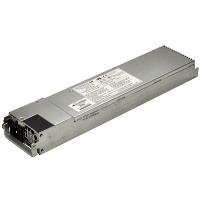
Figure 1: Supermicro PWS-501P-1R 500 Watt 1U Power Supply. The unit is a rectangular, metallic grey component with various connectors and a fan grille visible, designed for server rack integration.
5. Operating Instructions
After successful installation, follow these steps to operate your system with the new power supply.
- Initial Power On: With the AC power cord connected, press the system's power button. The system should initiate its boot sequence.
- System Monitoring: Monitor your system's stability and performance. Ensure all components are receiving power correctly. Modern operating systems and BIOS/UEFI often provide basic power monitoring information.
- Power Off: To power off the system, use the operating system's shutdown procedure. For a hard shutdown, press and hold the power button until the system turns off.
6. Maintenance
Regular maintenance helps ensure the longevity and optimal performance of your power supply.
- Dust Removal: Periodically (e.g., every 6-12 months), power down and disconnect the system. Use compressed air to gently clear dust from the power supply's fan and ventilation grilles. Do not open the power supply casing.
- Cable Inspection: Occasionally inspect all power cables for signs of wear, fraying, or damage. Replace any damaged cables immediately.
- Environmental Control: Ensure the operating environment remains clean, cool, and dry to prevent dust buildup and overheating.
7. Troubleshooting
If you encounter issues with your power supply, refer to the following basic troubleshooting steps:
7.1 No Power / System Not Turning On
- Check AC Connection: Ensure the AC power cord is securely plugged into both the power supply and a working electrical outlet.
- Test Outlet: Try plugging another device into the same outlet to confirm it has power.
- Internal Connections: Verify that all power cables from the PSU are correctly and firmly connected to the motherboard and other components.
- Power Button: Ensure the system's power button is functioning correctly.
7.2 System Instability / Random Shutdowns
- Overheating: Check for proper ventilation and dust buildup. Ensure the power supply fan is spinning.
- Overload: Ensure the total power draw of your components does not exceed the 500 Watt capacity of the power supply.
- Loose Connections: Re-check all power cable connections.
If these steps do not resolve the issue, consult Supermicro's technical support or a qualified technician.
8. Specifications
Key technical specifications for the Supermicro PWS-501P-1R power supply:
| Feature | Specification |
|---|---|
| Brand | Supermicro |
| Model Number | PWS-501P-1R |
| Output Wattage | 500 Watts |
| 80 PLUS Certification | 80 PLUS Platinum |
| Rack Size | 1U |
| Output Voltage | +5V, +12V |
| Form Factor | Proprietary |
| Cooling Method | Air |
| Item Weight | 4.1 Pounds (approx. 1.86 kg) |
| Product Dimensions (LxWxH) | 17.2 x 7.2 x 4.5 inches (approx. 43.7 x 18.3 x 11.4 cm) |
| UPC | 672042094608 |
9. Warranty and Support
For detailed warranty information regarding your Supermicro PWS-501P-1R power supply, please refer to the official Supermicro website or the warranty card included with your product. Warranty terms and conditions may vary by region and purchase date.
For technical assistance, troubleshooting beyond this manual, or to inquire about replacement parts, please visit the official Supermicro support portal:
Supermicro Official Website: www.supermicro.com
Supermicro Support: Refer to the support section on the official website for contact information, FAQs, and driver downloads.


