
1. Introduction
Thank you for choosing the LAFAYETTE MDL-10 Distance Meter. This device is designed for precise and rapid distance measurements, making it an essential tool for various applications in construction, interior design, and DIY projects. Please read this manual carefully before using the device to ensure safe and optimal operation.
2. Safety Information
Always observe the following safety precautions to prevent injury and damage to the device:
- Do not look directly into the laser beam.
- Do not disassemble or modify the device. Repairs should only be performed by authorized personnel.
- Keep the device out of reach of children.
- Avoid using the device in explosive environments or near flammable materials.
- Protect the device from extreme temperatures, moisture, and strong impacts.
- Dispose of batteries according to local regulations.
3. Package Contents
Upon opening the package, please verify that all items are present and in good condition:
- LAFAYETTE MDL-10 Distance Meter
- User Manual
- (Additional accessories may vary by region or package)
4. Product Overview
Familiarize yourself with the main components of your MDL-10 Distance Meter:
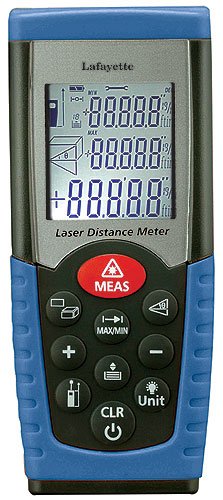
Figure 1: Front view of the LAFAYETTE MDL-10 Distance Meter. This image shows the device's display screen, measurement buttons, and the laser emission point.
- Laser Emission Lens: Emits the laser beam for measurement.
- Receiver Lens: Detects the reflected laser beam.
- Display Screen: Shows measurement results, battery status, and other indicators.
- Measurement Button: Initiates a measurement.
- Power/Clear Button: Turns the device on/off and clears previous measurements.
- Unit Button: Changes measurement units (e.g., meters, feet, inches).
- Battery Compartment: Located at the rear, for AAA batteries.
5. Setup
5.1. Battery Installation
The LAFAYETTE MDL-10 Distance Meter requires AAA batteries (not included) for operation.
- Locate the battery compartment cover on the back of the device.
- Slide or unclip the cover to open the compartment.
- Insert two (2) AAA batteries, ensuring the correct polarity (+ and -) as indicated inside the compartment.
- Close the battery compartment cover securely.
Note: Always use new batteries and remove them if the device will not be used for an extended period to prevent leakage.
6. Operating Instructions
6.1. Powering On/Off
- To turn on: Press the Power/Clear button briefly. The display will light up.
- To turn off: Press and hold the Power/Clear button for a few seconds until the display turns off. The device will also automatically shut off after a period of inactivity to conserve battery life.
6.2. Basic Distance Measurement
- Turn on the device.
- Point the laser emission lens towards the target object or surface from which you want to measure the distance.
- Press the Measurement button. The laser beam will activate, and the measured distance will appear on the display.
- To take another measurement, simply press the Measurement button again.
6.3. Changing Measurement Units
To cycle through available measurement units (e.g., meters, feet, inches), press the Unit button repeatedly until your desired unit is displayed.
7. Maintenance
Proper maintenance ensures the longevity and accuracy of your device:
- Cleaning: Use a soft, damp cloth to clean the device's exterior. Do not use abrasive cleaners or solvents. For the lenses, use a soft, lint-free cloth specifically designed for optical surfaces.
- Storage: When not in use, store the device in a dry, cool place, away from direct sunlight and extreme temperatures. Remove batteries if storing for extended periods.
- Calibration: The device is factory-calibrated. If you suspect accuracy issues, contact customer support.
8. Troubleshooting
If you encounter issues with your MDL-10 Distance Meter, refer to the following common problems and solutions:
| Problem | Possible Cause | Solution |
|---|---|---|
| Device does not turn on. | Dead or incorrectly inserted batteries. | Check battery polarity or replace with new AAA batteries. |
| Inaccurate measurements. | Obstructed laser path, dirty lenses, or measuring highly reflective/transparent surfaces. | Ensure clear line of sight, clean lenses, or use a target plate for difficult surfaces. |
| Display shows "Error". | Measurement out of range or internal error. | Move closer to the target, or turn the device off and on again. If the error persists, contact support. |
9. Specifications
Key technical specifications for the LAFAYETTE MDL-10 Distance Meter:
- Brand: LAFAYETTE
- Model: MDL-10
- Part Number: 33102420
- Item Weight: 135 Grams
- Battery Type: AAA (Lithium-ion cells recommended)
- Batteries Included: No
10. Warranty and Support
LAFAYETTE products are manufactured to high-quality standards. For warranty information, technical support, or service inquiries, please refer to the warranty card included with your purchase or visit the official LAFAYETTE website. Please have your model number (MDL-10) and part number (33102420) ready when contacting support.
For further assistance, please contact your local dealer or LAFAYETTE customer service.