
1. Introduction
Thank you for purchasing the YAMAHA DSP-AX430 DSP AV Amplifier. This amplifier is designed to provide high-quality audio and video performance for your home entertainment system, featuring Digital Sound Field Processing (DSP) for an immersive listening experience, along with AM and FM tuner capabilities. This manual provides essential information for setting up, operating, and maintaining your amplifier to ensure optimal performance and longevity.
2. Safety Information
Please read these safety instructions carefully before operating the unit. Keep this manual for future reference.
- Power Source: Connect the unit only to an AC outlet of the voltage specified on the rear panel.
- Ventilation: Ensure adequate ventilation. Do not block ventilation openings. Avoid placing the unit on carpets or near curtains that may obstruct airflow.
- Water and Moisture: Do not expose the unit to rain or moisture. Do not place objects filled with liquids, such as vases, on the unit.
- Heat: Do not place the unit near heat sources such as radiators, heat registers, stoves, or other apparatus (including amplifiers) that produce heat.
- Cleaning: Unplug the unit from the wall outlet before cleaning. Use a dry cloth for cleaning.
- Servicing: Do not attempt to service this unit yourself. Refer all servicing to qualified service personnel.
3. Product Overview
The YAMAHA DSP-AX430 is a versatile AV amplifier designed to be the central hub of your home audio-video system. It features multiple audio and video inputs, speaker outputs, and advanced DSP modes to enhance your listening experience.
3.1 Front Panel
The front panel provides access to essential controls such as power, input selection, volume, and DSP mode adjustments. The display shows current settings and status.

Figure 1: Front view of the YAMAHA DSP-AX430 AV Amplifier, showing the main controls and display.
3.2 Rear Panel Connections
The rear panel houses all input and output terminals for connecting your audio sources, video devices, and speakers.

Figure 2: Rear panel of the YAMAHA DSP-AX430, illustrating the various audio and video input/output terminals and speaker connections.
3.3 Side and Bottom Views
The side panels feature ventilation grilles for heat dissipation, while the bottom panel includes feet for stability and additional ventilation.

Figure 3: Top-side view, showing the ventilation grilles.

Figure 4: Side view of the amplifier.
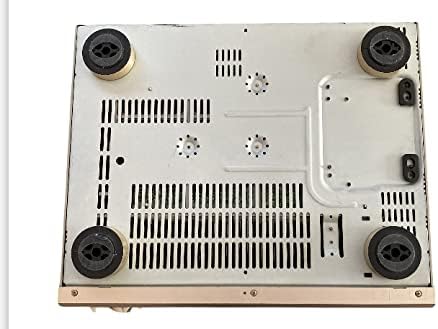
Figure 5: Bottom view, showing the support feet and additional ventilation.
4. Setup
Follow these steps to correctly set up your YAMAHA DSP-AX430 AV Amplifier.
4.1 Speaker Connections
- Ensure the amplifier is turned off and unplugged from the power outlet.
- Connect your speakers to the corresponding speaker terminals on the rear panel (Front L/R, Center, Surround L/R). Ensure correct polarity (+ to + and - to -).
- Use high-quality speaker cables for optimal sound performance.
4.2 Audio/Video Source Connections
- Connect your audio and video source components (e.g., DVD player, CD player, game console) to the appropriate input jacks on the rear panel.
- For analog audio, use RCA cables. For video, use composite or S-video connections as available.
- Connect your television or display to the monitor output jacks.
4.3 Antenna Connections
- Connect an FM antenna to the FM ANTENNA terminal for FM radio reception.
- Connect an AM loop antenna to the AM ANTENNA terminals for AM radio reception.
4.4 Power Connection
After all other connections are made, plug the amplifier's power cord into a suitable AC wall outlet.
5. Operating
This section covers the basic operation of your DSP-AX430 amplifier.
5.1 Power On/Off
Press the POWER button on the front panel to turn the amplifier on or off.
5.2 Input Selection
Use the INPUT SELECTOR knob or buttons on the front panel to choose the desired audio/video source (e.g., CD, DVD, TUNER).
5.3 Volume Control
Adjust the master volume using the large VOLUME knob on the front panel. Start with a low volume level and gradually increase it to a comfortable listening level.
5.4 Tuner Operation (AM/FM)
- Select the TUNER input.
- Press the BAND button to switch between FM and AM bands.
- Use the TUNING buttons to manually tune to a station or initiate auto-tuning.
5.5 DSP Modes
The DSP-AX430 features various Digital Sound Field Processing modes to simulate different acoustic environments (e.g., Concert Hall, Jazz Club, Game). Use the DSP program selection buttons on the front panel to cycle through available modes and find your preferred setting.
Note: The product description indicates that the remote control is missing. Some advanced functions and convenient operation may be limited without the original remote.
6. Maintenance
Proper care and maintenance will help ensure the longevity and performance of your amplifier.
- Cleaning: Wipe the exterior of the unit with a soft, dry cloth. For stubborn dirt, lightly dampen the cloth with water and a mild detergent, then wipe dry. Avoid using abrasive cleaners, solvents, or chemical sprays.
- Ventilation: Regularly check that the ventilation openings are not blocked by dust or debris. Ensure there is sufficient space around the unit for proper airflow.
- Power Cord: Periodically inspect the power cord for any damage. If damaged, discontinue use and seek professional repair.
7. Troubleshooting
If you encounter problems with your amplifier, refer to the following common issues and solutions.
7.1 No Power
- Ensure the power cord is securely plugged into both the amplifier and the wall outlet.
- Check if the wall outlet is functioning by plugging in another device.
- Verify that the POWER button on the front panel is pressed.
7.2 No Sound
- Check that the correct input source is selected.
- Ensure the volume is turned up and not muted.
- Verify that all speaker cables are correctly connected to both the amplifier and the speakers, with correct polarity.
- Confirm that your audio source device is playing and its output volume is adequate.
7.3 Poor Radio Reception
- Ensure the AM and FM antennas are properly connected.
- Adjust the position and orientation of the antennas for better reception.
- Check for local interference from other electronic devices.
If the problem persists after trying these solutions, please contact qualified service personnel.
8. Specifications
| Feature | Specification |
|---|---|
| Brand | YAMAHA |
| Model | DSP-AX430 |
| Dimensions (W x H x D) | 435mm x 151mm x 380mm |
| Weight | 10.0 kg |
| Features | AM Tuner, DSP, FM Tuner |
| Control Method | Remote (Note: Remote control may not be included with all units) |
| Release Date | March 10, 2002 |
9. Warranty and Support
For warranty information and customer support, please refer to the documentation provided at the time of purchase or visit the official YAMAHA website. Keep your purchase receipt as proof of purchase for any warranty claims.
For technical assistance or service inquiries, please contact YAMAHA customer support or an authorized service center.
You can find more information about YAMAHA products at the YAMAHA Store on Amazon.