
1. Overview
The Metrica 60581 Tripod is a versatile and robust support system designed for various measuring instruments, ensuring stability and precision. It features an adjustable height range from 95 cm to 195 cm, making it suitable for a wide array of applications. The tripod is equipped with a rack elevation mechanism for smooth height adjustments and secure locking features.
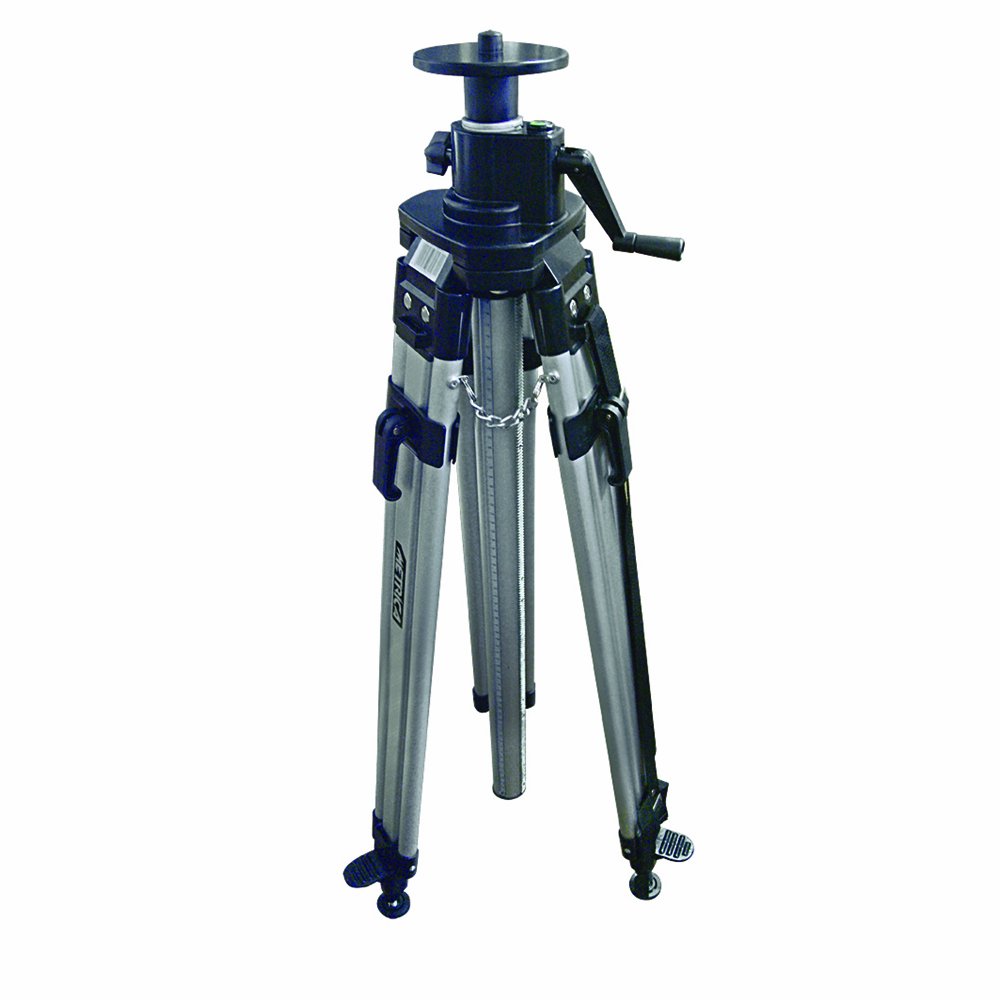
Image 1.1: The Metrica 60581 Tripod in its extended configuration, showcasing its design and stability.
2. Safety Instructions
- Always ensure the tripod legs are fully extended and locked before mounting any equipment.
- Place the tripod on a stable, level surface to prevent tipping.
- Do not exceed the maximum load capacity of the tripod (not specified, use caution).
- Keep hands and fingers clear of moving parts during height adjustment.
- When transporting, ensure all locking mechanisms are secured and the tripod is collapsed.
- Avoid using the tripod in strong winds without additional stabilization.
3. Package Contents
Verify that all the following items are included in your package:
- Metrica 60581 Tripod (1 unit)
- Carry bag (1 unit)
4. Setup
4.1 Unpacking
- Carefully remove the tripod from its carry bag.
- Inspect the tripod for any signs of damage from shipping. If damaged, do not use and contact customer support.
4.2 Extending the Legs
- Place the tripod on a flat surface.
- Release the leg locking levers on each leg.
- Extend each leg to the desired length. Ensure all legs are extended equally for maximum stability.
- Securely close the leg locking levers on each leg. Verify that the legs are firmly locked and do not slide.
4.3 Adjusting Height (Rack Elevation)
- Loosen the main elevation locking knob (if present, typically below the head).
- Use the rack elevation crank to raise or lower the central column to the desired height.
- Once the desired height is reached, tighten the main elevation locking knob to secure the column.
4.4 Changing Feet
The tripod includes both plastic feet for indoor use and pointed feet for outdoor use.
- For indoor use: Ensure the plastic feet are exposed. These provide grip and protect delicate floor surfaces.
- For outdoor use: If the plastic feet are removable or retractable, expose the pointed feet. These provide better stability on soft ground like soil or grass.
5. Operating
5.1 Mounting a Device
- Ensure the tripod head is level and stable.
- Carefully attach your measuring instrument or device to the tripod head's mounting screw.
- Tighten the mounting screw securely, but do not overtighten, to avoid damaging your device or the tripod head.
5.2 Adjusting Angle and Position
The tripod head allows for various adjustments to position your device accurately.
- Use the pan and tilt controls on the tripod head to adjust the horizontal and vertical angles of your device.
- Always loosen the corresponding locking knobs before adjusting and tighten them firmly once the desired position is achieved.
5.3 Stability Considerations
For optimal stability, especially with heavier equipment or in windy conditions:
- Keep the tripod legs spread as wide as possible.
- Minimize the extension of the central column if maximum height is not required.
- Utilize the safety chain (if applicable) to further secure the legs.
6. Maintenance
6.1 Cleaning
- Wipe down the tripod with a clean, damp cloth after each use, especially if used outdoors.
- Remove any dirt, dust, or debris from the leg mechanisms and the central column.
- Avoid using harsh chemicals or abrasive cleaners, which can damage the finish or moving parts.
6.2 Storage
- Collapse the tripod fully and secure all locking mechanisms before storing.
- Store the tripod in its carry bag in a dry, cool place, away from direct sunlight and extreme temperatures.
6.3 Inspection
- Periodically inspect all screws, levers, and moving parts for wear or damage.
- Ensure all locking mechanisms function correctly and provide a secure hold.
- If any part is damaged or not functioning properly, discontinue use and seek professional repair or replacement.
7. Troubleshooting
7.1 Tripod is unstable
- Ensure all leg sections are fully extended and their locking levers are securely closed.
- Verify that the tripod is placed on a level and firm surface.
- Check if the central column is fully locked after height adjustment.
- If using pointed feet, ensure they are properly engaged with the ground.
7.2 Difficulty adjusting height
- Ensure the main elevation locking knob is sufficiently loosened before attempting to adjust the rack elevation.
- Check for any obstructions or debris in the rack and pinion mechanism. Clean if necessary.
8. Specifications
| Feature | Specification |
|---|---|
| Manufacturer | Metrica |
| Model Number | 60581 |
| Item Code | 60581 |
| Height Range | 95 - 195 cm |
| Elevation Type | Rack Elevation |
| Locking Mechanism | Lever lock and safety chain |
| Feet Type | Plastic for indoor, pointed for outdoor |
| Material | Plastic |
| Color | Grey |
| Item Weight | 998 g |
| Product Dimensions | 1 x 1 x 1 cm (collapsed/packaged) |
9. Warranty and Support
Metrica products are manufactured to high-quality standards. For information regarding warranty coverage, please refer to the warranty card included with your purchase or visit the official Metrica website. For technical support, spare parts, or service inquiries, please contact your local Metrica dealer or authorized service center.