
1. Introduction
This manual provides essential information for the installation, operation, maintenance, and troubleshooting of your EVGA SuperNOVA 1300 G2 1300W 80+ Gold Fully Modular Power Supply. Please read this manual thoroughly before installation and retain it for future reference.
The EVGA SuperNOVA 1300 G2 is an 80 PLUS Gold certified power supply designed to deliver 1300W of continuous power with high efficiency. It features a fully modular design for improved cable management and includes heavy-duty protections to ensure system stability and safety.
2. Safety Information
Always observe the following safety precautions to prevent injury or damage to your equipment:
- Do not open the power supply unit. High voltages are present inside, and there are no user-serviceable components. Opening the unit will void the warranty.
- Ensure the power supply is disconnected from the AC power outlet before installation or handling.
- Install the power supply in a well-ventilated area, away from heat sources, direct sunlight, and moisture.
- Use only the cables provided with your EVGA SuperNOVA 1300 G2 power supply. Using third-party cables may cause damage to the power supply or connected components.
- Ensure all connectors are securely seated before powering on the system.
- This product is designed for use in personal computer systems. Do not use it for any other purpose.
3. Package Contents
Verify that all items are present in your package:
- EVGA SuperNOVA 1300 G2 Power Supply
- ATX Cable (24-pin)
- EPS Cables (4+4 pin CPU)
- PCIe Cables (6+2 pin VGA)
- SATA Cables
- Four-Pin Peripheral (Molex) Cables
- Floppy Adapter
- AC Power Cord
- Installation Guide
- Power Supply Tester
- Mounting Screws
- Cable Ties (Velcro)
Image: Included modular cables for the EVGA SuperNOVA 1300 G2 power supply, along with mounting screws.
4. Setup and Installation
Follow these steps to install your EVGA SuperNOVA 1300 G2 power supply:
- Prepare Your System: Ensure your computer is powered off and unplugged from the wall outlet. Open your computer case to access the power supply mounting area.
- Mount the Power Supply: Carefully place the EVGA SuperNOVA 1300 G2 into the power supply bay of your computer case. Secure it using the provided mounting screws. Ensure the fan is oriented correctly for optimal airflow (typically facing downwards if your case has a bottom vent, or upwards if not).

Image: Rear view of the EVGA SuperNOVA 1300 G2 power supply, showing the fan grill, power switch, and AC input.
- Connect Modular Cables: The SuperNOVA 1300 G2 is fully modular. Connect only the necessary cables for your system components. Refer to the connection panel diagram below.
- 24-pin ATX Cable: Connect to the motherboard.
- 4+4 pin EPS (CPU) Cables: Connect to the CPU power connectors on the motherboard. Modern motherboards may require one or two.
- 6+2 pin PCIe (VGA) Cables: Connect to your graphics cards.
- SATA Cables: Connect to SATA devices such as SSDs, HDDs, and optical drives.
- 4-pin Peripheral (Molex) Cables: Connect to older peripherals or case fans.

Image: Modular cable connection panel on the EVGA SuperNOVA 1300 G2 power supply, indicating ports for MB, VGA, SATA, and CPU.
Important: Always use the cables supplied with your EVGA power supply. Third-party cables may have different pinouts and can cause severe damage.
- Cable Management: Route cables neatly to improve airflow and aesthetics. Use the included Velcro ties for organization.
- Connect AC Power: Once all internal connections are secure, connect the AC power cord to the power supply and then to a wall outlet.
5. Operating Instructions
After installation, follow these steps to operate your power supply:
- Power On: Ensure the power switch on the back of the power supply is in the 'ON' (I) position. Then, power on your computer system.
- ECO Mode Switch: The EVGA SuperNOVA 1300 G2 features an 'ECO ON/OFF' switch located on the rear panel. When 'ECO ON' is selected, the power supply fan will remain off during low to moderate loads, providing silent operation. The fan will automatically activate when the load increases or the internal temperature rises. When 'ECO OFF' is selected, the fan will operate continuously based on temperature, even at low loads.

Image: Close-up of the rear panel of the EVGA SuperNOVA 1300 G2 power supply, showing the main power switch and the ECO ON/OFF switch.
- Power Off: To power off your system, shut down the operating system normally. For complete power disconnection, switch the power supply's main switch to 'OFF' (O) and unplug the AC cord.
6. Maintenance
The EVGA SuperNOVA 1300 G2 power supply is designed for reliable, long-term operation with minimal maintenance. However, consider the following:
- Keep Vents Clear: Ensure the power supply's intake and exhaust vents are free from dust and obstructions to maintain proper airflow and cooling. Periodically clean dust from the fan grill using compressed air.
- No User-Serviceable Parts: As stated in the safety information, do not attempt to open or repair the power supply. There are no user-serviceable components inside.
7. Troubleshooting
If you encounter issues with your power supply, try the following steps:
- No Power:
- Check if the AC power cord is securely connected to both the power supply and the wall outlet.
- Ensure the power supply's main switch on the rear panel is in the 'ON' (I) position.
- Verify that all modular cables are correctly and firmly connected to both the power supply and the components.
- Use the included power supply tester to check if the PSU is functioning independently.
- System Instability/Crashes:
- Ensure your system's power requirements do not exceed the 1300W capacity of the power supply.
- Check for proper ventilation within your computer case to prevent overheating of components, including the power supply.
- Confirm that all power connectors are fully seated.
- Fan Noise:
- If the fan is always on and you prefer silent operation at low loads, ensure the 'ECO ON/OFF' switch is set to 'ECO ON'.
- Clean any dust accumulation from the fan and vents.
If issues persist after performing these steps, contact EVGA customer support for further assistance.
8. Specifications
Key technical specifications for the EVGA SuperNOVA 1300 G2 power supply:
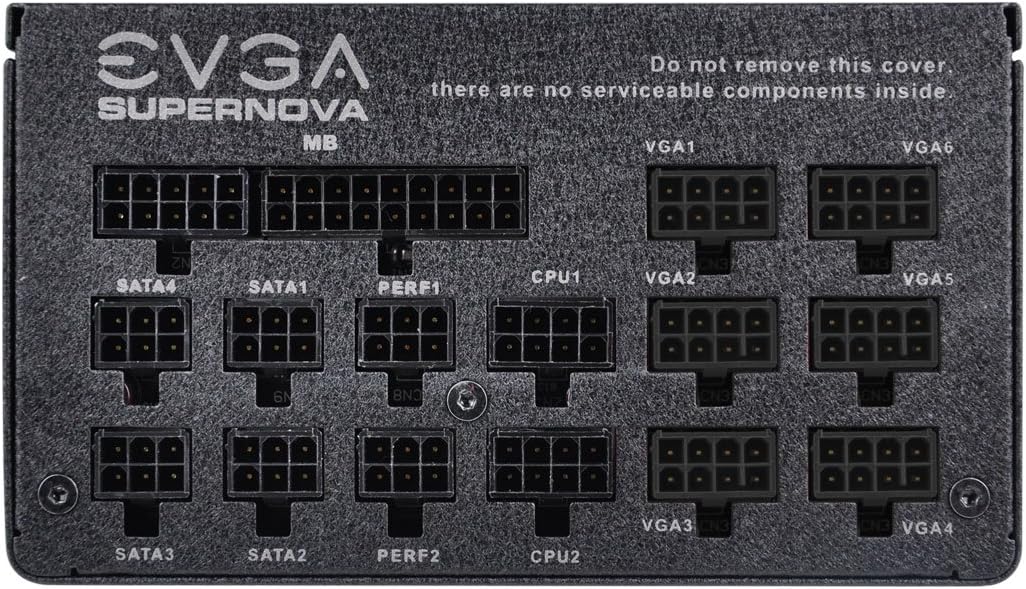
Image: Side view of the EVGA SuperNOVA 1300 G2 power supply, displaying its electrical specifications label.
| Feature | Specification |
|---|---|
| Model Number | 120-G2-1300-XR |
| Brand | EVGA |
| Series | SuperNOVA G2 |
| Output Wattage | 1300 Watts |
| 80 PLUS Certification | Gold (up to 90% efficiency) |
| Form Factor | ATX |
| Modularity | Fully Modular |
| Fan Size / Bearing | 140mm Double Ball Bearing |
| Cooling Method | Air |
| Input Voltage | 100-240 VAC |
| Input Frequency | 50/60 Hz |
| Protections | OVP, UVP, OCP, OPP, SCP |
| Product Dimensions (LxWxH) | 7.4 x 12 x 11.2 inches (approximate) |
| Item Weight | 8 pounds (approximate) |
9. Warranty and Support
The EVGA SuperNOVA 1300 G2 power supply comes with a 10-Year Warranty, demonstrating EVGA's commitment to quality and reliability. For warranty claims or technical support, please contact EVGA directly.
EVGA Support:
- Visit the official EVGA website for support resources, FAQs, and contact information.
- Have your product model number (120-G2-1300-XR) and serial number ready when contacting support.