Introduction
This manual provides essential instructions for the safe and effective use of your Maclean MCE101 Handheld Metal Detector. Please read this guide thoroughly before operating the device and retain it for future reference.
The Maclean MCE101 is designed for detecting metallic objects. It features adjustable sensitivity and provides both LED and audio alerts upon detection.
Safety Information
- Keep the device away from water and moisture to prevent electrical damage. The device has an IP54 rating, meaning it is protected from dust and splashing water, but not full immersion.
- Do not attempt to open or modify the device. Repairs should only be performed by qualified personnel.
- Ensure correct battery polarity when installing. Remove batteries if the device will not be used for an extended period to prevent leakage.
- Dispose of batteries responsibly according to local regulations.
- This device is not a toy. Keep out of reach of children.
Product Components
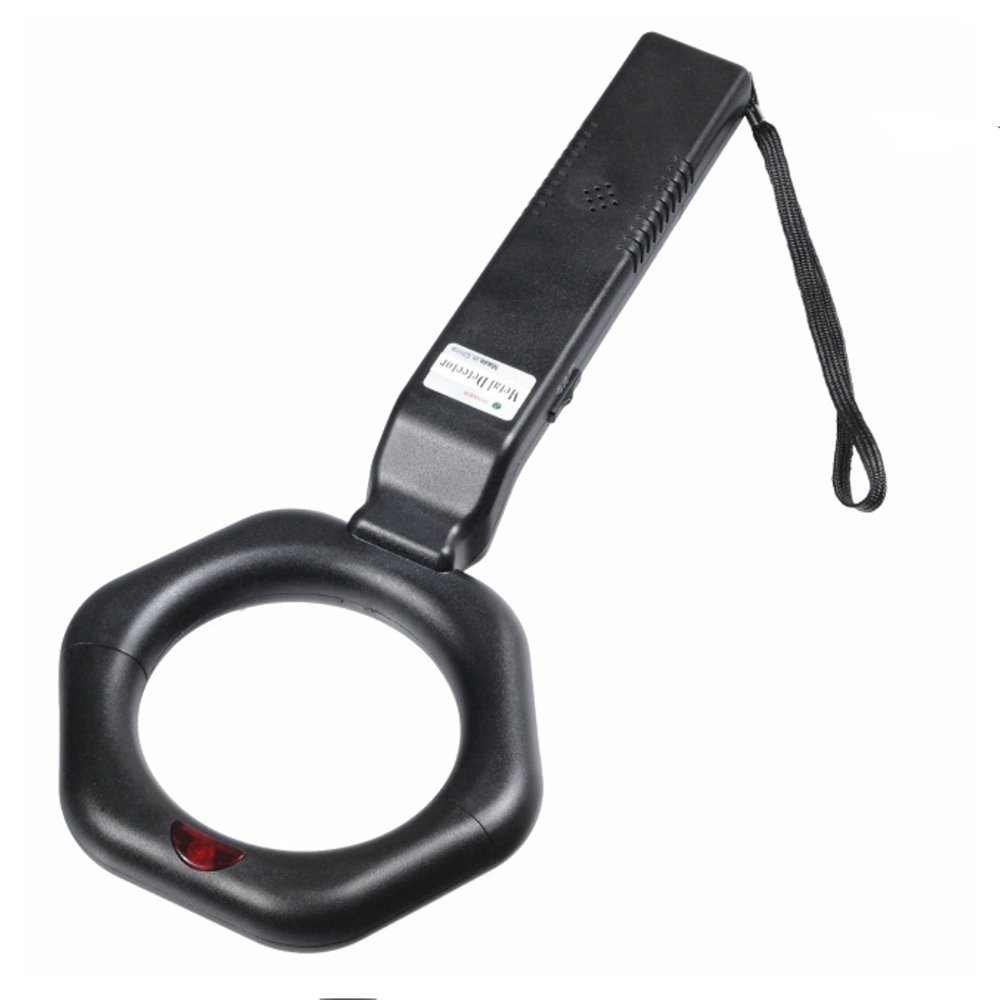
The Maclean MCE101 Handheld Metal Detector consists of the following main parts:
- Detection Head (Ring-shaped sensor)
- Handle with integrated electronics
- Power Switch (ON/OFF)
- Sensitivity Adjustment Dial/Button
- LED Indicator
- Audio Speaker
- Battery Compartment
- Wrist Strap

Setup
1. Battery Installation
- Locate the battery compartment cover on the handle of the device.
- Slide or unclip the cover to open the compartment.
- Insert one 9V (6LR61) battery, ensuring the correct polarity (+ and - terminals match the markings inside the compartment).
- Close the battery compartment cover securely.
Note: The 9V (6LR61) battery is not included with the device and must be purchased separately.
Operating Instructions
1. Powering On/Off
To turn the device on, slide the power switch to the "ON" position. The LED indicator may briefly light up, and a short beep might sound, indicating the device is ready. To turn off, slide the switch to "OFF".
2. Sensitivity Adjustment
The MCE101 features adjustable sensitivity. Locate the sensitivity control (dial or button) on the handle. Adjusting the sensitivity allows you to fine-tune the detection range and minimize false signals. Start with a medium sensitivity setting and adjust as needed based on your environment and target size.
3. Detection Process
- Hold the metal detector comfortably by the handle.
- Sweep the detection head slowly and steadily over the area you wish to scan. Maintain a consistent distance from the surface.
- When a metallic object is detected, the device will emit an audible sound and the LED indicator will light up. The intensity of the sound and light may vary with the size and proximity of the metal object.
- To pinpoint the exact location, reduce the sweep area and move the detector slowly until the signal is strongest.
4. Interpreting Signals
The device provides both visual (LED) and audible signals. A continuous or rapidly beeping sound accompanied by a lit LED indicates the presence of metal. The strength of the signal generally correlates with the size and depth of the detected object.
Maintenance
- Cleaning: Wipe the device with a soft, dry cloth. Do not use abrasive cleaners or solvents.
- Storage: Store the metal detector in a cool, dry place when not in use. Remove the battery if storing for extended periods.
- Battery Care: Replace the 9V battery when the low battery indicator (if present) activates, or if the device's performance diminishes.
Troubleshooting
| Problem | Possible Cause | Solution |
|---|---|---|
| Device does not power on. | Battery is dead or incorrectly installed. | Check battery polarity. Replace with a fresh 9V battery. |
| Weak or inconsistent detection. | Low battery or sensitivity set too low. | Replace battery. Increase sensitivity setting. |
| False alarms or constant beeping. | High sensitivity setting or interference from other electronic devices. | Decrease sensitivity. Move away from known sources of electromagnetic interference. |
Specifications
| Feature | Detail |
|---|---|
| Model Number | MCE101 |
| Dimensions (L x W x H) | 36.2 x 15.5 x 5.3 cm |
| Weight | 285 grams |
| Power Supply | 1 x 9V (6LR61) battery (not included) |
| Signaling | LED and Sound |
| Frequency | 22.5 kHz ± 10% |
| Battery Indicator | Yes |
| Power Consumption | 8 mA (min), 60 mA (max) |
| Material | Metal |
| International Protection (IP) Rating | IP54 |
| Estimated Battery Life | 8 hours |
Warranty and Support
For warranty information and technical support, please refer to the contact details provided at the point of purchase or on the manufacturer's official website.
Spare parts availability for this product is currently unavailable.


