1. Introduction
Thank you for purchasing the Vonyx SPJ-1000A Active Speaker. This manual provides important information regarding the safe operation, installation, and maintenance of your speaker. Please read this manual thoroughly before using the product to ensure proper and safe usage.
1.1 Safety Instructions
- Always connect the speaker to a grounded power outlet.
- Do not expose the unit to rain or moisture to prevent electric shock.
- Ensure proper ventilation around the speaker to prevent overheating.
- Do not open the speaker enclosure; there are no user-serviceable parts inside. Refer all servicing to qualified personnel.
- Avoid placing the speaker near heat sources or in direct sunlight.
- Protect the power cord from being walked on or pinched.
- Disconnect the power plug during lightning storms or when unused for long periods.
2. Product Overview
The Vonyx SPJ-1000A is a compact yet powerful 10-inch active speaker designed for various audio applications, including small parties, presentations, and live performances. It features an integrated amplifier, multiple input options, and tone controls for optimal sound customization.

Figure 2.1: Front-side view of the Vonyx SPJ-1000A Active Speaker.
2.1 Key Features
- 400W maximum power output for robust sound.
- Integrated amplifier for plug-and-play convenience.
- Multiple input options: RCA, XLR, and 6.3mm jack for line and microphone connections.
- Adjustable Bass and Treble controls for sound optimization.
- Durable ABS housing, resistant to impacts.
- Versatile placement options: floor, 35mm tripod pole mount, or horizontal monitor position.
2.2 Package Contents
- Vonyx SPJ-1000A Active Speaker Unit
- Power Cable
- Instruction Manual
3. Controls and Connections
The rear panel of the SPJ-1000A speaker houses all the necessary controls and connection ports. Familiarize yourself with these before operation.

Figure 3.1: Rear panel of the Vonyx SPJ-1000A Active Speaker.

Figure 3.2: Close-up of the control panel.
3.1 Control Panel Layout
- MIC IN (XLR / 6.3mm Jack): Input for connecting a microphone.
- LINE IN (RCA / XLR): Inputs for connecting line-level audio sources such as mixers, CD players, or smartphones.
- LINE OUT (XLR): Output for connecting to another active speaker or audio device.
- MIC LEVEL: Rotary knob to adjust the volume of the microphone input.
- LINE LEVEL: Rotary knob to adjust the volume of the line input.
- BASS: Rotary knob to adjust the low-frequency response.
- TREBLE: Rotary knob to adjust the high-frequency response.
- POWER Switch: Toggles the speaker power ON/OFF.
- CLIP Indicator: Illuminates when the input signal is too high, indicating potential distortion.
- PWR Indicator: Illuminates when the speaker is powered on.
- AC IN: Power input connector for the included power cable.
4. Setup
4.1 Placement
The SPJ-1000A offers flexible placement options:
- Floor Placement: The speaker can be placed directly on a stable, flat surface.
- Tripod Mounting: Utilize the integrated 35mm pole mount socket on the bottom of the speaker to mount it on a standard speaker tripod for elevated sound projection.
- Stage Monitor: The unique cabinet design allows the speaker to be placed horizontally on its side, making it suitable for use as a stage monitor.

Figure 4.1: Speaker in stage monitor position.
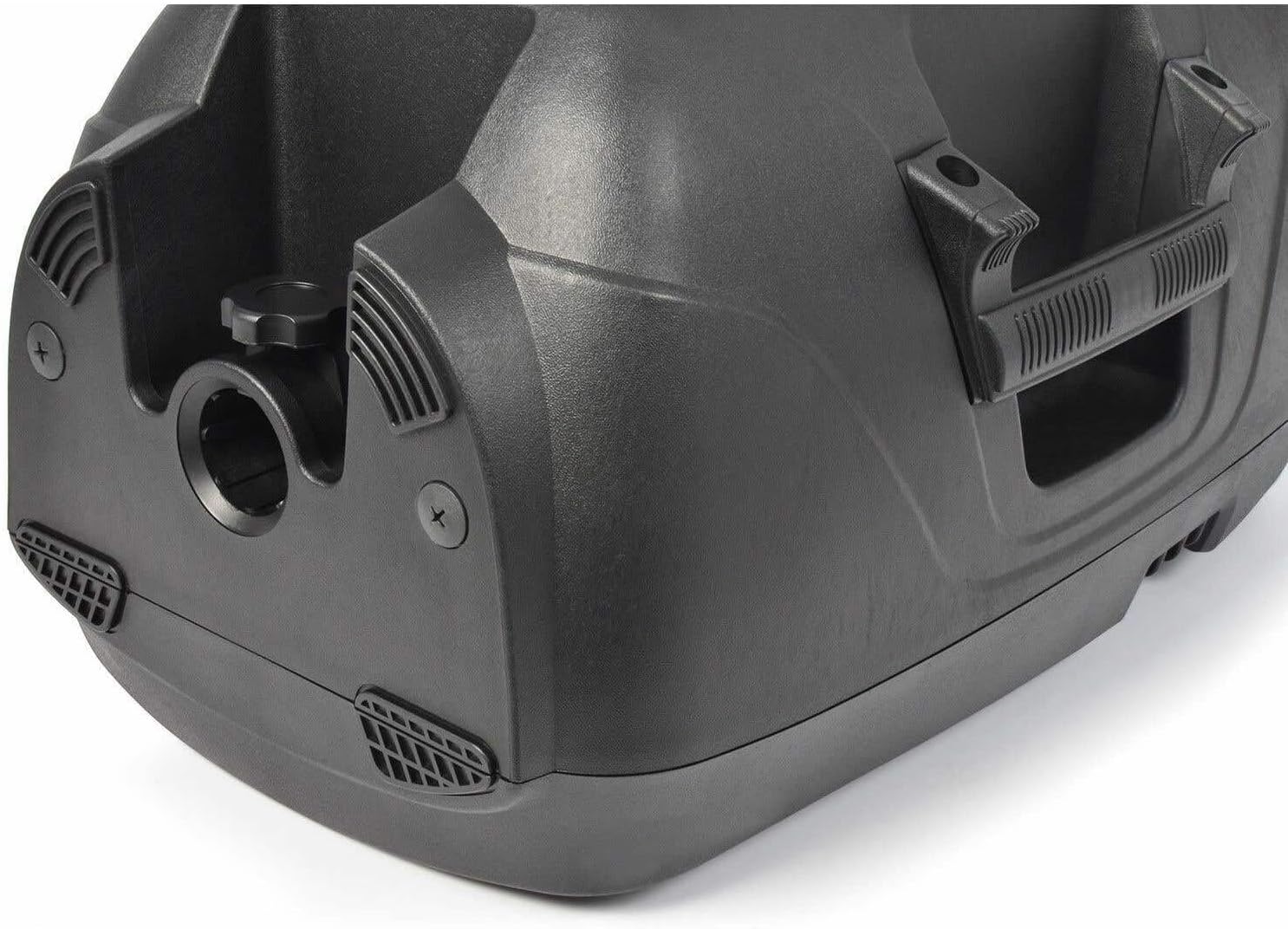
Figure 4.2: Bottom view showing the pole mount socket.
4.2 Power Connection
- Ensure the POWER switch on the rear panel is in the OFF position.
- Connect the supplied power cable to the AC IN port on the speaker.
- Plug the other end of the power cable into a suitable grounded electrical outlet.
4.3 Audio Connections
Connect your audio sources to the speaker using the appropriate input ports:
- Microphone: Connect a microphone to the MIC IN (XLR or 6.3mm Jack) port.
- Line-Level Devices: Connect devices like mixers, laptops, or smartphones to the LINE IN (RCA or XLR) ports.
- Daisy-Chaining: Use the LINE OUT (XLR) port to connect to another active speaker or an external amplifier for expanding your sound system.
5. Operation
5.1 Powering On/Off
- Before powering on, ensure all volume controls (MIC LEVEL, LINE LEVEL) are set to their minimum position.
- Flip the POWER switch to the ON position. The PWR indicator will illuminate.
- To power off, set all volume controls to minimum, then flip the POWER switch to the OFF position.
5.2 Adjusting Volume
- MIC LEVEL: Slowly increase this knob to adjust the volume of the connected microphone.
- LINE LEVEL: Slowly increase this knob to adjust the volume of the connected line-level audio source.
- Monitor the CLIP indicator. If it flashes frequently or stays lit, reduce the input level from your source or the corresponding level knob to prevent distortion.
5.3 Tone Control
Use the BASS and TREBLE knobs to fine-tune the speaker's sound output to your preference or the acoustics of the room.
- BASS: Turn clockwise to increase low frequencies (bass), counter-clockwise to decrease.
- TREBLE: Turn clockwise to increase high frequencies (treble), counter-clockwise to decrease.
6. Maintenance
Proper maintenance ensures the longevity and optimal performance of your Vonyx SPJ-1000A speaker.
- Cleaning: Use a soft, dry cloth to clean the exterior of the speaker. Do not use abrasive cleaners, solvents, or waxes.
- Storage: When not in use for extended periods, store the speaker in a cool, dry place, away from direct sunlight and extreme temperatures.
- Ventilation: Ensure the ventilation grilles are free from dust and debris to maintain proper airflow.
7. Troubleshooting
If you encounter issues with your speaker, refer to the table below for common problems and their solutions.
| Problem | Possible Cause | Solution |
|---|---|---|
| No power | Power cable not connected; Power switch off; No power from outlet | Check power cable connection; Turn power switch ON; Test outlet with another device |
| No sound output | Volume controls too low; Incorrect input selected; Faulty audio cable; Source device not playing | Increase MIC/LINE LEVEL; Ensure correct input connection; Replace audio cable; Check source device |
| Distorted sound (CLIP light on) | Input signal too high | Reduce volume on source device or MIC/LINE LEVEL knob on speaker |
| Humming or buzzing noise | Ground loop; Faulty cable; Interference | Ensure proper grounding; Try different cables; Move speaker away from other electronics |
8. Specifications
Detailed technical specifications for the Vonyx SPJ-1000A Active Speaker.
| Feature | Specification |
|---|---|
| Model Name | SPJ-1000A |
| Speaker Size | 10 Inches |
| Max. Output Power | 400 Watts |
| RMS Power | 200 Watts |
| Frequency Response | 55 Hz - 18 kHz |
| Max. SPL | 119 dB |
| Connections | RCA, XLR |
| Control Method | Voice (referring to microphone input control) |
| Power Source | Corded Electric |
| Material | ABS |
| Color | Black |
| Product Dimensions (L x W x H) | 26 x 32 x 49.5 cm (10.2 x 12.6 x 19.5 inches) |
| Weight | 7.96 kg (17.55 lbs) |
| Recommended Uses | Indoor and outdoor events, parties, PA systems |
9. Warranty and Support
Vonyx products are designed and manufactured to the highest standards. For information regarding warranty coverage, technical support, or service, please refer to the warranty card included with your product or visit the official Vonyx website. Keep your purchase receipt as proof of purchase.
For further assistance, you may contact the retailer where you purchased the product or the Vonyx customer support directly.


