
1. Introduction
Thank you for choosing the Fonestar AS-24U Hi-Fi USB/SD/MP3 Amplifier. This manual provides essential information for the safe and efficient operation of your device. Please read it thoroughly before use and retain it for future reference.
2. Safety Instructions
- Power Supply: Ensure the amplifier is connected to a power source matching the specified voltage (230V).
- Ventilation: Do not block ventilation openings. Allow adequate space around the unit for proper airflow to prevent overheating.
- Moisture: Keep the amplifier away from water, moisture, and high humidity environments. Do not expose it to dripping or splashing.
- Heat Sources: Avoid placing the unit near heat sources such as radiators, heat registers, stoves, or other heat-producing appliances.
- Cleaning: Disconnect the power cord before cleaning. Use a dry, soft cloth. Do not use liquid cleaners or aerosol cleaners.
- Servicing: Do not attempt to service this product yourself. Refer all servicing to qualified service personnel.
- Object/Liquid Entry: Never push objects of any kind into this product through openings as they may touch dangerous voltage points or short-out parts that could result in a fire or electric shock.
3. Product Overview
3.1 Front Panel
The front panel features controls for power, input selection, volume adjustment, and USB/SD media playback. It also includes a display for media information.
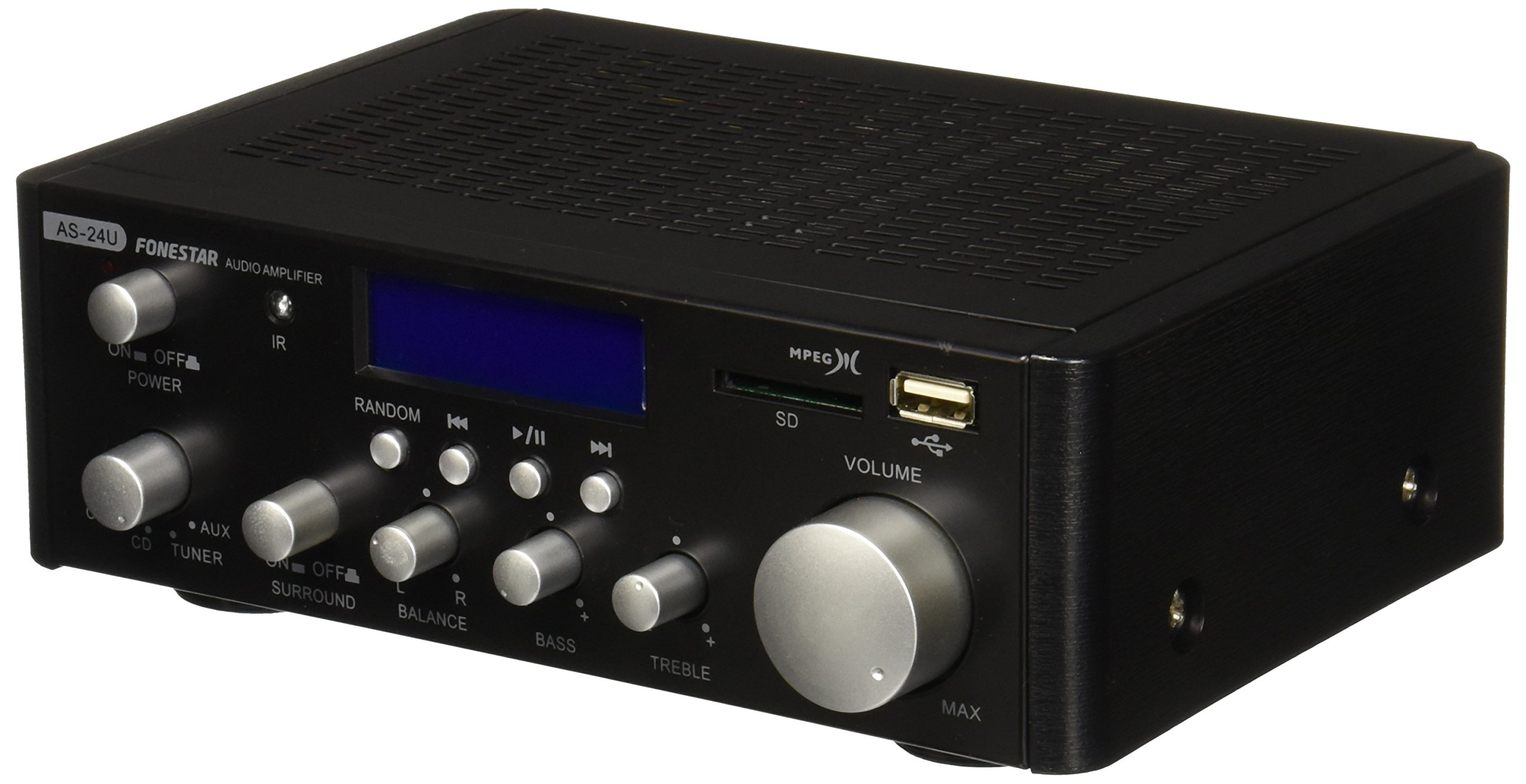
Image 1: Front view of the Fonestar AS-24U amplifier, showing the main controls and display.
3.2 Rear Panel
The rear panel provides all necessary connections for audio input sources, speaker outputs, and power.

Image 2: Rear view of the Fonestar AS-24U amplifier, detailing input/output ports and power connection.
- INPUT (AUX, TUNER, CD): RCA stereo inputs for connecting external audio sources.
- SPEAKER OUT (STEREO): Spring clip terminals for connecting passive speakers (4-8 Ω).
- SPEAKER OUT (SURROUND): Additional spring clip terminals for surround speakers (8 Ω).
- POWER IN: AC power input for the main power cable.
- VOLTAGE SELECTOR: Switch for selecting between 115V and 230V power input. Ensure this is set correctly for your region.
3.3 Remote Control
The included remote control allows for convenient operation of the amplifier's media playback functions.
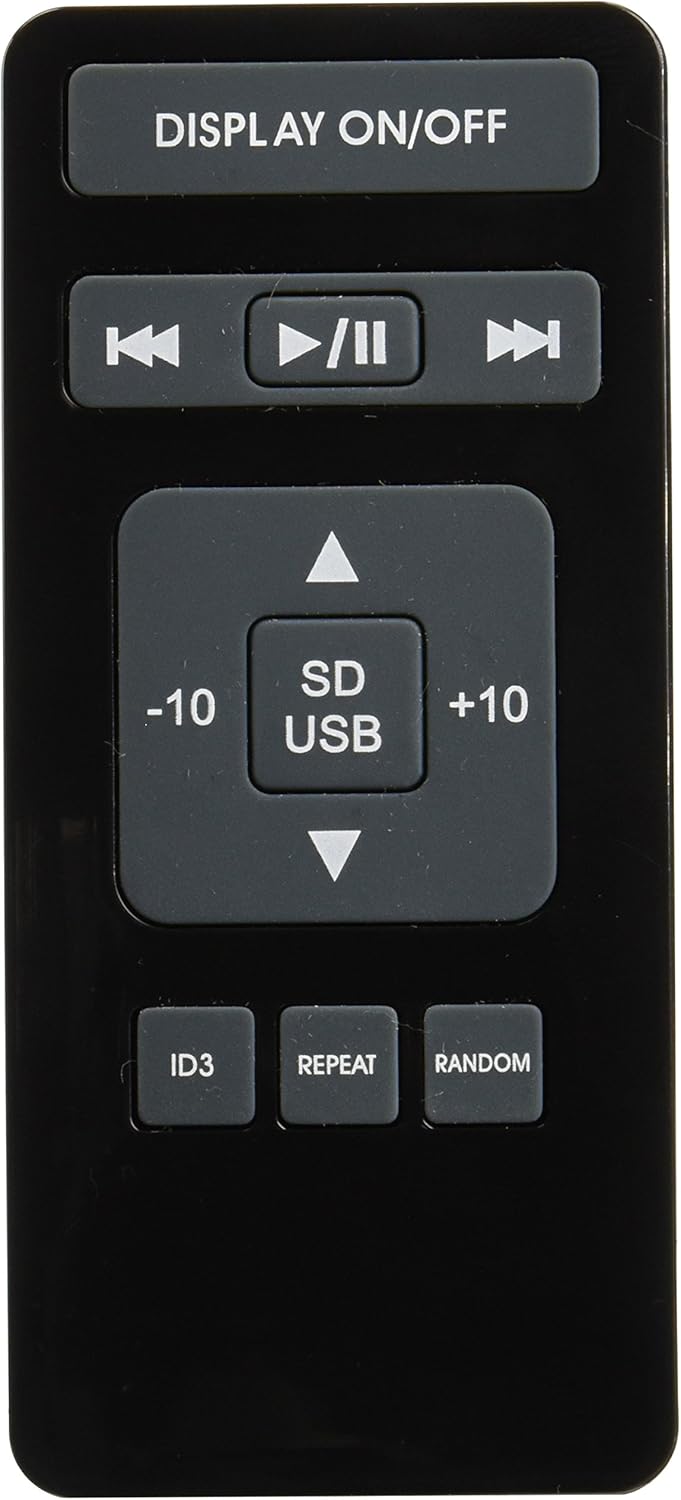
Image 3: Remote control for the Fonestar AS-24U amplifier, showing buttons for media playback and display control.
- DISPLAY ON/OFF: Toggles the front panel display.
- PLAY/PAUSE, PREVIOUS/NEXT: Controls for media playback.
- SD/USB: Selects between SD card and USB drive as the media source.
- -10/+10: Skips tracks by 10.
- ID3: Displays ID3 tag information for MP3 files.
- REPEAT: Toggles repeat modes (e.g., repeat one, repeat all).
- RANDOM: Toggles random playback.
4. Setup
4.1 Connecting Speakers
- Ensure the amplifier is powered off and unplugged.
- Connect your passive speakers to the SPEAKER OUT terminals on the rear panel.
- Match the positive (+) terminal on the amplifier to the positive (+) terminal on your speaker, and the negative (-) to the negative (-).
- For stereo speakers, use the 4-8 Ω terminals. For surround speakers, use the 8 Ω terminals. Ensure your speakers' impedance matches the amplifier's specifications.
4.2 Connecting Audio Sources
- Connect your audio devices (e.g., CD player, tuner, auxiliary device) to the corresponding RCA INPUT jacks (CD, TUNER, AUX) on the rear panel.
- Ensure left and right channels are correctly matched (red for right, white for left).
4.3 Power Connection
- Verify the VOLTAGE SELECTOR switch on the rear panel is set to the correct voltage for your region (e.g., 230V).
- Connect the power cable to the POWER IN socket on the rear panel and then to a suitable wall outlet.
5. Operating Instructions
5.1 Powering On/Off
Press the power button on the front panel to turn the amplifier on or off. A soft start protection circuit is integrated.
5.2 Selecting Input Source
Use the input selector knob or buttons on the front panel to choose between CD, TUNER, AUX, USB, or SD inputs.
5.3 Adjusting Volume
Rotate the main volume knob on the front panel to adjust the overall sound level. Start with a low volume and gradually increase it to a comfortable listening level.
5.4 USB/SD Playback
- Insert a USB flash drive or SD card containing MP3 audio files into the respective slot on the front panel.
- Select the USB or SD input using the input selector.
- Use the playback controls (Play/Pause, Previous/Next) on the front panel or remote control to manage your music.
- The remote control allows for additional functions like skipping 10 tracks (+10/-10), displaying ID3 tags, repeating tracks, and random playback.
6. Maintenance
6.1 Cleaning
To clean the amplifier, first unplug it from the power outlet. Use a soft, dry cloth to wipe down the exterior surfaces. Do not use abrasive cleaners, waxes, or solvents as they may damage the finish.
6.2 Storage
If storing the amplifier for an extended period, ensure it is unplugged, clean, and stored in a cool, dry place away from direct sunlight and extreme temperatures.
7. Troubleshooting
- No Power:
- Check if the power cable is securely connected to both the amplifier and the wall outlet.
- Ensure the wall outlet is functional.
- Verify the VOLTAGE SELECTOR switch is set correctly.
- No Sound:
- Confirm that the correct input source is selected.
- Check all speaker connections for proper polarity and secure fit.
- Ensure the volume is turned up and not muted.
- Test with a different audio source.
- Distorted Sound:
- Reduce the volume.
- Check speaker impedance compatibility.
- Ensure audio cables are not damaged and are securely connected.
- USB/SD Playback Issues:
- Ensure the USB drive or SD card is formatted to a compatible file system (e.g., FAT32).
- Verify that the audio files are in MP3 format.
- Try a different USB drive or SD card.
8. Specifications
| Brand | FONESTAR |
| Model | AS-24U |
| Stereo Power Output | 25 + 25 W max, 15 + 15 W RMS (4 Ω), 12 + 12 W RMS (8 Ω) |
| Surround Power Output | 10 + 10 W max, 6 + 6 W RMS (8 Ω) |
| Inputs | 3 stereo (CD, Tuner, AUX), 2 x RCA 400 mV |
| Protections | Soft start, short circuit, overload |
| Voltage | 230 Volts |
| Dimensions (L x W x H) | 5 x 5 x 10 cm (approx. 50 x 50 x 100 mm) |
| Weight | 1.9 kg |
| Speaker Connectivity | Wired |
9. Warranty and Support
This Fonestar AS-24U amplifier comes with a standard manufacturer's warranty. Please refer to the warranty card included with your purchase for specific terms and conditions. For technical support, service, or warranty claims, please contact your retailer or the official Fonestar customer service.
