
1. Introduction
This manual provides instructions for the proper installation and use of the ACV 1530-01 GT13 DIN Antenna Adaptor. This adaptor is designed to connect a vehicle's GT13 antenna system to a car radio or head unit requiring a DIN antenna input.
2. Product Overview
The ACV 1530-01 is an antenna adapter that converts a GT13 female connector to a DIN male connector. It ensures proper signal transmission between your vehicle's antenna and your aftermarket radio.
Compatibility:
- Honda Civic (2006 onwards)
- Honda CR-V (2006 onwards)
- Honda FR-V (2007 onwards)
- Mazda 3 (2010 onwards)
- Mazda 6 (2010 onwards)
- Mazda CX 7 (2009 onwards)
- Suzuki Swift (2012 onwards)
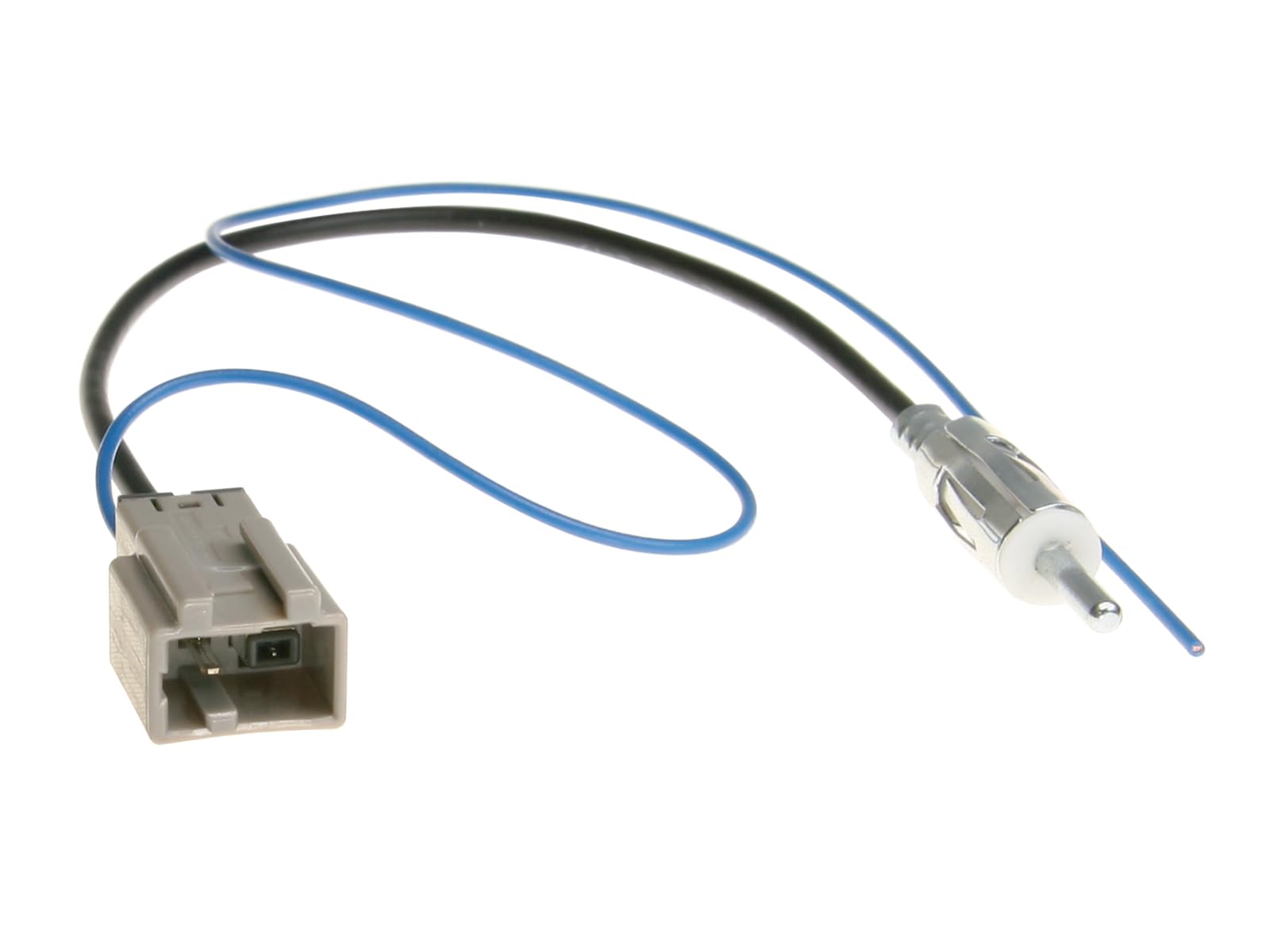
This image displays the two ends of the ACV 1530-01 antenna adaptor. On the left is the grey GT13 connector, designed to plug into the vehicle's existing antenna cable. On the right, a standard DIN male antenna plug is visible, which connects to the aftermarket car radio.
3. Setup and Installation
Before Installation:
- Ensure the vehicle's ignition is off and the battery is disconnected to prevent electrical damage.
- Verify that your vehicle's antenna cable has a GT13 female connector and your new car radio requires a DIN male input.
Installation Steps:
- Locate the vehicle's existing antenna cable, typically found behind the car radio or dashboard.
- Connect the GT13 end of the ACV 1530-01 adaptor to the vehicle's antenna cable. Ensure a secure fit.
- Connect the DIN end of the ACV 1530-01 adaptor to the antenna input port on your aftermarket car radio. Ensure a secure fit.
- Carefully route the cable to avoid pinching or damage.
- Reconnect the vehicle's battery and turn on the ignition.
- Test the radio's reception to confirm proper installation.
4. Operating Instructions
Once installed, the ACV 1530-01 adaptor operates passively, facilitating the antenna signal. No user interaction is required for its operation. The quality of radio reception will depend on the vehicle's antenna, the car radio, and environmental factors.
5. Maintenance
The ACV 1530-01 antenna adaptor requires no regular maintenance. Ensure connections remain secure and free from moisture or physical damage. If the adaptor is removed, inspect the connectors for any signs of wear or corrosion before reinstallation.
6. Troubleshooting
No Radio Reception or Poor Signal:
- Check all connections: Ensure the GT13 end is firmly connected to the vehicle's antenna cable and the DIN end is firmly connected to the car radio.
- Verify compatibility: Confirm that the adaptor is correct for your vehicle and radio model.
- Inspect for damage: Check the adaptor cable and connectors for any visible damage, bends, or corrosion.
- Test with another antenna (if possible): This can help determine if the issue is with the adaptor, the vehicle's antenna, or the car radio.
- Ensure the vehicle's antenna is properly installed and functional.
7. Specifications
- Model: 1530-01
- Connector Type 1: GT13 (female)
- Connector Type 2: DIN (male)
- Impedance: 50 Ohms
- Dimensions: Approximately 9.84 x 0.39 x 0.39 inches (25 x 1 x 1 cm)
- Weight: Approximately 1.41 ounces (40 grams)
- Material: High-quality plastic and metal connectors
- Box Contents: 1x ACV 1530-01 Antenna Adaptor
8. Warranty and Support
For warranty information and technical support, please refer to the documentation provided with your purchase or contact ACV customer service directly. Keep your proof of purchase for warranty claims.