1. Introduction
This manual provides instructions for the safe and effective use of your Silverline Audio Replacement AC Adapter. This adapter is designed to provide reliable power to compatible Korg electronic devices, serving as an aftermarket replacement for original power supplies.
Please read this manual thoroughly before using the product to ensure proper operation and to prevent damage to your devices.
2. Important Safety Instructions
- Polarity Warning: This power adapter features a center negative pin. It is crucial to verify that your Korg device also requires a center negative power supply. Using a power supply with a positive center pin will cause damage to your device.
- Voltage and Current: Ensure your device requires 9V DC and a maximum of 1A. Using this adapter with devices requiring different voltage or higher current may cause damage.
- Indoor Use Only: This adapter is designed for indoor use in dry locations. Do not expose it to water, moisture, or extreme temperatures.
- Ventilation: Ensure adequate ventilation around the adapter during use. Do not cover it or place it in an enclosed space.
- Cable Care: Do not pull on the cord to disconnect the adapter from the outlet. Always grasp the plug firmly. Avoid placing heavy objects on the cord or kinking it.
- Damage: Do not use the adapter if the cord or plug is damaged. Contact the manufacturer for assistance.
3. Compatible Devices
This Silverline Audio Replacement AC Adapter is compatible with the following Korg products:
- Korg Beatlab Digital Metronome
- Korg microKONTROL Midi Studio Controller
- Korg MT1200 Master Tune - Multi Temperament Tuner
- Korg GT120 Guitar/Bass Chromatic Tuner
- Korg OT12M Orchestral Tuner
- Korg OT120 Orchestral Tuner
Always confirm the power requirements (voltage, current, and polarity) of your specific device before connecting the adapter.
4. Setup
- Inspect the Adapter: Before connecting, visually inspect the adapter and its cable for any signs of damage.
- Verify Device Requirements: Confirm that your Korg device requires a 9V DC, 1A, center negative power supply. This information is usually found on the device itself or in its original manual.
- Connect to Device: Insert the barrel connector tip of the AC adapter firmly into the DC input jack of your Korg device.
- Connect to Power Outlet: Plug the AC adapter into a standard wall outlet (100-240V AC, 50-60Hz).
- Power On: Turn on your Korg device. If it does not power on, refer to the Troubleshooting section.
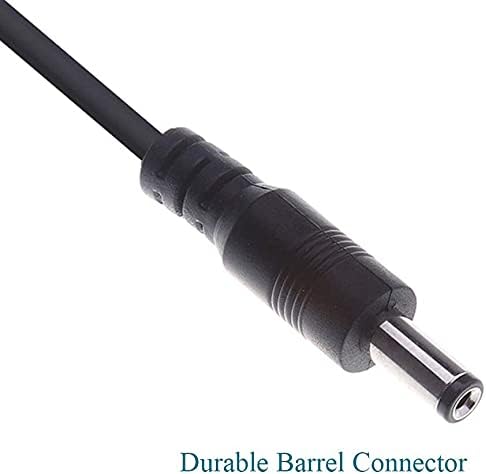
Figure 1: A detailed view of the adapter's durable barrel connector, featuring a center negative pin configuration. Ensure this matches your device's power input requirements.
5. Operation
Once connected, the Silverline Audio Replacement AC Adapter provides continuous power to your compatible Korg device. There are no user-adjustable settings on the adapter itself.
- Ensure the adapter is securely plugged into both the wall outlet and your device.
- The adapter is designed for continuous use within its specified operating parameters.
- Disconnect the adapter from the wall outlet when not in use for extended periods.
6. Maintenance
The Silverline Audio Replacement AC Adapter requires minimal maintenance.
- Cleaning: Disconnect the adapter from power before cleaning. Use a soft, dry cloth to wipe the exterior. Do not use liquid cleaners or solvents.
- Storage: When not in use, store the adapter in a cool, dry place, away from direct sunlight and moisture. Avoid tightly winding the cable to prevent damage.
- Inspection: Periodically inspect the cable and connector for any signs of wear or damage.
7. Troubleshooting
| Problem | Possible Cause | Solution |
|---|---|---|
| Device does not power on. |
|
|
| Adapter feels warm during use. | Normal operation. | A slight warmth is normal. Ensure adequate ventilation. If it becomes excessively hot or emits smoke/odor, disconnect immediately. |
8. Specifications
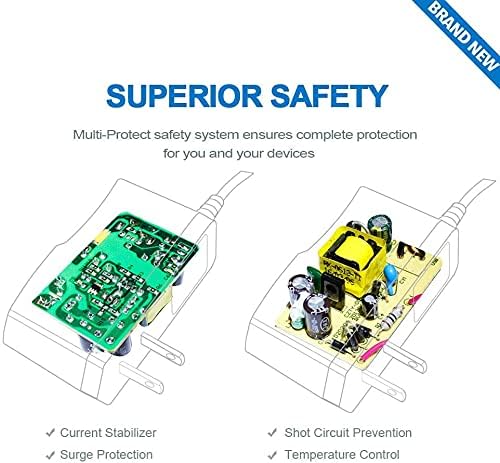
Figure 2: This image illustrates the internal safety features of the power adapter, including current stabilization, surge protection, short circuit prevention, and temperature control, designed to protect both the adapter and your connected device.
| Feature | Detail |
|---|---|
| Input Voltage | 100-240V AC, 50-60Hz |
| Output Voltage | 9V DC |
| Output Current | 1A (1000mA) |
| Polarity | Center Negative (-) |
| Cable Length | Approximately 43 inches (109 cm) |
| Connector Type | Barrel Connector |
| Safety Standards | FCC, CE, RoHS Compliant |
| Safety Features | Automatic Overload Cut-off, Automatic Thermal Cut-off, Short Circuit Protection, Over Voltage Protection, Current Stabilizer, Surge Protection |
9. Warranty and Support
For warranty information or technical support regarding your Silverline Audio Replacement AC Adapter, please contact the manufacturer directly. Details can typically be found on the product packaging or the seller's website.
Please retain your proof of purchase for warranty claims.


