
1. Introduction
The Kodak PIXPRO Astro Zoom AZ361 is a 16.1-megapixel digital camera featuring a powerful 36x optical zoom lens and a 24mm wide-angle capability. Designed for ease of use, this camera allows you to capture high-quality photos and 720p HD videos. Its features include optical image stabilization, various detection modes, and a 3-inch LCD screen for clear framing and review.
2. Package Contents
Before you begin, please ensure all items are present in your camera package:
- Kodak PIXPRO Astro Zoom AZ361 Camera Body
- LCD Screen (integrated)
- Lithium-Ion Batteries
- USB Cable (for charging and data transfer)
- AC Adapter
- Neck Strap
- Lens Cap
3. Camera Overview
Familiarize yourself with the camera's components and controls.
Front and Angled View

Figure 3.1: Front angled view of the Kodak PIXPRO Astro Zoom AZ361, showing the lens, grip, and flash unit.
This view highlights the camera's 36x optical zoom lens, the ergonomic grip, and the built-in flash unit. The lens cap should be removed before operation.
Rear View
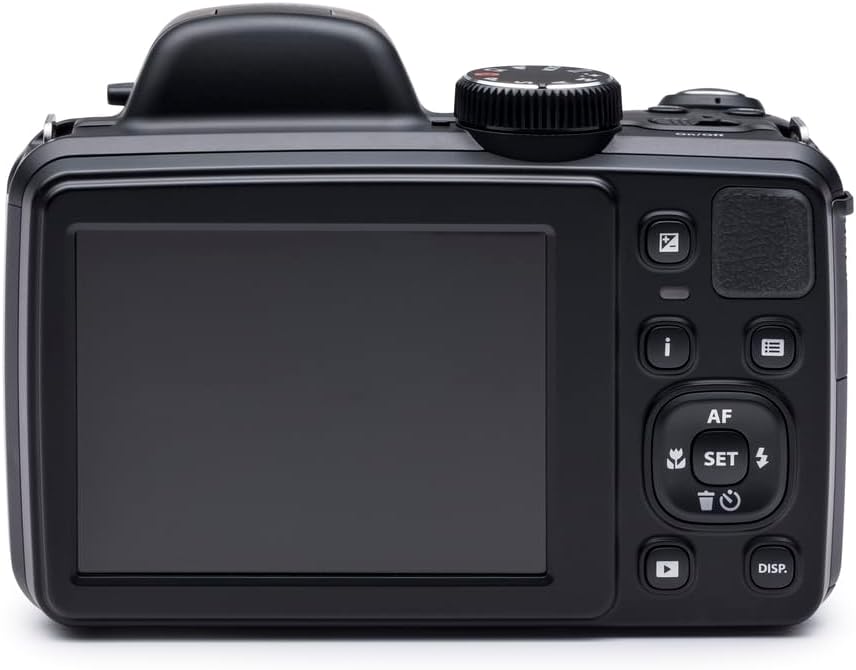
Figure 3.2: Rear view of the Kodak PIXPRO Astro Zoom AZ361, displaying the 3-inch LCD screen and various control buttons.
The rear of the camera features the 3-inch LCD screen for live view and playback. To the right of the screen are navigation buttons, menu access, playback, and dedicated video recording buttons.
Top View with Flash Up

Figure 3.3: Top angled view of the Kodak PIXPRO Astro Zoom AZ361, showing the pop-up flash in its activated position.
This image shows the camera with its pop-up flash extended, ready for use in low-light conditions. The mode dial and shutter button are also visible on the top panel.
4. Setup
4.1. Installing the Battery
- Open the battery compartment cover located at the bottom of the camera.
- Insert the supplied Lithium-Ion battery, ensuring the correct orientation as indicated inside the compartment.
- Close the battery compartment cover securely.
4.2. Charging the Battery
Connect the camera to the AC adapter using the USB cable. The charging indicator light will show the charging status. Ensure the battery is fully charged before first use.
4.3. Inserting a Memory Card
The camera supports SDXC memory cards. A maximum capacity of 64GB is recommended.
- Open the memory card slot cover, usually located near the battery compartment.
- Insert the SDXC card with the metal contacts facing the correct direction until it clicks into place.
- Close the memory card slot cover.
4.4. Initial Power On
Press the Power button to turn on the camera. Follow any on-screen prompts for initial setup, such as setting the date and time.
5. Operating the Camera
5.1. Taking Photos
- Turn on the camera.
- Select your desired shooting mode using the mode dial (e.g., Auto, Program, Scene modes).
- Frame your shot using the 3-inch LCD screen or the optical viewfinder.
- Use the zoom lever to adjust the 36x optical zoom.
- Press the shutter button halfway down to focus. The camera will automatically detect faces, cats, or dogs if enabled.
- Press the shutter button fully to capture the image.
5.2. Recording Videos
The camera can record HD 720p videos in MP4 format.
- In a shooting mode, press the dedicated video recording button.
- Press the button again to stop recording.
5.3. Special Features
- Face/Cat/Dog Detection: Automatically detects and optimizes focus and exposure for faces, cats, or dogs in your frame.
- Blink/Smile Detection: Helps capture the perfect moment by detecting blinks or smiles.
- Face Beautifier Mode: Reduces facial flaws and enhances skin tone in portraits.
- Panorama Mode: Create seamless 180-degree panoramic images by panning the camera.
- Optical Image Stabilization: Minimizes blur caused by camera shake, especially useful with the 36x zoom.
5.4. Playback
Press the Playback button to review your photos and videos on the LCD screen. Use the navigation buttons to scroll through your media.
6. Maintenance
6.1. Cleaning the Camera
- Use a soft, lint-free cloth to clean the camera body.
- For the lens and LCD screen, use a specialized lens cleaning cloth and solution. Avoid harsh chemicals.
- Ensure the camera is powered off before cleaning.
6.2. Battery Care
- Store batteries in a cool, dry place when not in use.
- Avoid fully discharging the battery frequently to prolong its lifespan.
- Remove the battery if the camera will not be used for an extended period.
6.3. Storage
Store the camera in a dry, dust-free environment, away from extreme temperatures and direct sunlight. Use a camera bag for protection during transport.
7. Troubleshooting
If you encounter issues with your camera, refer to the following common problems and solutions:
- Camera does not power on:
Ensure the battery is fully charged and correctly inserted. Try recharging the battery. - Camera freezes or becomes unresponsive:
Remove the battery, wait a few seconds, and then reinsert it to reset the camera. - Images are blurry or out of focus:
Ensure the lens is clean. Check that the camera is focusing correctly by pressing the shutter button halfway. Avoid shooting objects closer than 2 feet, as the camera may have difficulty focusing at very close ranges, especially with high zoom. Ensure optical image stabilization is active. - Memory card error:
Ensure the memory card is inserted correctly and is not full. Try formatting the card (this will erase all data). Use a compatible SDXC card (up to 64GB). - Poor image quality:
Check your shooting mode and lighting conditions. Ensure the lens is clean.
8. Specifications
| Feature | Specification |
|---|---|
| Model Name | Astro Zoom AZ361 |
| Sensor Type | 16.1 MP CCD |
| Optical Zoom | 36x |
| Digital Zoom | 4x |
| Lens Type | Wide Angle (24-864mm equivalent) |
| Maximum Aperture | f/2.9 - f/5.7 |
| Image Stabilization | Optical, Digital |
| Display | 3-inch LCD (921600 dots) |
| Viewfinder | Optical |
| Video Resolution | HD 720p (MP4 format) |
| Supported File Formats | JPEG, RAW |
| Flash Memory Type | SDXC (up to 64GB) |
| Battery Type | Lithium Ion |
| Connectivity | USB 2.0, Video Out |
| Item Weight | 14.72 ounces |
| Color | Black |
9. Warranty and Support
For warranty information and technical support, please refer to the official KODAK PIXPRO website or contact their customer service. Keep your proof of purchase for warranty claims.


