1. Introduction
This manual provides essential information for the safe and efficient operation of your Audiopipe DJAP1580BT 15-inch Professional Loudspeaker. This unit features Bluetooth connectivity, an FM tuner, USB/SD card playback, and remote control functionality. Please read this manual thoroughly before using the product and retain it for future reference.
2. Important Safety Instructions
- Power Source: Connect the unit only to the specified power supply as indicated on the product label. Ensure the voltage is compatible with your region.
- Ventilation: Do not block any ventilation openings. Install in accordance with the manufacturer's instructions. Maintain adequate space around the unit for proper airflow.
- Water and Moisture: Do not expose this apparatus to rain or moisture. Do not place objects filled with liquids, such as vases, on the apparatus.
- Heat: Do not install near any heat sources such as radiators, heat registers, stoves, or other apparatus (including amplifiers) that produce heat.
- Cleaning: Clean only with a dry cloth. Unplug the unit from the wall outlet before cleaning.
- Servicing: Do not attempt to service this product yourself. Refer all servicing to qualified service personnel. Servicing is required when the apparatus has been damaged in any way, such as power-supply cord or plug is damaged, liquid has been spilled or objects have fallen into the apparatus, the apparatus has been exposed to rain or moisture, does not operate normally, or has been dropped.
- California Proposition 65 Warning: This product may contain chemicals known to the State of California to cause cancer and birth defects or other reproductive harm.
3. Package Contents
Verify that all items are present in the package:
- Audiopipe DJAP1580BT 15-inch Professional Loudspeaker
- Remote Control
- Power Cord
- User Manual (this document)
4. Product Overview
Familiarize yourself with the main components of your loudspeaker.
4.1 Front Panel

Figure 1: Front view of the Audiopipe DJAP1580BT loudspeaker, showcasing the 15-inch woofer, horn tweeter, and the included remote control.
The front panel features the main 15-inch woofer for bass frequencies and a horn tweeter for high frequencies. The speaker grille protects the components.
4.2 Rear Panel and Control Interface
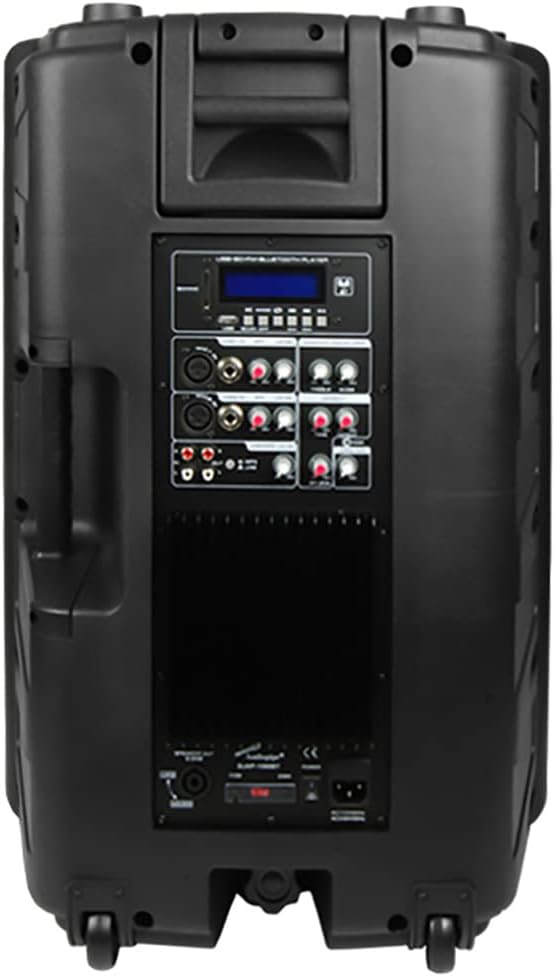
Figure 2: Rear view of the Audiopipe DJAP1580BT loudspeaker, displaying the control panel with various inputs, outputs, and adjustment knobs.
The rear panel houses the primary control interface, including:
- LCD Display: Shows current mode, track information, and FM frequency.
- Mode Button: Switches between Bluetooth, FM, USB, SD, and Line In modes.
- USB/SD Card Slots: For media playback.
- Microphone Inputs (XLR/1/4" Jack): For connecting microphones.
- Line Inputs (XLR/RCA): For connecting external audio sources.
- Line Output (XLR/RCA): For connecting to another speaker or audio device.
- Volume Controls: Separate controls for Master, Microphone, and Line inputs.
- Equalizer (EQ) Controls: For adjusting bass and treble.
- Power Switch and AC Inlet: For power connection.
5. Setup
- Unpacking: Carefully remove the loudspeaker from its packaging. Retain the packaging for future transport or storage.
- Placement: Place the loudspeaker on a stable, flat surface or mount it securely if using a speaker stand (not included). Ensure adequate ventilation around the unit.
- Power Connection: Connect the provided power cord to the AC inlet on the rear panel of the loudspeaker, then plug the other end into a suitable wall outlet.
- Initial Power On: Ensure all volume controls are set to minimum before turning on the unit. Flip the power switch on the rear panel to the "ON" position. The LCD display should illuminate.
6. Operating Instructions
6.1 Basic Operation
- Power On/Off: Use the power switch on the rear panel.
- Mode Selection: Press the "MODE" button on the control panel or remote to cycle through input sources: Bluetooth, FM, USB, SD, and Line In.
- Volume Adjustment: Use the Master Volume knob on the rear panel or the volume buttons on the remote control. Adjust individual input volumes (Mic, Line) as needed.
6.2 Bluetooth Connectivity
- Switch the loudspeaker to Bluetooth mode using the "MODE" button. The LCD display will show "BLUETOOTH" and an indicator will flash, signifying pairing mode.
- On your Bluetooth-enabled device (smartphone, tablet, etc.), enable Bluetooth and search for available devices.
- Select "DJAP1580BT" from the list of devices.
- Once paired, the Bluetooth indicator on the loudspeaker will stop flashing and remain solid. You can now play audio from your device through the loudspeaker.
6.3 FM Tuner Operation
- Switch the loudspeaker to FM mode using the "MODE" button. The LCD display will show the current FM frequency.
- Press the "PLAY/PAUSE" button (or scan button on remote) to automatically scan and save available FM stations.
- Use the "PREV/NEXT" buttons to navigate between saved stations or manually adjust the frequency.
6.4 USB/SD Card Playback
- Insert a USB flash drive or SD card (pre-loaded with MP3 audio files) into the respective slot on the rear panel.
- The loudspeaker will automatically switch to USB or SD mode and begin playing audio. If not, press the "MODE" button to select the correct source.
- Use the "PLAY/PAUSE", "PREV", and "NEXT" buttons on the control panel or remote to manage playback.
6.5 Microphone and Line Inputs
- Connect microphones to the XLR or 1/4" jack inputs. Adjust the dedicated Microphone Volume knob.
- Connect external audio devices (e.g., mixer, CD player) to the XLR or RCA Line Inputs. Adjust the dedicated Line Input Volume knob.
7. Maintenance
- Cleaning: Wipe the exterior surfaces with a soft, dry cloth. Do not use abrasive cleaners, waxes, or solvents.
- Storage: If storing the unit for an extended period, unplug it from the power source and store it in a cool, dry place, preferably in its original packaging.
- Handling: Avoid dropping or subjecting the loudspeaker to strong impacts.
8. Troubleshooting
| Problem | Possible Cause | Solution |
|---|---|---|
| No power | Power cord not connected; Power switch off; Outlet not active. | Ensure power cord is securely connected. Turn power switch ON. Test outlet with another device. |
| No sound output | Volume too low; Incorrect input mode selected; Audio source issue; Cables not connected. | Increase Master Volume and individual input volumes. Select correct input mode. Check audio source device. Verify all audio cables are securely connected. |
| Bluetooth pairing fails | Loudspeaker not in pairing mode; Device too far; Device already paired to another unit. | Ensure loudspeaker is in Bluetooth mode and indicator is flashing. Move device closer. Disconnect from other Bluetooth devices. |
| Remote control not working | Batteries depleted; Obstruction between remote and unit; Remote sensor blocked. | Replace remote control batteries. Ensure clear line of sight to the unit's remote sensor. |
9. Specifications
| Model Name | DJAP1580BT |
| Speaker Type | Woofer |
| Speaker Size | 15 Inches |
| Wireless Communication Technology | Bluetooth |
| Connectivity Technology | Bluetooth, USB |
| Special Features | USB Port, FM Tuner, SD Card Slot, Remote Control |
| Control Method | Remote |
| Power Source | Corded Electric |
| Audio Output Mode | Stereo |
| Product Dimensions | 18 x 21 x 29 inches |
| Item Weight | 61 pounds |
| Material | Metal (Chassis/Grille components) |
| Manufacturer | AUDIOPIPE |
10. Warranty and Support
Audiopipe products are designed for reliability and performance. For information regarding warranty coverage, please refer to the warranty card included with your purchase or visit the official Audiopipe website. For technical support or service inquiries, please contact Audiopipe customer service through their official channels.
Keep your purchase receipt as proof of purchase for warranty claims.


