
Denon AVR-X1000
Denon AVR-X1000 5.1-Channel Networking Home Theater AV Receiver User Manual
Model: AVR-X1000
Introduction
The Denon AVR-X1000 is a 5.1-channel networking home theater AV receiver designed to deliver powerful surround sound performance with advanced connectivity. It integrates network functions for streaming services like Spotify, Pandora, and SiriusXM Internet Radio, along with AirPlay for seamless content enjoyment from Apple devices. This receiver also supports the Denon Remote App for convenient control from your smartphone or tablet. Its multi-zone functionality allows for flexible audio distribution throughout your home.

Image: Front view of the Denon AVR-X1000 receiver, showcasing its sleek black design and front panel controls.
Setup
Setting up your Denon AVR-X1000 is designed to be straightforward. The unit features an on-screen graphical display with clear text and icons to guide you through the process. The exclusive Denon Setup Assistant will walk you through optimizing the receiver for your specific speaker configuration and source equipment.
Connections
- HDMI Inputs: The AVR-X1000 is equipped with six HDMI inputs (five on the rear panel and one on the front panel) and one HDMI output. This allows for easy connection of various HDMI-equipped devices such as camcorders, game consoles, and other multimedia devices.
- Speaker Connections: The multi-way speaker-wire-binding post connections on the rear panel are banana-plug compatible and arranged in a horizontal configuration. Color-coded speaker cable labels are provided to ensure correct speaker cable hookup.
- Network Connection: The receiver's network functionality requires a wired Ethernet connection. Ensure your home network has an available Ethernet port for connection.
- USB Input: A built-in USB port on the front panel supports digital music playback and charging from iPod, iPhone, iPad, or other USB devices.
Initial Configuration with Denon Setup Assistant
Upon first power-on, the Denon Setup Assistant will appear on your TV screen (connected via HDMI). Follow the on-screen prompts to configure your speaker system, input sources, and network settings. This assistant simplifies the optimization process for your listening environment.
Operating Instructions
Audio Processing with Audyssey Silver
The AVR-X1000 features Denon's Audyssey Silver package, which includes Audyssey MultEQ XT, Audyssey Dynamic Volume, and Audyssey Dynamic EQ. These technologies work together to optimize your audio experience:
- Audyssey MultEQ XT: Calibrates the system for up to eight different seating positions, using high-quality filters for improved bass response and more even sound distribution throughout the room.
- Audyssey Dynamic Volume: Automatically adjusts the difference between normal and very loud sounds, preventing sudden volume spikes.
- Audyssey Dynamic EQ: Automatically adjusts subwoofer and surround speaker levels to maintain optimal performance at any playback volume.
Video: An informational video explaining the benefits and features of Audyssey technology built into Denon AV receivers, including MultEQ XT, Dynamic Volume, and Dynamic EQ, and how they enhance the home theater experience.
Network Functionality and Streaming
The AVR-X1000's network capabilities allow you to enjoy a wide range of streaming media:
- Internet Radio: Access services such as Spotify, Pandora, and SiriusXM (subscription may be required).
- AirPlay: Wirelessly stream music from iTunes on your PC or Mac, or directly from your iPod touch, iPhone, or iPad via your home network.
- DLNA 1.5 Certification: Ensures audio streaming compatibility with the latest Windows 8 PCs and tablets.
Control Options
You can control the AVR-X1000 using several methods:
- Remote Control: The included remote control features discrete source-selection buttons for quick input switching.
- Denon Remote App: Control the receiver using your iOS or Android smartphone or tablet via the free Denon Remote App.
- Web Control: Adjust sound settings and choose inputs from any PC or Mac connected to your home network via a web browser.
- Automated Home Control Systems: Features an RS-232C serial port and I/P control for integration with automated home control systems from partners like AMX, Control4, Crestron, RTI, Savant, and URC.
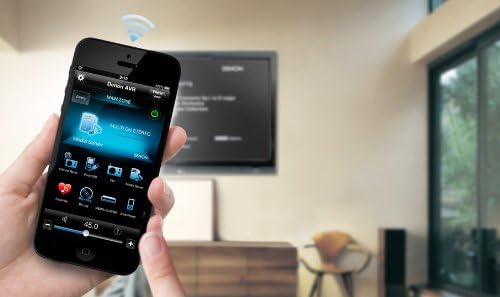
Image: A hand holding a smartphone displaying the Denon Remote App interface, demonstrating wireless control of the AV receiver.
Multi-Room Capability
With two-zone, two-source multi-room capability, you can connect a stereo amplifier to the Zone 2 pre-out. This allows you to enjoy stereo sound from one source in a different room, while others can enjoy a separate program in the main home theater room.
Maintenance
To ensure the longevity and optimal performance of your Denon AVR-X1000, follow these general maintenance guidelines:
- Cleaning: Use a soft, dry cloth to clean the exterior of the unit. Avoid using abrasive cleaners, waxes, or solvents.
- Ventilation: Ensure adequate ventilation around the receiver. Do not block ventilation openings or place the unit in an enclosed space without proper airflow.
- Power: Disconnect the power cord from the wall outlet if the unit will not be used for an extended period.
Troubleshooting
This section addresses common issues you might encounter with your Denon AVR-X1000. For more detailed troubleshooting, refer to the full Owner's Manual.
| Problem | Possible Cause / Solution |
|---|---|
| No Sound / Poor Sound Quality |
|
| Unit Does Not Power Down Completely |
|
| Network Features Not Working (e.g., AirPlay, Streaming) |
|
| Remote Control Not Responding |
|
Specifications
| Feature | Detail |
|---|---|
| Channels | 5.1-Channel |
| Power Output | 80 watts per channel (8 ohms, 20Hz-20kHz, 0.08% THD, 2-ch driven) |
| HDMI Inputs | 6 (5 rear, 1 front) |
| HDMI Outputs | 1 |
| Audio Decoders | Dolby TrueHD, DTS-HD Master Audio |
| Network Features | AirPlay, Spotify, Pandora, SiriusXM, DLNA 1.5, Windows 8/RT compatible |
| Room Correction | Audyssey MultEQ XT, Dynamic Volume, Dynamic EQ |
| Control Options | Remote Control, Denon Remote App (iOS/Android), Web Control, RS-232C, I/P Control |
| Front Panel Connectivity | HDMI, USB |
| Dimensions (H x W x D) | 6.6 x 17.1 x 13 inches |
| Weight | 18.1 pounds |
What's in the Box
The Denon AVR-X1000 package includes the following items:
- AVR-X1000 Receiver
- Setup Measuring Microphone with attached cable
- Remote Control
- Two AAA Batteries
- Power Cord
- FM Antenna
- AM Loop Antenna
- CD-ROM Owner's Manual
- Quick Setup Guide
- Color-coded Speaker Label Tags
- Warranty Information Sheet
Warranty and Support
For detailed warranty information, please refer to the Warranty Information Sheet included in your product package. For further assistance, technical support, or to download the full Owner's Manual, please visit the official Denon support website or refer to the provided user guide link:
Related documentsAVR-X1000


Ask a question about this manual
Ask about setup, troubleshooting, compatibility, parts, safety, or missing instructions. Manuals+ will review the question and use this page’s manual context to help answer it.