1. Introduction
This manual provides essential information for the installation, operation, and maintenance of your WD Blue 1TB Mobile Hard Disk Drive, model WD10JPVX. This 2.5-inch internal hard drive is designed for portable computing and offers reliable storage for everyday use.

Figure 1.1: WD Blue 1TB Mobile Hard Disk Drive (WD10JPVX) with internal components.
2. Key Features
The WD Blue WD10JPVX hard drive incorporates several technologies to enhance performance and data integrity:
- IntelliSeek: This technology calculates optimal seek speeds, which contributes to lower power consumption, reduced noise, and minimized vibration during operation.
- Data LifeGuard: Advanced algorithms continuously monitor the drive's health, helping to ensure its optimal condition and reliability over time.
- NoTouch Ramp Load Technology: The recording head is designed to never touch the disk media. This design significantly reduces wear to both the recording head and the media, and provides enhanced drive protection during transit.
- Massive Capacity: Offers 1TB of storage, suitable for operating systems, applications, and a large volume of digital photos, music, and video files.
- Quiet Operation: Features WhisperDrive technology, which utilizes state-of-the-art seeking algorithms to achieve quiet operation.
- Reliable and Rugged Design: ShockGuard technology protects the drive's mechanical components and platter surfaces from physical shocks. SecurePark technology parks the recording heads off the disk surface during spin-up, spin-down, and when the drive is powered off.
3. Setup and Installation
The WD Blue WD10JPVX is a 2.5-inch SATA internal hard drive. Installation typically involves physically securing the drive in a compatible laptop or external enclosure and connecting it via a SATA interface. Please note that mounting hardware and cables are not included and must be purchased separately if required.
3.1. Advanced Format (AF) Drives and Software
This drive utilizes Advanced Format (AF) technology, which organizes data in 4096-byte sectors. For optimal performance and compatibility, especially with older operating systems like Windows XP, proper partition alignment is crucial. WD provides specific software tools to assist with this process:
- WD Acronis True Image: Available as a free download from the WD Support site, this software allows you to clone your existing drive's data to the new WD Blue drive. This eliminates the need to reinstall your operating system and applications.
- WD Align: This utility is designed to align partitions on Advanced Format drives. It is recommended to run this tool to ensure the drive operates at its full potential, particularly when migrating from a non-AF drive or using certain operating systems. Instructions for use are available on the WD website.
It is recommended to download these tools directly from the official Western Digital support website (www.westerndigital.com/support) to ensure you have the latest versions and correct instructions.
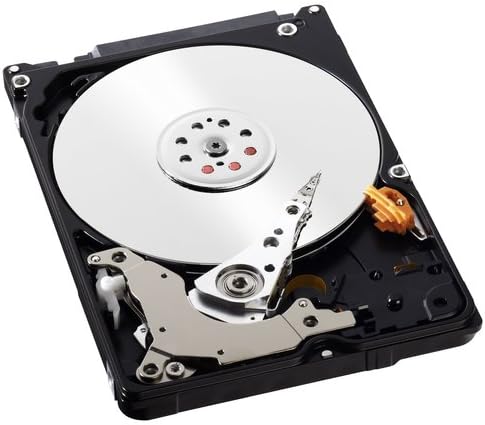
Figure 3.1: Drive label indicating Advanced Format (AF) and model WD10JPVX.
4. Operating Principles
The WD Blue WD10JPVX operates at 5400 RPM (revolutions per minute) and utilizes a SATA 6 Gb/s interface for data transfer. This combination provides a balance of performance and power efficiency suitable for mobile applications. The drive is designed to integrate seamlessly into systems supporting 2.5-inch SATA drives.

Figure 4.1: WD Blue 1TB Mobile Hard Disk Drive with branding.
5. Maintenance and Care
To ensure the longevity and optimal performance of your WD Blue hard drive, consider the following:
- Data LifeGuard: The drive's built-in Data LifeGuard technology actively monitors its health. Regularly check your system's S.M.A.R.T. (Self-Monitoring, Analysis and Reporting Technology) status for early indications of potential issues.
- NoTouch Ramp Load Technology: This feature minimizes wear on the recording head and disk media. Avoid physical shocks or drops to prevent damage to the drive's delicate internal components.
- Regular Backups: While the drive is engineered for reliability, it is crucial to regularly back up important data to another storage device to prevent data loss from unforeseen circumstances.
- Firmware Updates: Periodically check the Western Digital support website for any available firmware updates for your specific model, as these can improve performance and stability.
6. Troubleshooting
This section addresses common issues that may arise during the installation or operation of your WD Blue WD10JPVX hard drive.
6.1. Performance Issues After Installation
If you experience slower-than-expected performance, especially after migrating from an older drive, consider the following:
- Advanced Format (AF) Alignment: Ensure that the drive's partitions are properly aligned. Use the WD Align utility (available from the WD support website) to correct any misalignment, which can significantly impact performance on AF drives, particularly with older operating systems.
- Intel Rapid Storage Technology (IRST) Drivers: For older computer systems, an outdated IRST driver can cause performance issues or system instability. Obtain the correct and latest IRST driver update from your computer manufacturer's support website (e.g., HP, Dell, Lenovo), not directly from Intel or Microsoft, as manufacturer-specific versions are often required.
6.2. Operating System or Software Issues
- Windows Update Errors: If Windows Update fails to run or finds errors after a drive migration, it might be due to corrupted or inaccessible Windows Update service files. Solutions often involve resetting Windows Update components, such as renaming the `SoftwareDistribution` subfolders (WuRedir, DataStor, Download, SelfUpdate) and restarting the `wuauserv` service. Consult Microsoft support resources for detailed steps.
- Cloning Problems: When cloning a drive, it is generally recommended to perform the cloning operation with both the source and destination drives connected directly via SATA, if possible, rather than over USB, for better speed and reliability. Ensure the WD Acronis True Image software detects your WD drive for full functionality.
7. Specifications
| Specification | Detail |
|---|---|
| Brand | WD |
| Series | Blue |
| Model Number | WD10JPVX |
| Hard Drive Capacity | 1 TB (1000 GB) |
| Hard Drive Interface | Serial ATA-600 (SATA 6 Gb/s) |
| Rotational Speed | 5400 RPM |
| Form Factor | 2.5 Inches |
| Height | 9.5 MM (0.37 inches) |
| Dimensions (LxWxH) | 3.94 x 2.75 x 0.37 inches |
| Item Weight | 4.2 ounces |
| Hardware Platform | PC; Mac |
| Operating System Compatibility | Windows: XP/Vista/7/8/8.1/10 (32-bit & 64-bit); MAC: OS X |
| Compatible Devices | Notebooks, external enclosures, certain industrial applications |
8. Warranty and Support
The WD Blue WD10JPVX hard drive comes with a 2-year manufacturer limited warranty. For warranty claims or technical assistance, please refer to the official Western Digital support channels.
Western Digital provides extensive support resources, including:
- A detailed Knowledge Base with numerous helpful articles.
- Toll-free support services available in various regions.
For the most current support information, documentation, and contact details, please visit the official WD Support site: www.westerndigital.com/support.