
Nokia A00011072
Nokia 301 User Manual
Model: A00011072
1. Introduction
Welcome to the user manual for your Nokia 301 mobile phone. This guide provides essential information on setting up, operating, maintaining, and troubleshooting your device. Please read this manual carefully to ensure optimal performance and longevity of your phone.
2. Setup
2.1. Inserting the SIM Card
- Turn off the phone and remove the back cover.
- Locate the SIM card slot.
- Insert the SIM card with the gold contacts facing down and the cut corner aligned with the slot.
- Ensure the SIM card is securely in place.
2.2. Inserting the Battery
- Align the battery contacts with the contacts in the battery compartment.
- Gently press the battery into place until it clicks.
- Replace the back cover.
2.3. Charging the Battery
- Connect the charger to a power outlet.
- Plug the charger connector into the phone's charging port.
- The battery indicator on the screen will show the charging status.
- Once fully charged, disconnect the charger.
2.4. Powering On/Off
- To power on, press and hold the power key until the phone vibrates.
- To power off, press and hold the power key, then select 'Power off' from the options.
3. Operating Your Nokia 301
3.1. Basic Navigation
Use the keypad and the navigation key (center button) to move through menus and select options. The soft keys below the screen perform functions indicated on the display.
3.2. Making and Receiving Calls
- Making a Call: Enter the phone number using the keypad and press the call key (green button).
- Receiving a Call: Press the call key when the phone rings.
- Ending a Call: Press the end call key (red button).
3.3. Sending and Receiving Messages
- Navigate to the 'Messaging' menu.
- Select 'Create message' or 'New message'.
- Enter your message text.
- Add the recipient's number or select from contacts.
- Select 'Send'.
3.4. Using the Camera
The Nokia 301 features a 3.2 MP camera with smart camera capabilities. To access the camera, navigate to the 'Camera' application from the main menu.
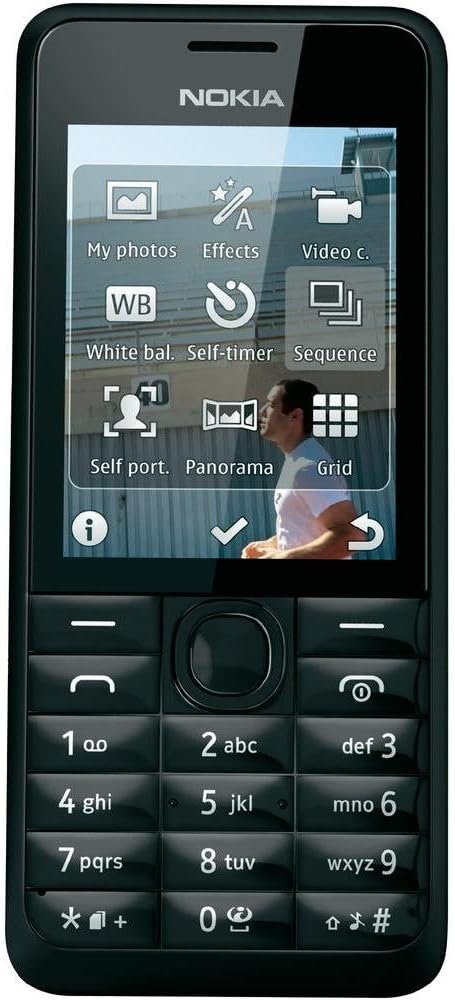
Image: The Nokia 301 phone, showcasing its screen with various camera functions and settings. Options visible include 'My photos' for viewing images, 'Effects' for applying filters, 'Video c.' for video recording, 'White bal.' for white balance adjustment, 'Self-timer' for delayed shots, 'Sequence' for burst mode, 'Self port.' for self-portraits, 'Panorama' for panoramic shots, and 'Grid' for composition guides. The physical keypad is visible below the screen.
- Taking a Photo: Frame your shot and press the center navigation key to capture.
- Video Recording: Switch to video mode and press the center navigation key to start/stop recording.
- Camera Features: Explore options like White Balance, Self-timer, Sequence mode, Self-portrait, Panorama, and Grid for enhanced photography.
3.5. MicroSD Card Usage
The phone supports MicroSD cards for expanded storage. Insert a MicroSD card into the dedicated slot to store more photos, videos, and other files.
4. Maintenance
4.1. Cleaning the Device
- Use a soft, lint-free cloth to clean the screen and body of the phone.
- Avoid using harsh chemicals or abrasive materials.
4.2. Battery Care
- Avoid exposing the battery to extreme temperatures.
- Do not puncture or damage the battery.
- For optimal battery life, avoid frequent full discharges.
4.3. Software Updates
Information regarding guaranteed software updates for this model is not available. Please check the Nokia support website for any potential updates.
5. Troubleshooting
5.1. Phone Not Powering On
- Ensure the battery is properly inserted and charged.
- Try connecting the charger to see if the charging indicator appears.
5.2. No Network Signal
- Check that the SIM card is correctly inserted.
- Ensure you are in an area with network coverage.
- Restart the phone.
5.3. Battery Drains Quickly
- Reduce screen brightness.
- Close unused applications.
- Limit background data usage.
5.4. Unable to Send/Receive Messages
- Verify your message center number in settings.
- Check your network signal.
- Ensure you have sufficient credit or plan allowance.
6. Specifications
| Feature | Detail |
|---|---|
| Brand | Nokia |
| Model Name | Nokia 301 |
| Item Model Number | A00011072 |
| Color | Black |
| Product Type | Monobloc |
| Operating System | Asha |
| Screen Size | 2.4 Inches |
| Screen Resolution | 320 x 240 |
| Connectivity | 2G, UMTS, 3G Cellular |
| Cellular Technology | 3G, 2G |
| Camera Resolution | 3.2 MP |
| Internal Memory | 20 MB |
| Special Features | Smart Camera |
| Battery Composition | Lithium |
| Battery Type | 1 AAA (included) |
| CPU Speed | 1.4 GHz |
| Wireless Carrier | Unlocked |
| Manufacturer | Nokia |
| No Longer Produced by Manufacturer | No |
7. Warranty and Support
For information regarding product warranty, please refer to the documentation provided at the time of purchase or visit the official Nokia support website. Standard return policies typically allow for refunds or replacements within 30 days of purchase, subject to seller terms.
For technical support or further assistance, please contact Nokia customer service or visit their official support channels.
Related documentsA00011072


Ask a question about this manual
Ask about setup, troubleshooting, compatibility, parts, safety, or missing instructions. Manuals+ will review the question and use this page’s manual context to help answer it.