
Noctua NH-U12S
Contents
Noctua NH-U12S Premium CPU Cooler Instruction Manual
Model: NH-U12S | Brand: Noctua
1. Introduction
The Noctua NH-U12S is a premium 120mm single tower CPU cooler designed to provide outstanding cooling performance while maintaining excellent compatibility with RAM modules and PCIe slots. Featuring Noctua's highly optimized NF-F12 FocusedFlow fan, this cooler offers automatic speed control and ultra-quiet operation, making it an ideal choice for high-performance desktop systems.

Image 1: The Noctua NH-U12S CPU Cooler with its signature brown and beige fan.
2. Safety Information
- Always disconnect power from your computer before installation or maintenance.
- Handle the cooler and its components with care to avoid damage to yourself or the product.
- Keep out of reach of children.
- Ensure proper ventilation within your PC case to maximize cooling efficiency and prevent overheating.
- Do not attempt to modify the cooler or its components.
3. Package Contents
Your Noctua NH-U12S package should include the following items:
- NH-U12S heatsink
- NF-F12 PWM 120mm fan
- SecuFirm2™ Multi-Socket Mounting System (for Intel LGA1851, LGA1700, LGA1200, LGA115x and AMD AM5 & AM4)
- NT-H1 high-end thermal compound
- Low-Noise Adaptor (L.N.A.)
- Fan clips for second NF-F12 (optional second fan not included)
- Noctua Metal Case-Badge

Image 2: Overview of the Noctua NH-U12S cooler and its included accessories, including mounting kits for Intel and AMD, and thermal paste.
4. Setup and Installation
The NH-U12S features the SecuFirm2™ mounting system, which provides secure and reliable installation for various Intel and AMD sockets. Please refer to the detailed instructions provided in your package for your specific CPU socket type. Below are general steps and important considerations:
- Prepare Motherboard: Depending on your CPU socket (Intel or AMD), install the appropriate backplate and mounting bars as per the SecuFirm2™ manual. Ensure all stand-offs are securely tightened.
- Apply Thermal Paste: Clean the CPU surface thoroughly. Apply a small amount of the supplied NT-H1 thermal compound to the center of the CPU's integrated heat spreader (IHS). A pea-sized dot is usually sufficient.
- Mount Heatsink: Carefully place the heatsink onto the CPU, aligning the mounting screws with the mounting bars. Tighten the screws evenly in an alternating pattern until secure. Do not overtighten.
- Attach Fan: Use the provided fan clips to attach the NF-F12 fan to the heatsink. The slim design of the NH-U12S ensures 100% compatibility with tall RAM modules on most motherboards.
- Connect Fan: Connect the NF-F12 fan's 4-pin PWM cable to the CPU_FAN header on your motherboard. If desired, use the Low-Noise Adaptor (L.N.A.) to reduce the fan's maximum speed for even quieter operation.
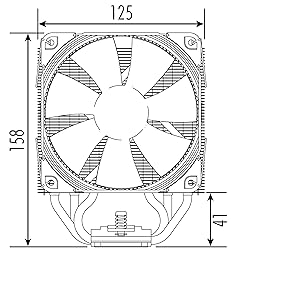
Image 3: A close-up view of thermal paste being applied to a CPU, demonstrating the recommended application method.

Image 4: Side view of the Noctua NH-U12S, highlighting its slim profile and fan attachment mechanism.
For visual guidance, please refer to the official installation videos available on the Noctua website or their official YouTube channel. While no seller-provided videos are available here, customer videos often demonstrate the installation process effectively.
5. Operating Instructions
The Noctua NH-U12S operates automatically once installed and connected to a PWM-enabled CPU fan header on your motherboard. The motherboard's BIOS/UEFI or operating system software will control the fan speed based on CPU temperature, ensuring optimal cooling performance and noise levels.
- PWM Control: The NF-F12 fan supports Pulse Width Modulation (PWM), allowing for precise and automatic speed control. This ensures the fan only spins as fast as necessary, reducing noise during light loads.
- Low-Noise Adaptor (L.N.A.): For users prioritizing absolute silence, the included L.N.A. can be connected between the fan and the motherboard to reduce the fan's maximum speed, resulting in even lower noise emissions.
6. Maintenance
Regular maintenance helps ensure the longevity and optimal performance of your NH-U12S CPU cooler:
- Dust Removal: Periodically (e.g., every 3-6 months), use compressed air or a soft brush to gently remove dust accumulation from the heatsink fins and fan blades. Ensure the fan does not spin freely when cleaning with compressed air to prevent damage to the bearings.
- Thermal Paste Reapplication: If you remove the heatsink for any reason (e.g., CPU upgrade), it is highly recommended to clean off the old thermal paste from both the CPU and the heatsink base and apply fresh thermal paste before reinstallation.
7. Troubleshooting
If you encounter issues with your Noctua NH-U12S, consider the following common troubleshooting steps:
- High CPU Temperatures:
- Ensure the heatsink is properly seated and making full contact with the CPU. Re-tighten mounting screws if necessary.
- Verify that thermal paste was applied correctly and evenly. Reapply if unsure.
- Check if the fan is spinning. If not, ensure it's properly connected to the CPU_FAN header and that the header is enabled in BIOS.
- Improve case airflow by ensuring intake and exhaust fans are properly configured.
- Excessive Fan Noise:
- Check for dust accumulation on the fan blades or heatsink fins and clean if necessary.
- Ensure fan cables are not obstructing the fan blades.
- Verify fan settings in your motherboard's BIOS/UEFI. Adjust fan curves to a quieter profile if desired.
- Consider using the included Low-Noise Adaptor (L.N.A.) to reduce maximum fan speed.
- Fan Not Spinning:
- Confirm the 4-pin fan cable is securely plugged into the motherboard's CPU_FAN header.
- Check BIOS/UEFI settings to ensure the CPU_FAN header is enabled and not set to a "disabled" or "manual 0 RPM" mode.
- Test the fan on another fan header if available, or try a different fan to rule out a faulty fan or motherboard header.
8. Specifications
| Feature | Detail |
|---|---|
| Model | NH-U12S |
| Dimensions (LxWxH) | 4.92"L x 2.8"W x 6.22"H (125mm x 71mm x 158mm) |
| Weight | 1.66 pounds (755g with fan) |
| Material | Copper (base and heat-pipes), aluminium (cooling fins), soldered joints & nickel plating |
| Fan Model | NF-F12 PWM |
| Fan Speed (Max) | 1500 RPM |
| Noise Level (Max) | 22.4 dB(A) |
| Power Connector | 4-Pin PWM |
| Voltage | 12 Volts |
| Compatible Sockets | Intel LGA1851, LGA1700, LGA1200, LGA115x (LGA1150, LGA1151, LGA1155, LGA1156) & AMD AM5, AM4 |

Image 5: Technical diagram showing the dimensions of the Noctua NH-U12S CPU cooler.
9. Warranty and Support
The Noctua NH-U12S CPU Cooler is backed by a 6-year manufacturer's warranty, ensuring long-term reliability and peace of mind.
For further assistance, technical support, or warranty claims, please visit the official Noctua website or their Amazon store:
- Noctua Official Website: noctua.at
- Noctua Amazon Store: Visit the Noctua Store on Amazon
Documents and downloads
Ask a question about this manual
Ask about setup, troubleshooting, compatibility, parts, safety, or missing instructions. Manuals+ will review the question and use this page’s manual context to help answer it.