
Introduction
Thank you for purchasing the Studio Z SPA-3000BT Hybrid Receiver and Amplifier. This unit is designed to provide high-quality audio amplification for your home digital studio or music sound system. It features a powerful amplifier, AM/FM radio tuner, Bluetooth connectivity, and USB input for versatile audio playback.
Please read this manual thoroughly before operating the unit to ensure proper use and to maximize its performance and longevity.
Safety Precautions
- Do not expose this unit to rain or moisture to prevent fire or shock hazards.
- Do not open the cabinet. There are no user-serviceable parts inside. Refer all servicing to qualified service personnel.
- Ensure proper ventilation. Do not block ventilation openings.
- Place the unit on a stable, level surface.
- Disconnect the power cord from the wall outlet if the unit is not to be used for a long period of time.
Product Overview
The Studio Z SPA-3000BT is a 2-channel hybrid receiver and amplifier. It integrates multiple audio input options and a powerful output for connecting to passive speakers.

Figure 1: Front Panel of the SPA-3000BT. This image displays the main unit with its black finish, blue illuminated controls, central display, and various input ports including USB and auxiliary jacks.
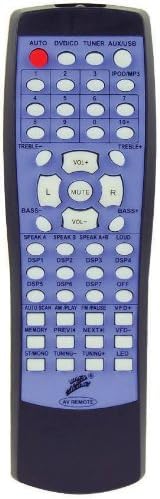
Figure 2: Remote Control for the SPA-3000BT. This image shows the compact remote control with a purple and black color scheme, featuring buttons for input selection, volume, tuning, and other playback controls.
Setup
1. Speaker Connection
Connect your passive speakers to the speaker terminals on the rear panel of the SPA-3000BT. Ensure correct polarity (+ to + and - to -) for each speaker channel (Left and Right) to avoid phase issues and ensure optimal sound quality.
2. Audio Source Connection
- RCA Inputs: Use RCA cables to connect external audio devices such as CD players, DVD players, or other audio components to the RCA input jacks on the rear panel.
- Auxiliary Input: For devices with a 3.5mm audio output, use an auxiliary cable to connect to the front panel AUX input.
- USB Input: Insert a USB flash drive containing audio files (e.g., MP3) into the USB port on the front panel.
- Bluetooth: For wireless audio streaming, ensure your device's Bluetooth is enabled and pair with the SPA-3000BT (see Operating section for details).
3. Power Connection
Once all audio and speaker connections are made, plug the power cord into a standard AC wall outlet. The unit is now ready for operation.
Operating Instructions
1. Power On/Off
Press the POWER button on the front panel to turn the unit on or off. Note: The remote control for this model does not include a power on/off button. Power must be controlled directly from the unit's front panel.
2. Input Selection
Use the INPUT SELECTOR knob or the corresponding buttons on the remote control (e.g., DVD/CD, TUNER, AUX/USB, BLUETOOTH) to choose your desired audio source.
3. Volume Control
Adjust the MASTER VOLUME knob on the front panel or use the VOL+ / VOL- buttons on the remote control to set the desired listening level.
4. AM/FM Radio Operation
- Select TUNER as the input source.
- Use the TUNING buttons on the remote or front panel to manually tune to a station.
- Use AUTO SCAN to automatically search and store available stations.
- Press MEMORY to save a station to a preset number. Use the numeric buttons to recall saved stations.
5. Bluetooth Pairing
- Select BLUETOOTH as the input source. The display will indicate "PAIRING" or similar.
- On your Bluetooth-enabled device (smartphone, tablet, etc.), search for available devices.
- Select "SPA-3000BT" from the list. Once connected, the display will confirm the pairing.
- You can now stream audio wirelessly from your device to the amplifier.
6. USB Playback
- Insert a USB flash drive into the USB port.
- Select USB as the input source. The unit will automatically begin playing compatible audio files.
- Use the PREV, NEXT, and PLAY/PAUSE buttons on the front panel or remote for playback control.
Maintenance
- Cleaning: Use a soft, dry cloth to clean the exterior of the unit. Do not use liquid cleaners or aerosol sprays.
- Ventilation: Ensure that the ventilation openings are clear of dust and debris to prevent overheating.
- Storage: If storing the unit for an extended period, disconnect it from power and store it in a cool, dry place.
Troubleshooting
| Problem | Possible Cause | Solution |
|---|---|---|
| No power | Power cord not connected; Power button not pressed. | Ensure power cord is securely plugged into the unit and wall outlet. Press the POWER button on the front panel. |
| No sound output | Incorrect input selected; Volume too low; Speakers not connected properly; Mute function active. | Select the correct input source. Increase the MASTER VOLUME. Check speaker connections for correct polarity. Deactivate mute if active. |
| Bluetooth not connecting | Unit not in pairing mode; Device Bluetooth off; Device too far. | Ensure unit is in Bluetooth input mode. Turn on Bluetooth on your device and search for "SPA-3000BT". Move device closer to the unit. |
| Remote control not working | Batteries dead or inserted incorrectly; Obstruction between remote and unit; Remote not designed for specific function (e.g., power on/off). | Replace batteries. Remove any obstructions. Note that the remote does not have a power on/off button for this model. |
Specifications
| Feature | Detail |
|---|---|
| Model Number | SPA3000BT |
| Brand | Nippon |
| Output Power | 3000 Watts (Peak) |
| Audio Output Mode | Stereo |
| Surround Sound Channel Configuration | 2 Channel |
| Connectivity Technology | RCA, Bluetooth, Auxiliary, USB |
| Compatible Devices | Speaker |
| Special Feature | USB Charging Port |
| Color | Black |
| Item Weight | 17.61 pounds |
Warranty and Support
For information regarding the product warranty, please refer to the warranty card included with your purchase or contact the manufacturer directly. Warranty terms and conditions may vary.
For technical support, service, or inquiries, please contact Nippon customer service. Contact details can typically be found on the manufacturer's official website or on the product packaging.