
Introduction
The KitchenAid 7-Speed Hand Mixer, model KHM7210, is designed to provide efficient and versatile mixing for a variety of culinary tasks. Featuring seven distinct speeds and essential accessories, this compact and lightweight appliance is ideal for preparing everything from delicate meringues to dense cookie doughs. This manual will guide you through the proper setup, operation, and maintenance of your hand mixer to ensure optimal performance and longevity.

Image: The KitchenAid 7-Speed Hand Mixer in Empire Red, shown with its standard Turbo Beater II accessories and Pro Whisk.
Setup
Unpacking and Initial Setup
Carefully remove all components from the packaging. Ensure you have the mixer unit, two Turbo Beater II accessories, and one Pro Whisk. Before first use, wash all accessories in warm, soapy water or in the dishwasher. Wipe the mixer unit with a damp cloth.
Attaching Accessories
- Ensure the mixer is unplugged and the speed control is set to '0' (Off).
- Insert the desired accessories (beaters or whisk) into the openings on the underside of the mixer. Push firmly until they click into place. The beaters are interchangeable.

Image: Close-up view of the durable stainless steel Turbo Beater II accessories.
Power Connection
Plug the mixer into a standard electrical outlet. The mixer features a lockable swivel cord that can be adjusted to either side for convenience during use, keeping the cord out of your way.
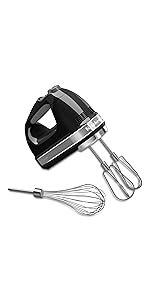
Image: The lockable swivel cord, designed for flexible and convenient use.
Operating Instructions
Speed Control
The KitchenAid 7-Speed Hand Mixer offers precise control for various mixing needs. The speed settings are indicated on the top of the unit.
- To Increase Speed: Press the 'Up' arrow button.
- To Decrease Speed: Press the 'Down' arrow button.
- Slow Start Feature: The mixer automatically starts at a low speed to prevent splashing, gradually increasing to your selected speed.
Recommended Speeds:
- Speed 1: For mixing in nuts, chocolate chips, or gently folding ingredients.
- Speeds 2-4: For mixing batters, gravies, and sauces.
- Speeds 5-7: For whipping egg whites, heavy cream, or mashing potatoes.

Image: Top view of the mixer highlighting the intuitive speed control buttons and digital display.
On/Off Function
To turn the mixer ON, slide the power switch to the 'On' position. To turn the mixer OFF, slide the power switch to the 'Off' position.
Ejecting Accessories
Once mixing is complete and the mixer is turned off, press the eject button located on the top of the mixer to release the accessories. This allows for quick and easy removal for cleaning.
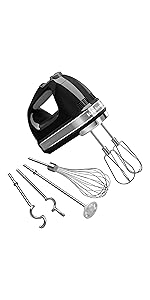
Image: The single-handed press eject button for convenient accessory removal.
Official Product Video
Video: An official product video demonstrating the features and use of the KitchenAid Hand Mixer, including mixing, blending, kneading, and whipping various ingredients.
Maintenance and Cleaning
Beaters and Whisk
The Turbo Beater II accessories and Pro Whisk are dishwasher-safe for easy cleaning. Alternatively, they can be washed by hand in warm, soapy water.
Mixer Unit
The main mixer unit should be wiped clean with a damp cloth. Do not immerse the mixer unit in water or other liquids.
Specifications
- Brand: KitchenAid
- Model Name: 7-Speed Hand Mixer
- Model Number: KHM7210ER
- Product Dimensions: 8"D x 3.5"W x 6"H
- Item Weight: 2 Pounds
- Voltage: 120 Volts
- Wattage: 250 watts
- Special Feature: Adjustable Speed Control
- Controls Type: Push Button
- Is Dishwasher Safe (Accessories): Yes
- Material: Polycarbonate
Troubleshooting
If your KitchenAid 7-Speed Hand Mixer is not operating as expected, please consider the following:
- Power: Ensure the mixer is securely plugged into a functional electrical outlet.
- Speed Setting: Verify that the speed control is set to a desired speed (1-7) and not '0' (Off).
- Attachments: Confirm that the beaters or whisk are correctly inserted and locked into place.
For further assistance, please refer to the official KitchenAid website or contact their customer support.
Warranty and Support
Warranty Information
KitchenAid products are manufactured to high-quality standards and are backed by a manufacturer's warranty. For specific details regarding the warranty period and terms for your KHM7210 hand mixer, please refer to the warranty card included with your product or visit the official KitchenAid website.
Customer Support
Should you require assistance, have questions about your product, or need to order replacement parts, please visit the KitchenAid Store on Amazon or the official KitchenAid customer support website. You may also find helpful resources and FAQs there.


