1. Product Overview
The Elero VarioTec Control Unit is a versatile device designed to manage roller shutters, blinds, and Venetian blinds. It offers flexible control options for enhancing comfort in your living or working space.
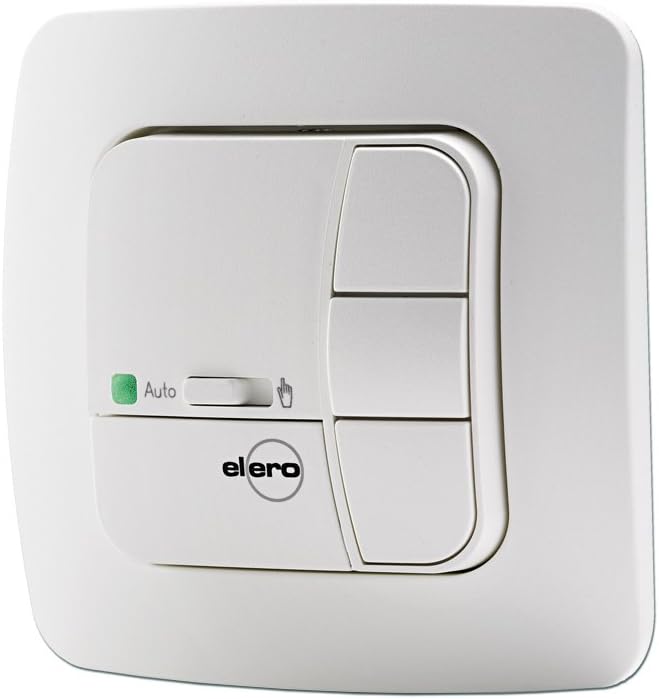
Image 1.1: Front view of the Elero VarioTec control unit in Alpine White. It features a green LED indicator, an 'Auto' slider switch, and three control buttons for operation.
Key Features:
- Control device for building comfort controls.
- Flexible use for roller shutters, blinds, and Venetian blinds.
- Intermediate position function for customized shading.
- Reversible position function.
- Can be used as a central or terminal control unit.
2. Setup and Installation
Installation of the Elero VarioTec Control Unit should be performed by a qualified electrician in accordance with local electrical codes and regulations. Incorrect installation can lead to hazards or damage to the device.
Safety Precautions:
- Always disconnect power to the circuit before beginning installation.
- Ensure all wiring connections are secure and properly insulated.
- Do not expose the unit to moisture or extreme temperatures.
Installation Steps (General Guidance):
- Prepare the mounting location, ensuring it is clean and dry.
- Connect the power supply and motor wires to the designated terminals on the control unit. Refer to the wiring diagram provided with the product packaging for specific connections.
- Mount the control unit securely into the wall box or surface.
- Attach the front cover and frame.
- Restore power and test the unit's functionality.
3. Operating Instructions
The Elero VarioTec Control Unit features intuitive controls for easy operation of your roller shutters or blinds.
Control Elements:
- Up Button: Press to raise the roller shutter or blind.
- Down Button: Press to lower the roller shutter or blind.
- Stop Button: Press to halt movement at any desired position.
- 'Auto' Slider Switch: This switch enables or disables automatic control functions. When set to 'Auto', the unit may respond to programmed timers or sensors (if connected). When switched off 'Auto', manual control takes precedence. The green LED indicates 'Auto' mode is active.
Setting Intermediate and Reversible Positions:
Specific programming steps for intermediate and reversible positions are detailed in the full technical manual. Generally, these involve moving the blind to the desired position and then pressing a combination of buttons for a specified duration to save the setting.
4. Maintenance
The Elero VarioTec Control Unit requires minimal maintenance to ensure long-term performance.
- Cleaning: Wipe the surface of the unit with a soft, dry cloth. Do not use abrasive cleaners, solvents, or excessive moisture, as these can damage the unit.
- No User-Serviceable Parts: The unit contains no user-serviceable parts. Do not attempt to open or repair the device yourself. Refer all servicing to qualified personnel.
5. Troubleshooting
If you encounter issues with your Elero VarioTec Control Unit, try the following basic troubleshooting steps:
- Unit Not Responding: Check if the power supply to the unit is active. Verify that circuit breakers or fuses are not tripped.
- Motor Not Moving: Ensure the motor is properly connected to the control unit. Check for any obstructions preventing the roller shutter or blind from moving.
- Incorrect Movement: If the shutter/blind moves in the wrong direction, consult the wiring diagram to ensure the motor connections are correct.
- Automatic Functions Not Working: Ensure the 'Auto' slider switch is in the 'Auto' position and the green LED is illuminated. Verify any connected sensors or timers are functioning correctly.
- Resetting the Unit: For persistent issues, a power cycle (disconnecting and reconnecting power) may resolve minor glitches.
If problems persist after attempting these steps, contact a qualified technician or Elero customer support.
6. Specifications
| Feature | Specification |
|---|---|
| Manufacturer | Elero |
| Model Number | 28.120.0001 |
| Product Dimensions (Package) | 18.6 x 11 x 6 cm |
| Item Weight (Package) | 259.99 grams |
| Batteries Included | No |
| Batteries Required | No |
| Color | Alpine White |
7. Warranty and Support
Specific warranty information for the Elero VarioTec Control Unit is typically provided with the product packaging or available from your point of purchase. Please retain your proof of purchase for warranty claims.
For technical support, service, or further inquiries, please contact your authorized Elero dealer or visit the official Elero website. Contact information may also be found in the documentation included with your product.


