1. Introduction
This manual provides essential instructions for the safe and effective use, setup, operation, and maintenance of your OSIM uSoffa OS-810 Runway Zero Gravity Massage Chair. Please read this manual thoroughly before operating the chair and retain it for future reference.
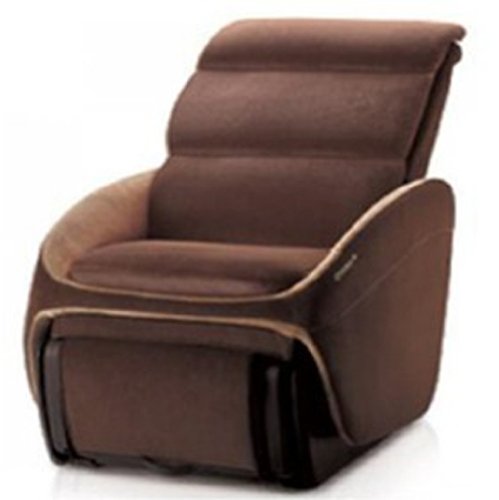
Figure 1.1: The OSIM uSoffa OS-810 Runway Zero Gravity Massage Chair. This image displays the chair's brown upholstery and sleek, modern design, highlighting its comfortable seating and backrest.
2. Safety Information
To reduce the risk of electric shock, burns, fire, or injury, observe the following precautions:
- Always unplug the chair from the electrical outlet immediately after use and before cleaning.
- Do not use while bathing or in a shower.
- Do not place or store the chair where it can fall or be pulled into a tub or sink.
- Do not operate under a blanket or pillow. Excessive heating can occur and cause fire, electric shock, or injury to persons.
- Close supervision is necessary when this product is used by, on, or near children, invalids, or disabled persons.
- Use this product only for its intended use as described in this manual. Do not use attachments not recommended by the manufacturer.
- Never operate this product if it has a damaged cord or plug, if it is not working properly, if it has been dropped or damaged, or dropped into water.
- Keep the cord away from heated surfaces.
- Do not use outdoors.
- Do not operate where aerosol (spray) products are being used or where oxygen is being administered.
- To disconnect, turn all controls to the OFF position, then remove the plug from the outlet.
3. Setup
3.1 Unpacking
- Carefully remove the massage chair from its packaging.
- Inspect the chair for any signs of damage during transit. Contact your retailer immediately if damage is found.
- Remove all packing materials and ensure no components are left inside the chair.
3.2 Placement
Position the massage chair on a flat, stable surface. The OSIM uSoffa OS-810 features "Zero Wall Technology," which allows the chair to recline forward, saving space. Ensure there is sufficient clearance around the chair for full recline, though less space is required compared to traditional recliners.
3.3 Power Connection
- Ensure the chair's power switch is in the OFF position.
- Connect the power cord to the chair's power inlet.
- Plug the power cord into a grounded electrical outlet (220-240 volts).
4. Operating Instructions
4.1 Basic Operation
- Power On/Off: Locate the power button on the control panel (or remote) and press to turn the chair on or off.
- Recline Function: Use the recline controls to adjust the backrest and footrest to your desired position. The chair features a Zero-Gravity recline, which elevates your thighs and knees above your heart, distributing body weight evenly and reducing stress on the spine.
- Retractable Foot Massager: The foot massager unit can be extended or retracted as needed.
4.2 Massage Programs
The OSIM uSoffa OS-810 offers 13 professionally crafted massage programs designed by Japanese Expert Sato Tsuyoshi. These programs utilize OSIM Human-3D massage technology for a comprehensive full-body massage experience.
- Full-Body Massage: Experience deep and point-focused massage for neck, shoulders, back, arms, hands, palms, thighs, hips, butt, calves, ankles, and feet.
- Air Pressure Massage: Rhythmic airbags target arms, hands, palms, thighs, hips, and butt to stimulate circulation.
- Foot and Leg Massage: A combination of wrap-around power squeeze, vibration massage, roller reflexology, and warm air rejuvenates tired legs.
- Auto Timer: Each program is typically set to run for approximately 15 minutes.
4.3 Mobile App Integration (uDivine App)
The uDivine App enhances your massage experience by leveraging smartphone and mobile technology.
- Connectivity: Connect your smart device (Apple iPod touch, iPhone, iPad, or compatible Android devices) wirelessly via Bluetooth to the massage chair.
- Personalized Recommendations: The uDivine App acts as a personal massage advisor, offering smart recommendations to optimize your massage experience.
- Multi-Sensory Experience: Enjoy audio-visual entertainment by streaming music, watching videos, or browsing online while receiving a massage.
5. Maintenance
5.1 Cleaning
- Always unplug the chair before cleaning.
- Wipe the chair's surface with a soft, damp cloth. Do not use abrasive cleaners or solvents.
- For fabric areas, use a mild upholstery cleaner if necessary, testing on an inconspicuous area first.
- Ensure no liquid enters the internal components of the chair.
5.2 Storage
When not in use for extended periods, store the massage chair in a cool, dry place, away from direct sunlight and extreme temperatures. Cover the chair to protect it from dust.
6. Troubleshooting
If you encounter issues with your OSIM uSoffa OS-810, refer to the following common troubleshooting steps:
| Problem | Possible Cause | Solution |
|---|---|---|
| Chair does not power on. | Power cord not properly connected; power outlet malfunction; chair's power switch off. | Ensure power cord is securely plugged into both the chair and a working electrical outlet. Check the chair's power switch. |
| Massage function not working. | Program not selected; safety feature activated. | Select a massage program from the control panel or app. Ensure no objects are obstructing moving parts. |
| Abnormal noise during operation. | Loose components; foreign object obstruction. | Turn off and unplug the chair. Inspect for any loose parts or obstructions. If the noise persists, contact customer support. |
| Mobile app not connecting. | Bluetooth not enabled; app not updated; chair not in pairing mode. | Ensure Bluetooth is enabled on your device and the chair. Update the uDivine App to the latest version. Refer to the app's instructions for pairing. |
For issues not listed here, or if problems persist, please contact OSIM customer support.
7. Specifications
- Model Number: OS-810
- Manufacturer: OSIM
- Product Dimensions (LxWxH): 116 x 72 x 102 cm
- Item Weight: 72 kg
- Electrical Requirements: 220 - 240 volts
- Auto Timer: Approximately 15 minutes per program
- Key Features: Zero Wall Technology, Zero-Gravity Recline, Human-3D Massage, uDivine App Integration, Retractable Foot Massager.
8. Warranty and Support
The OSIM uSoffa OS-810 Runway Massage Chair is covered by a manufacturer's warranty. Please refer to the warranty card included with your purchase for specific terms and conditions, including warranty period and coverage details.
For technical support, service, or warranty claims, please contact OSIM customer service through their official website or the contact information provided in your warranty documentation.
Manufacturer: OSIM
First Available: 9 September 2013